Trigger synchronization Gate synchronization
T
40ms approx.
ON
OFF
High
Low
ON
OFF
T
ON
OFF
High
Low
ON
OFF
External
synchronization
input
Sensing
output
External
synchroni-
zation
selection
switch
Sensing
signal
T 0.5ms (When using interference prevention function: T 0.7ms)
Note: If you do not use the external synchronization, set the switch on gate
synchronization and make the external synchronization input open
(High).
FX7
0V (Blue)
Emission disable
input (Violet)
OFF
FX7
0V (Blue)
ON
[Emission] [No emission]
Emission disable
input (Violet)
T T T
HIGH
LOW
ON
OFF
Emission disable
input
Sensing output
when light is
not received.
T 0.5ms
Normal Abnormal
If it is in ON state
When using interference
prevention function: T 0.7ms.
A
Received light
intensity
too low
B
Stable light
received level
Sensing output
operation level
Stable light
interruption
level
Operation
indicator (Red)
Stability indicator
(green)
Sensing
condition
Self-diagnosis
output
AB
ON
OFF
ON
OFF
ON
OFF
40ms approx. 40ms approx.
1
2
1
3
Light interruption
incomplete
when light is
received.
If it is in ON state
Sensing object
OFF button
input level
ON button
input level
Automatic sensitivity setting level
Press ‘OFF’ button in
this example.
Back-
ground
Sensitivity shift:
The maximum sensitivity
level for which background
is not detected is achieved.
ON
www.sunxsensors.com
SUNX Limited
Head Office
2431-1 Ushiyama-cho, Kasugai-shi, Aichi, 486-0901, Japan
Phone: +81-(0)568-33-7211 FAX: +81-(0)568-33-2631
Overseas Sales Dept.
Phone: +81-(0)568-33-7861 FAX: +81-(0)568-33-8591
Sensing of a tiny object with the thru-beam type
1. Set the mode selection switch to ‘SET’.
2. Press ‘OFF’ button (or ON button) without the sensing
object.
3. Press ‘ON’ button (or OFF button) when light is
completely interrupted.
4. Set the mode selection switch to ‘SIF’.
5. Press the button again which was pressed without the
sensing object.
6. Set the mode selection switch to ‘RUN’.
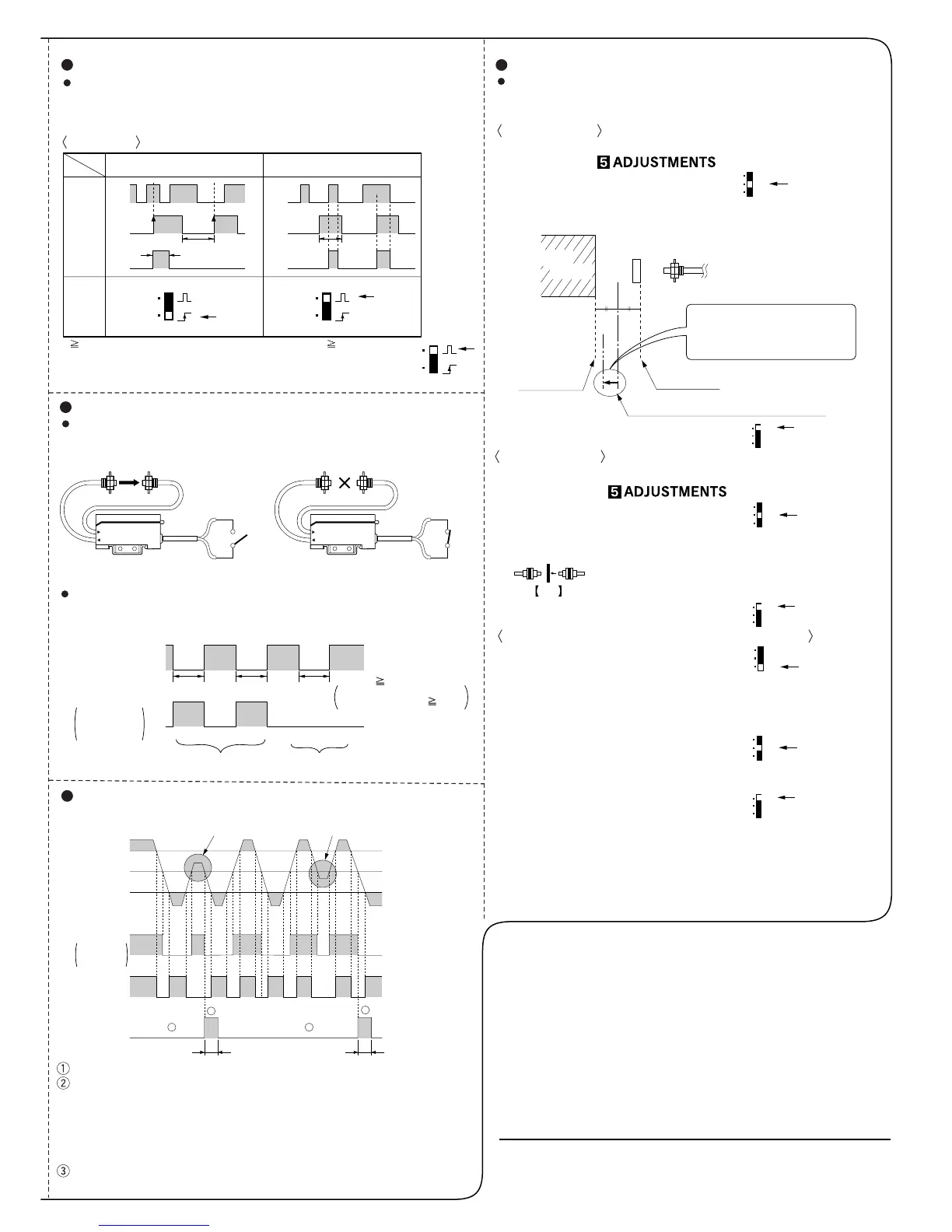
External synchronization function (For FX-75, FX-75G only)
By using external synchronization function, the timing for making
detection can be specified.
Trigger synchronization and gate synchronization are available.
Time chart
Emission disable function (For FX-75, FX-75G only)
Emission stops when emission disable input (violet) is set Low. The
sensing output can be turned ON and OFF without a sensing object
and this can be used for start-up inspections.
It is judged that sensor operation is normal if sensing output follows
the ON and OFF of the emission disable input, and is abnormal if it
does not follow.
Self-diagnosis function (Incorporated in all models)
The self-diagnosis output transistor is ‘OFF’ during stable sensing.
If the sensor does not reach at either stable light receiving level or
stable light interruption level when sensing output turns ON or OFF,
the self-diagnosis output turns ON and then turns OFF after approx.
40ms. Further, the self-diagnosis output changes at the time when
the sensing output changes from light received to light interrupted
state. (The operation of the sensing output is not affected.)
There is a time delay in turning ON of the self-diagnosis output
when light interruption is insufficient.
Reflective type
1. Make normal sensitivity setting.
(Refer to section )
2. Set the mode selection switch to ‘SIF’.
3. Press the sensitivity setting button again which was pressed
with background.
4. Set the mode selection switch to ‘RUN’.
Thru-beam type
1. Make normal sensitivity setting.
(Refer to section )
2. Set the mode selection switch to ‘SIF’.
3. Press the sensitivity setting button again which was
pressed with the sensing object.
RUN
SET
SIF
RUN
SET
SIF
Press ‘ON’ button in this example.
4. Set the mode selection switch to ‘RUN’.
If sensing is not possible, apply normal sensitivity setting method,
or use one of the small diameter fiber cables.
For FX-77, FX-77G, the sensitivity shift cannot be made by using
remote sensitivity setting input.
RUN
SET
SIF
RUN
SET
SIF
RUN
SET
SIF
RUN
SET
SIF
RUN
SET
SIF
Notes: 1)
2)
Sensitivity shift function (Incorporated in all models)
This is used for setting the maximum sensitivity for which the
reflective type does not detect the background, or for sensing
tiny objects with the thru-beam type.


 To Previous Page
 Loading...