LICENSED SOFTWARE AP
-41-
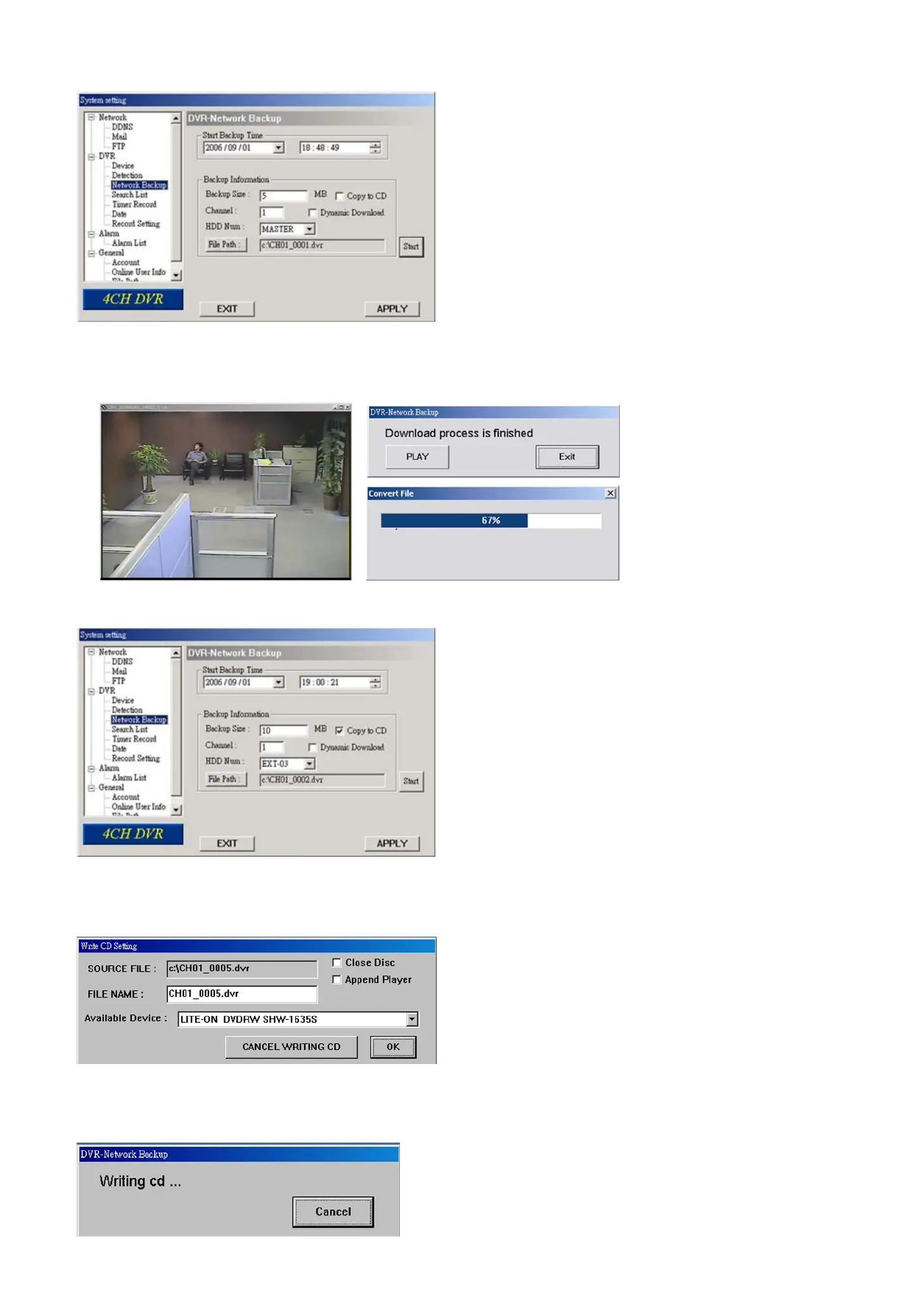
‧ Making backup to your PC:
After pressing “Start”, the backup will be proceeded and a status bar will be displayed. “DVR Network Backup” pop-up
window will show the message “Download process is finished” when the backup is succeeded.
Press “PLAY” button to directly convert and play the file, or “Exit” to quit.
‧ Making backup to a CD:
After pressing “Start”, “Write CD Setting” pop-up window will show on the screen. Choose “Close Disc” when you
don’t want to write any more data to this CD after this burning; choose “Append Player” when you want to play the backup
file on another PC which doesn’t have any available player to play it.
Press “OK” to start making a CD backup, or press “CANCEL WRITING CD” to only make a backup file to your PC.
When CD writing is processing, “DVR-Network Backup” window will show the message “Writing cd …” and a status
bar will show the writing status.



 To Next Page