22
4 - Operation
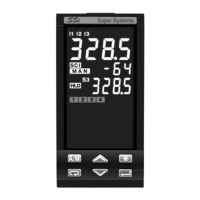
4.1.1 KEY FUNCTIONS AND DISPLAYS IN OPERATOR MODE
SP operating Setpoint
(Local/Remote or Stored)
% Control output
or Program status (see page 64)
Control output LEDs (red)
å OP1/OP4 ON - ç OP2/OP4 OFF
Run/stop Timer or a program
Entry key for selection and value setting confirmation
Setpoint setting
Menu access
Auto/Man
Alarm status LEDs (reds)
Å AL1 ON
Ç AL2 ON
É AL3 ON
Ñ AL4 ON
Status LEDs (greens)
} Communications running
(serial communications interface)
Ä Tuning running
{ Manual operating mode
Ö Timer
á Program Waiting
Ü Remote Setpoint active
ú First stored Setpoint active
ù Second stored Setpoint active
û Third stored Setpoint active
Digital input status LEDs (yellows)
ó - IL1 active
ò - IL2 active
ô - IL3 active
4 OPERATION
8888____ 8888----
PV control input in engineering units
Over range Under range


 To Next Page