Page 11 of 24 Form 0160C 3825 03/10/08
Superchips Inc.
Superchips Inc. 1790 East Airport Blvd., Sanford, FL. 32773 (407) 585-7000 http://www.Superchips.com
Superchip & Superchips are registered trademarks of Superchips, Inc.
Section A – Overview of
FLASHPAQ
7. Quick Start – Return my vehicle to factory stock NOW!!!
Please follow the steps below to program your vehicle to Stock
*** Press DOWN to scroll as needed ***
From the opening screen
1) Press ENTER – after selection of Performance Tuning
2) Press ENTER – after selection of Change Setup
3) Follow ON SCREEN – Vehicle Ignition Switch OFF/ON
Some vehicles may need switched off/on up to five times.
(DO NOT START VEHICLE!!)
4) Press ENTER – after selection of Power Level
5) Press ENTER – after selection of STOCK tuning level
6) Press EXIT – for Vehicle Read Complete
From this Screen
1) Press ENTER – after selection of Program Vehicle
2) Follow ON SCREEN – Vehicle Ignition Switch OFF/ON
Some vehicles may need switched off/on up to five times.
(DO NOT START VEHICLE!!)
Upon completion, remove cable from vehicle.
Your vehicle’s program is now returned to factory stock. You may
now start your vehicle.
Page 12 of 24 Form 0160C 3825 03/10/08
Superchips Inc.
Superchips Inc. 1790 East Airport Blvd., Sanford, FL. 32773 (407) 585-7000 http://www.Superchips.com
Superchip & Superchips are registered trademarks of Superchips, Inc.
Section A – Overview of
FLASHPAQ
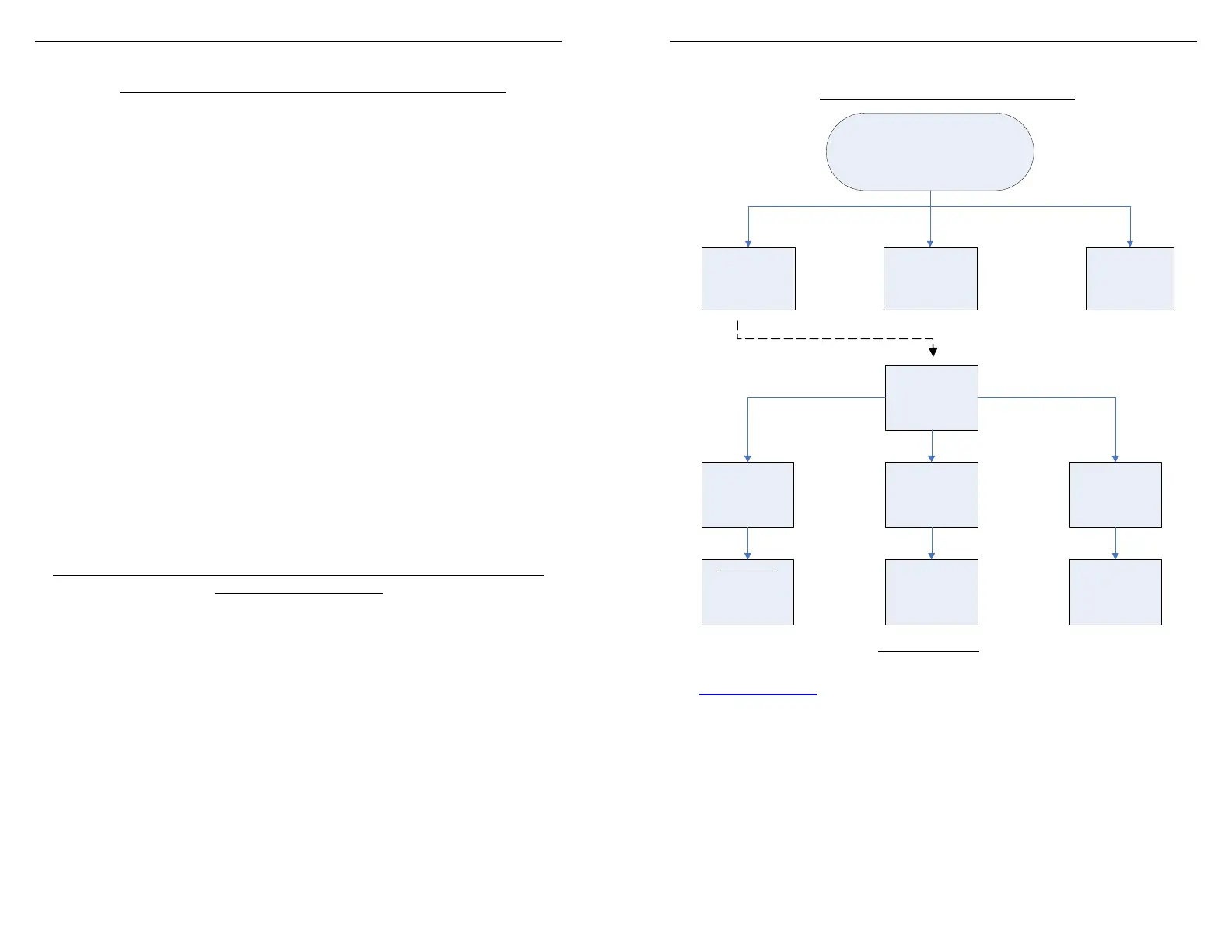
8. Understanding the Menu Screens
FLASHPAQ
Setup
About: Displays Tuner Firmware Version, Database Version, Serial Number
Visit www.superchips.com
for latest updates
Set Screen Contrast: Allows changes to screen text & graphics darkness
Set Screen BackLight: Allows changes to screen brightness level
(Adjustable for extreme viewing situations – direct sunlight, nighttime, low lighting)
FlashPaq
Main Menu
FlashPaq
Setup
Performance
Tuning
Advanced
Features
FlashPaq
Setup
About
Set Screen
Contrast
Set Screen
BackLight
Displays
Firmware #
Database #
Serial #
Adjust
Contrast
0-100%
Adjust
BackLight
0-100%


 To Next Page
 Loading...