Page 5 of 16
Form 0141A 06/21/2004
Superchips Inc. 1790 East Airport Blvd., Sanford, FL. 32773 (407) 585-7000 http://www.Superchips.com
Superchip & Superchips are registered trademarks of Superchips, Inc.
1. Connecting the MAX Micro Tuner to your vehicle
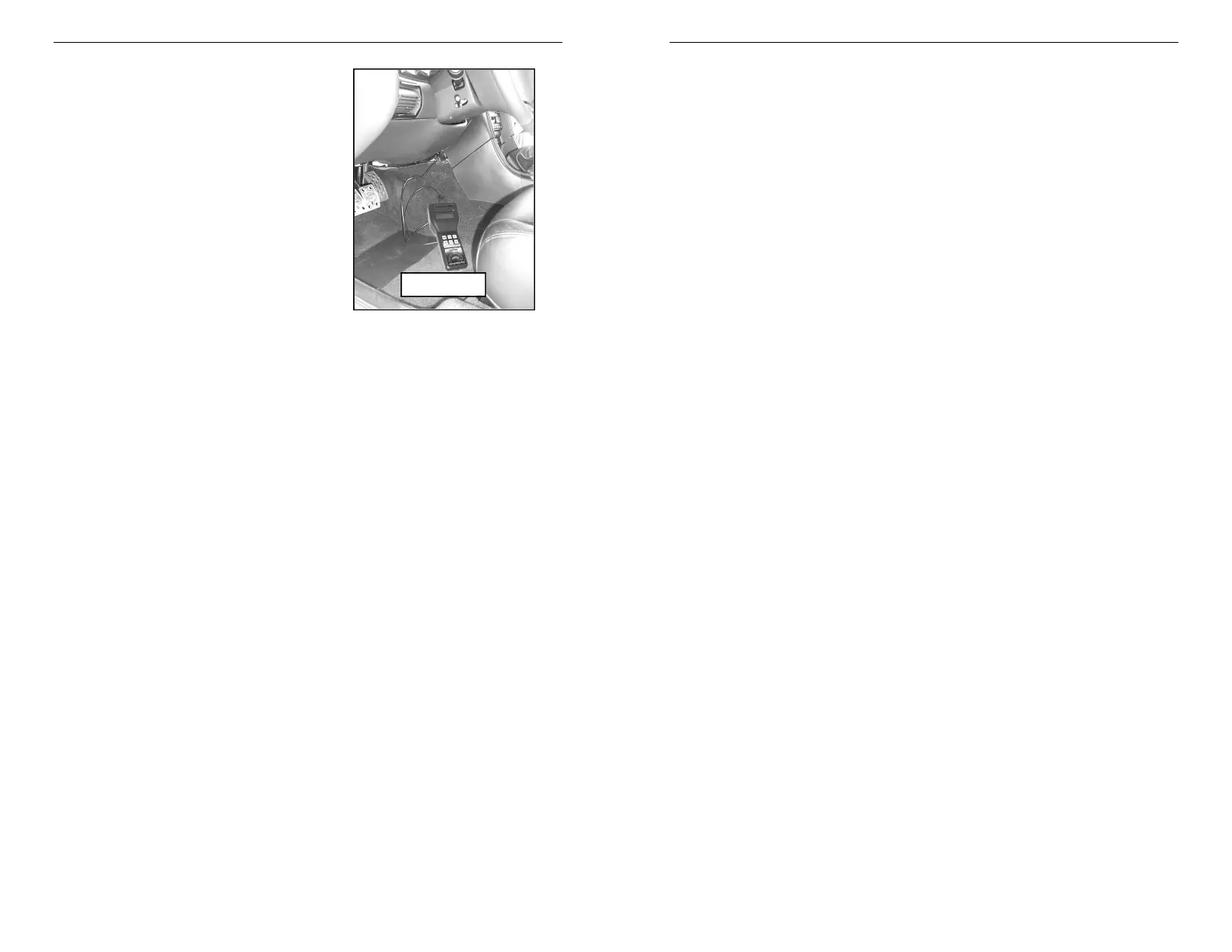
With the ignition switch in the OFF position, locate
the diagnostic connector under the dash to the right
of the steering wheel and connect the MAX Micro
Tuner cable to the diagnostic connector.
(See Figure 5)
When connected, the MAX Micro Tuner will run a
self-test, displaying several start-up messages.
Following the start up messages, if the MAX Micro
Tuner has been previously used to program a
vehicle, the Micro Tuner will beep and display:
Micro Tuner is
VIN Locked
This indicates the MAX Micro Tuner has been
previously used to program a vehicle and can not
program another. The MAX Micro Tuner will
continue to operate normally on the original vehicle
and may be used as a DTC Reader on other Ford vehicles.
The MAX Micro Tuner then displays the following message:
Begin with Ign.
OFF Press >
2. Selecting Tune Vehicle / Diagnostics
Turn the ignition switch to the ON position. Press the ‘>’ key on the keypad. The MAX Micro
Tuner will beep and display the message:
A= Tune Vehicle
B= Diagnostics
Press the ‘A’ key on the keypad to continue with the tuning process.
Press the ‘B’ key to read and/or clear any Diagnostic Trouble Codes from the vehicle. See
DTC Reader Instructions and DTC interpretation in the separate manual provided for this
purpose with your product.
3. Vehicle Programming
Press the ‘A’ key on the keypad. The MAX Micro Tuner will beep and display the
message:
Is FUEL PMP Fuse
Removed YES/NO?
If ‘NO’ is pressed, the MAX Micro Tuner will beep and display the following
messages:
MUST Remove Fuse
Before Tuning!!!
Press Any Key
To Continue…
After pressing a key, the MAX Micro Tuner beeps and returns to
Selecting Tune Vehicle / Diagnostics at Step 2 .
If ‘YES’ is pressed, the MAX Micro Tuner will display the following message:
Turn Ignition ON
Do NOT START Eng
Page 6 of 16
Form 0141A 06/21/2004
Superchips Inc. 1790 East Airport Blvd., Sanford, FL. 32773 (407) 585-7000 http://www.Superchips.com
Superchip & Superchips are registered trademarks of Superchips, Inc.
Turn the ignition to the ON position. The MAX Micro Tuner will proceed to establish
communications and display the following message:
Establishing
Communications
The MAX Micro Tuner is establishing communications with and identifying the vehicle’s
computer. If the MAX Micro Tuner has not yet been used to program a vehicle, no vehicle
ID will be stored in the MAX Micro Tuner. In such a case, the MAX Micro Tuner will begin
saving the STOCK program for the vehicle. If the vehicle ID matches a vehicle ID stored in
the Micro Tuner, the MAX Micro Tuner will go directly to the Return to Stock Sequence at
Step 10 that follows.
Not the Original
Vehicle/Program
Error Type: 09 *
Call Superchips!
Press '>' to
Continue...
* Other error codes, with or without explanations may be displayed.
Pressing the ‘>’ key will cause the MAX Micro Tuner to beep and display the
message:
Please Wait...
After a few seconds the MAX Micro Tuner resets and returns to the power-up self test.
4. Saving the STOCK program for the vehicle
The manufacturer’s STOCK program is first saved in the MAX Micro Tuner to allow the
vehicle to be reprogrammed to STOCK condition if necessary. The STOCK program is
AUTOMATICALLY saved only the first time the vehicle is programmed.
Once the MAX Micro Tuner has established communications, it will beep and display the
following message for approximately 3 seconds:
Please Wait…
After initialization is complete, the MAX Micro Tuner will beep and start saving the stock
program. This will take about three minutes. The MAX Micro Tuner will blink the following
message:
Saving Stock
The bottom line of the display shows the progress of the stock upload.
When completed, the MAX Micro Tuner checks to see if the stock program it has uploaded
can be found in its internal database. If not it will display the message:
Tuner Requires
an Update…
Call Superchips!
or…
Check Vehicle
application…
Press any key to
continue...
If the stock upload is found in the internal database, the MAX Micro Tuner will beep and
display the message:
Please Wait…



 To Next Page
 Loading...