28
English
F
unction
A
ction
D
isplay
Timer
activated/deactivat-
e
d
o
n any given day
P
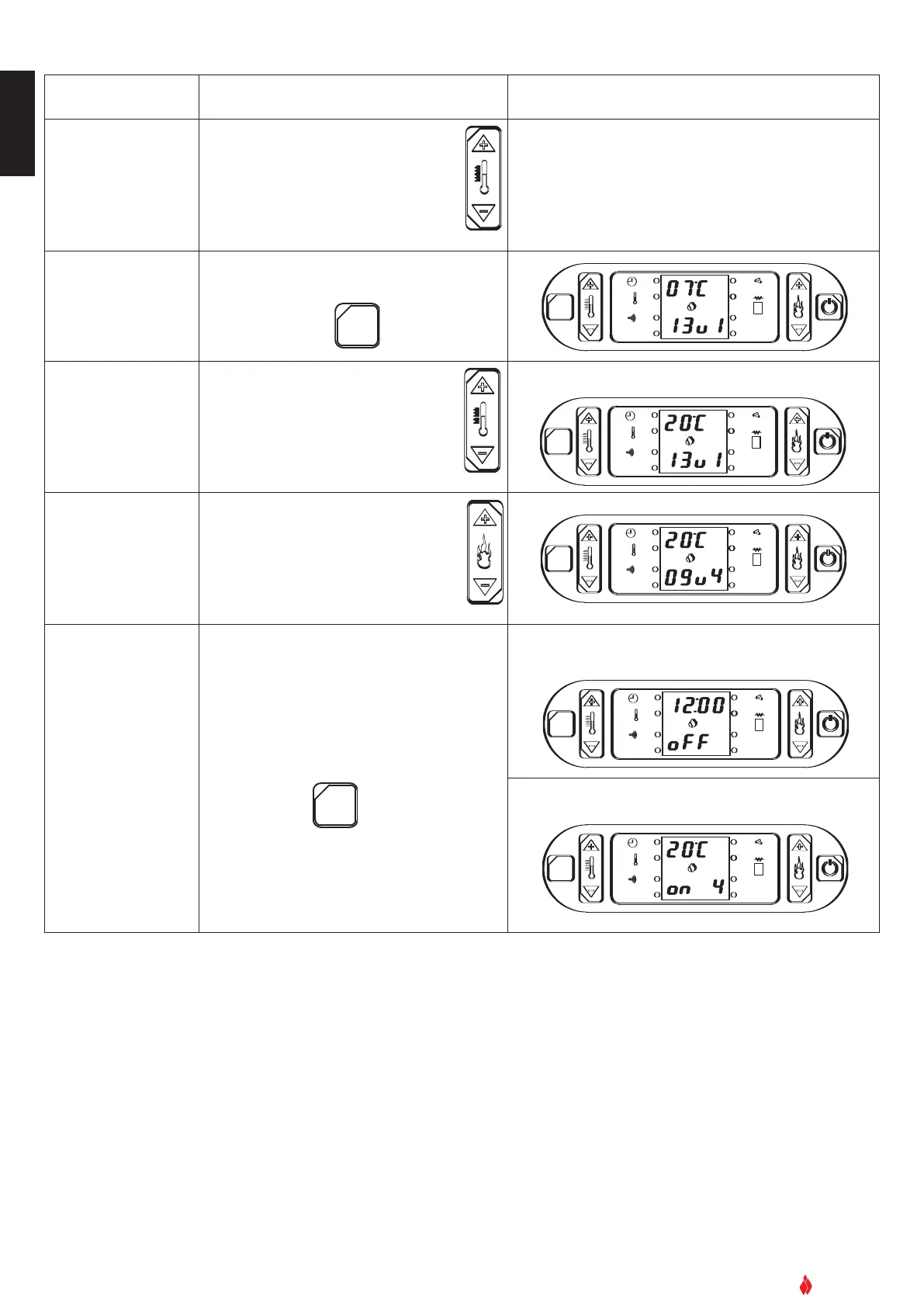
ress key 1 to see the days of the
w
eek
Press key 2 to activate/deactivate
the timer function on that day: ‘on’ or
‘off’
T
he chosen timetable will be confirmed (
o
o
n
n
)
or
cancelled (
oFF) for any given day
eg LUon = Montag aktiviert
eg
LUoF = Montag deaktiviert
C
onfirm selection
and move to next set-
ting
Press SET key to confirm
OK
SET
GRUPPO PIAZZETTA
1
2
3 4
5
6
AL. F
S
ET
A
L. C
Select desired tem-
perature
Pr
ess key
1 to incr
ease temperature
Press key 2 to lower the temperature
progressively
O
K
SET
G
RUPPO PIAZZETTA
1
2
3
4
5
6
AL. F
SET
AL. C
Select power level
Press key 6 to increase the power
level: 1, 2, 3, 4
Power level 2 is recommended.
Press key 5 to decrease the power
level: 1, 2, 3, 4
OK
SET
GRUPPO PIAZZETTA
1
2
3
4
5
6
AL. F
SET
AL. C
Confirm selection.
Programming com-
plete. Exit from pr
o
-
gramming mode.
Press SET key to confirm
OK
SET
GRUPPO PIAZZETTA
1
2
3
4
5
6
AL. F
SET
A
L. C
OK
SET
GRUPPO PIAZZETTA
1
2
3
4
5
6
AL. F
SET
AL. C
DT2040015-00
For example you want the room temperature to be 20°C
If you have programmed the timer while the stove is unlit
the top half of the display will show the current time. For
example:
If you have pr
ogrammed the timer while the stove is lit,
the display may look like this:


 To Next Page