English
27
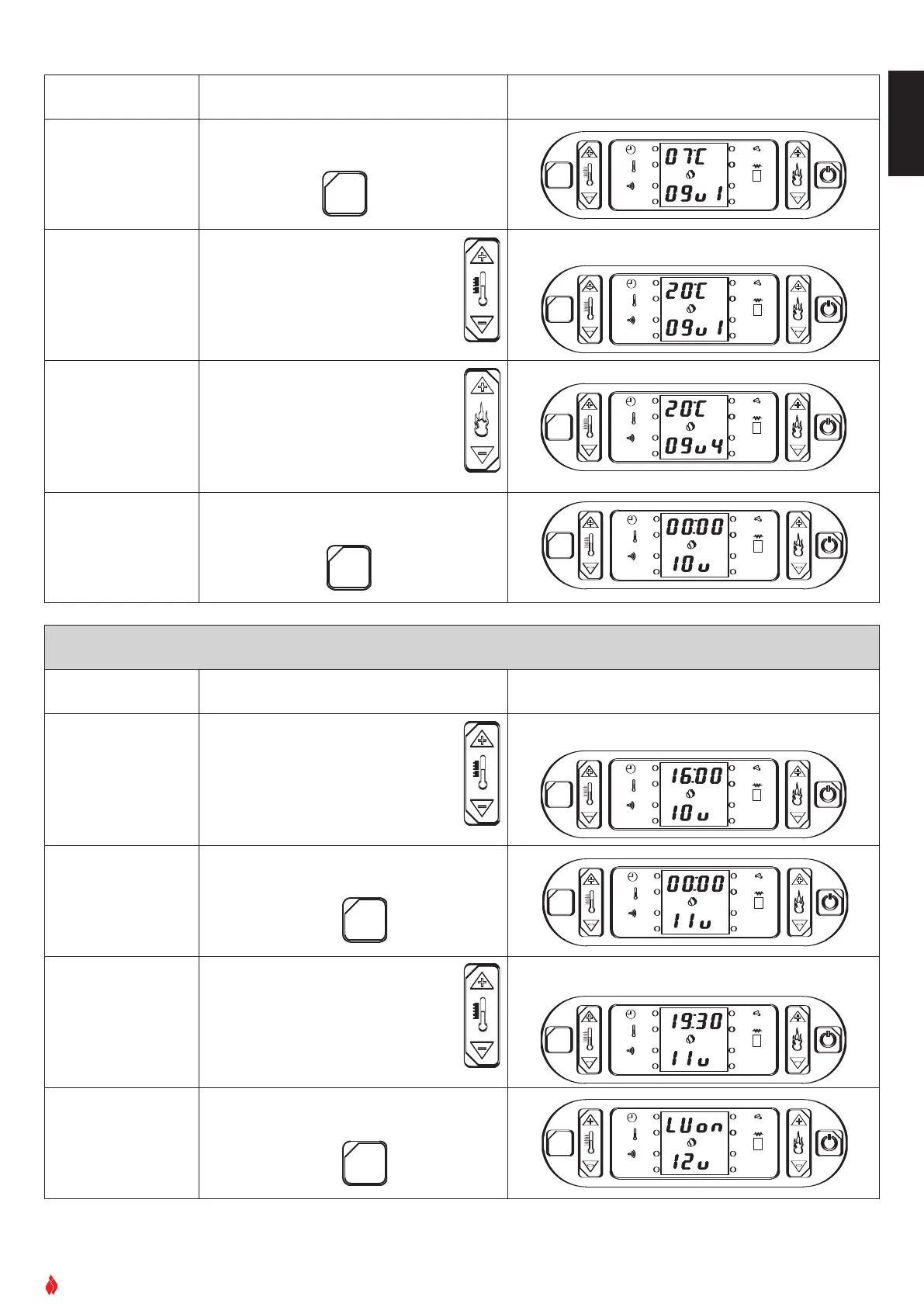
Function Action Display
Confirm selection
and move to next set-
ting
Press SET key to confirm
OK
SET
GRUPPO PIAZZETTA
1
2
3
4
5
6
AL. F
SET
AL. C
Select desired tem-
perature
Press key 1 to increase temperature
P
ress key
2
to lower temperature
OK
SET
GRUPPO PIAZZETTA
1
2
3
4
5
6
AL. F
S
ET
A
L. C
Select power level
Press key 6 to increase the power
level: 1, 2, 3, 4
Power level 2 is recommended
Press key 5 to decrease the power
level: 1, 2, 3, 4
OK
SET
GRUPPO PIAZZETTA
1
2
3 4
5
6
AL. F
SET
A
L. C
Confirm selection
and move to pro-
gramming second
cycle
Press SET key to confirm
O
K
S
ET
GRUPPO PIAZZETTA
1
2
3
4
5
6
A
L. F
SET
A
L. C
For example you want the room temperature to be 20°C
PROGRAMMING THE TIMER’S SECOND CYCLE
Function Action Display
Setting second cycle
automatic startup
time
Press key 1 to advance through the
timetable (10 minutes at a time)
Press key 2 to return through the
sequence
OK
SET
GRUPPO PIAZZETTA
1
2
3
4
5
6
AL. F
SET
AL. C
Confirm selection
and move to next set-
ting
Press the SET key to confirm
OK
SET
GRUPPO PIAZZETTA
1
2
3 4
5
6
AL. F
SET
AL. C
Setting second cycle
automatic shutdown
time
Press key 1 to advance through the
timetable (10 minutes at a time)
Press key 2 to return through the
sequence
OK
SET
GRUPPO PIAZZETTA
1
2
3 4
5
6
AL. F
SET
AL. C
Confirm selection
and move to next set-
ting
Pr
ess
SET key to confir
m
OK
SET
GRUPPO PIAZZETTA
1
2
3 4
5
6
AL. F
SET
AL. C
DT2040014-00
For example you want the stove to start up at 16:00
For example you want the second cycle to shut down at 19.30


 To Next Page