26
English
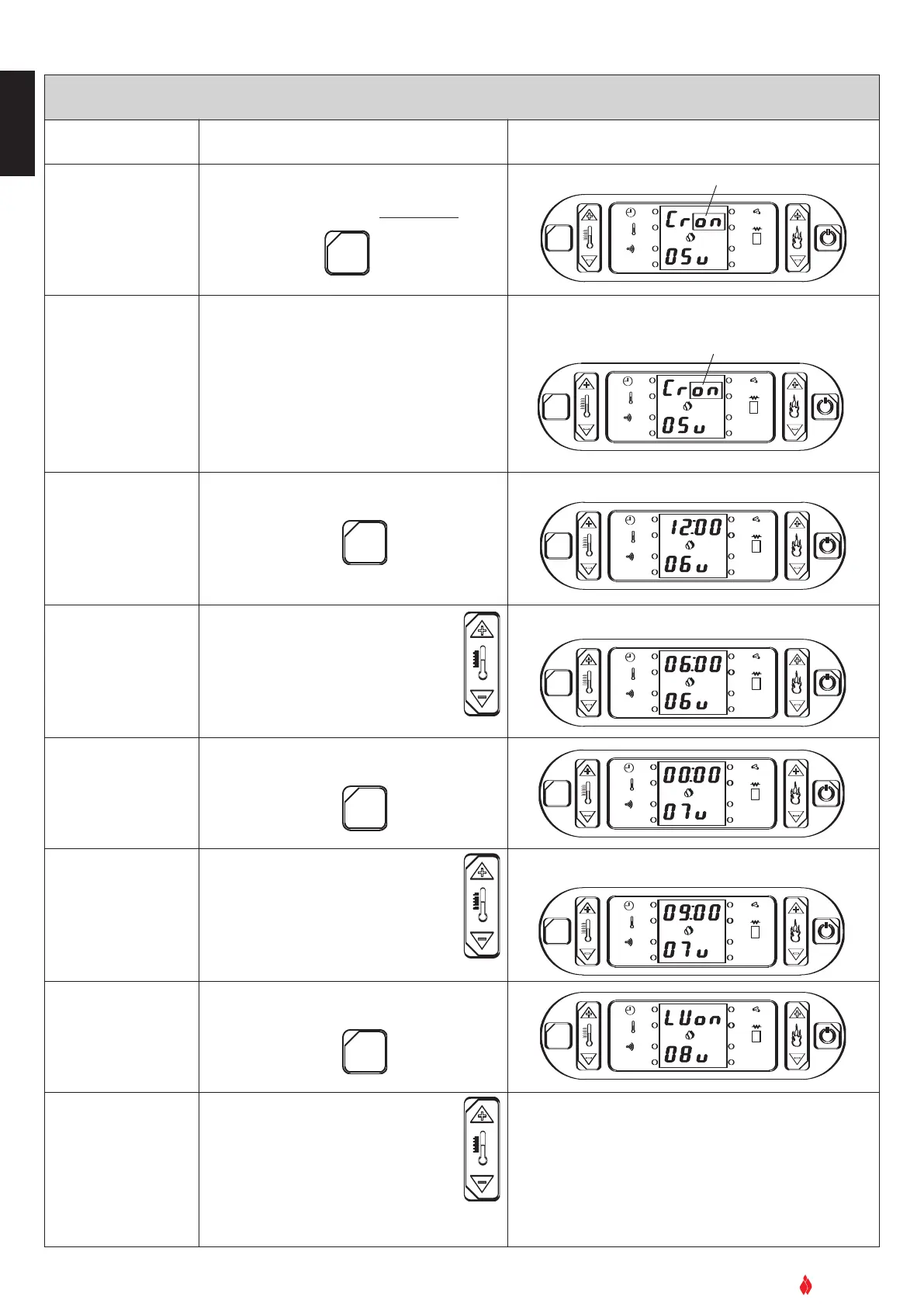
PROGRAMMING THE TIMER’S FIRST CYCLE
Function Action Display
Access to program-
ming mode
Hold down the SET key for five seconds
OK
SET
GRUPPO PIAZZETTA
1
2
3
4
5
6
AL. F
SET
FLASHING SCRIPT
A
L. C
Activate/deactivate
the timer
The timer programming mode is
activated/deactivated by selecting the display
Cron (activated) or CroF (deactivated).
Press key 1 to select the desired display.
OK
SET
GRUPPO PIAZZETTA
1
2
3 4
5
6
AL. F
SET
FLASHING SCRIPT
A
L. C
Confirm selection
Press the SET key to confirm.
OK
SET
GRUPPO PIAZZETTA
1
2
3
4
5
6
AL. F
SET
AL. C
Setting first cycle
automatic startup
time
Press key 1 to advance through the
timetable (10 minutes at a time).
Press key
2 to return through the
sequence.
OK
SET
GRUPPO PIAZZETTA
1
2
3 4
5
6
AL. F
SET
AL. C
Confirm selection
and move to next set-
ting
Pr
ess the
SET key to confir
m
OK
SET
GRUPPO PIAZZETTA
1
2
3
4
5
6
AL. F
SET
AL. C
Setting first cycle
automatic shutdown
time
Press key 1 to advance through the
timetable (10 minutes at a time).
Press key
2 to return through the
sequence.
OK
SET
GRUPPO PIAZZETTA
1
2
3 4
5
6
AL. F
SET
AL. C
Confirm selection
and move to next set-
ting
Press SET key to confirm
OK
SET
GRUPPO PIAZZETTA
1
2
3 4
5
6
AL. F
SET
AL. C
Timer
activated/deactivat-
ed for any given day
Press key 1 to see the days of the
week
Press key 2 to activate/deactivate
the timer function on that day: ‘on’ or
‘off’
The chosen timetable will be confirmed (
o
o
n
n
) or
cancelled (oFF) for any given day
eg LUon = active Monday
eg LUoF = deactive Monday
For example, you want to activate the automatic startup and
shutdown for the desired period: Example of display.
The time previously input is shown:
For example, you want the stove to start up at 06:00
For example, you want the first cycle of operation to shut down at
09.00:


 To Next Page