English
25
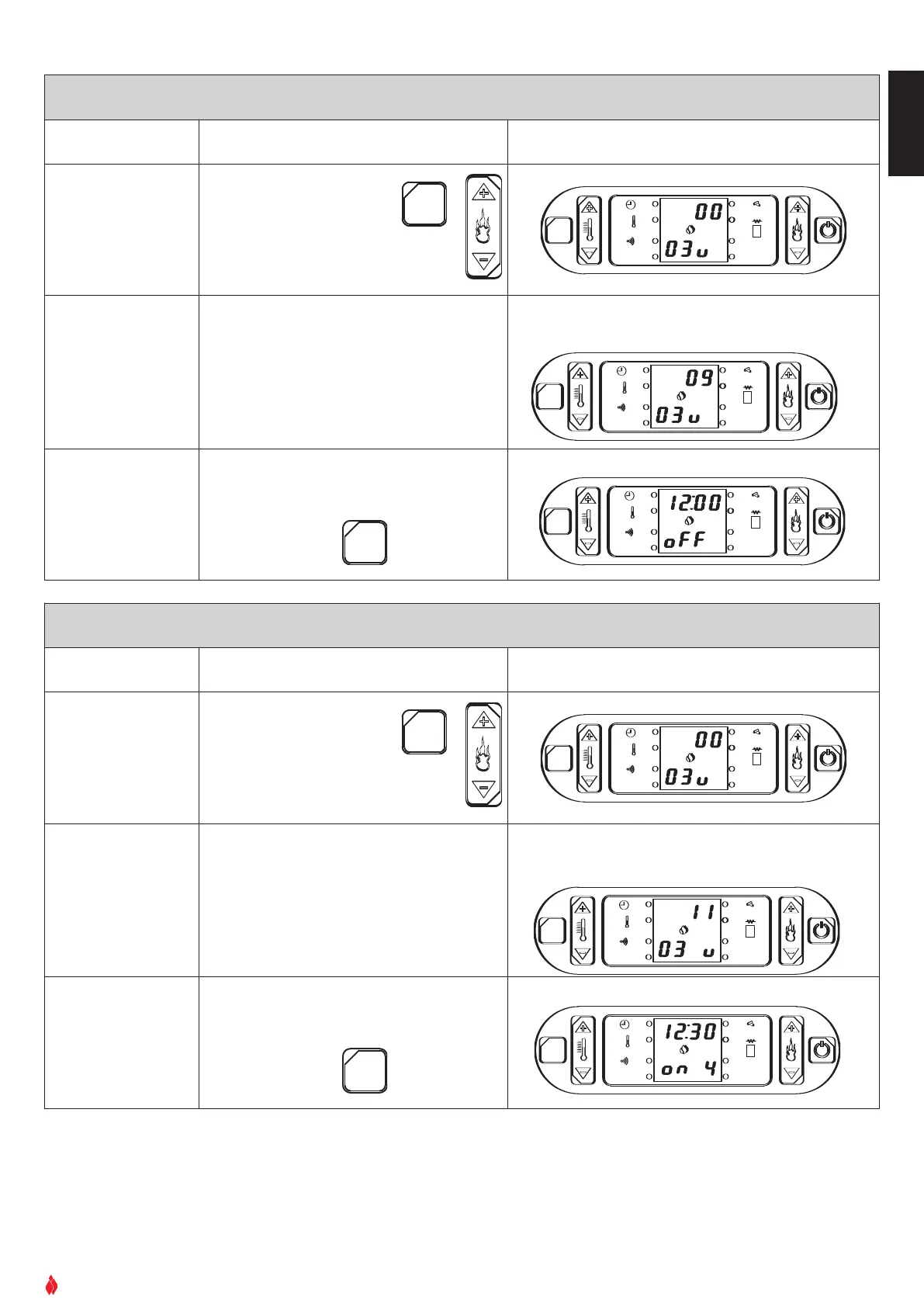
ACTIVATION/DEACTIVATION OF THE ALARM SIGNAL
Function Action Display
A
ctivation/deactiva-
tion of the alarm sig-
nal during operation
of the stove.
Proceed from the previous
section or press the SET
key then key 6
Press the set
key twice in succession and on the
lower part of the display the code
03u will appear.
OK
SET
GRUPPO PIAZZETTA
1
2
3 4
5
6
AL. F
SET
AL. C
Set the code
Press key 1 to advance through the sequence
of the codes:
(09 = alarm activated;
10 = alarm deactivated).
Press key 2 to return through the sequence.
OK
SET
GRUPPO PIAZZETTA
1
2
3 4
5
6
AL. F
SET
A
L. C
Confirm selection
Press SET to confirm
O
K
S
ET
GRUPPO PIAZZETTA
1
2
3 4
5
6
A
L. F
SET
A
L. C
DT2040012-00
Example: you want the alarm to be active during operation of the
stove: select code 09.
Example:
ACTIVATION/DEACTIVATION OF THE TEMPERATURE/TIME DISPLAY
Function Action Display
Activation/deactiva-
tion of the tempera-
tur
e/time display
during operation.
Press the SET key then
press key
6.
Press the SET key twice in succession
and on the lower part of the display
the code
03u will appear.
O
K
SET
GRUPPO PIAZZETTA
1
2
3 4
5
6
AL. F
SET
AL. C
Set the code
Press key 1 to advance through the sequence
of the codes:
(11= room temperature displayed; 12 = time
displayed).
Press key 2 to return through the sequence.
OK
SET
GRUPPO PIAZZETTA
1
2
3
4
5
6
AL. F
SET
AL. C
Confirm selection
and move to pro-
gramming the first
timer cycle
Press SET to confirm
OK
SET
GRUPPO PIAZZETTA
1
2
3
4
5
6
AL. F
SET
AL. C
OK
SET
GRUPPO PIAZZETTA
1
2
3 4
5
6
AL. F
SET
AL. C
DT2040013-00
Example: you want the room temperature to be shown during oper-
ation: select code
11.
Example of display when stove is lit:


 To Next Page