24
English
S
etting the timer
S
ETTING THE TIMER FOR THE FIRST TIME, REMEMBER TO SET THE CLOCK, INPUTTING THE CURRENT DAY, HOUR AND MINUTE,
AS WITH A NEW WATCH. This will be neccessary only the first time that the clock is activated.
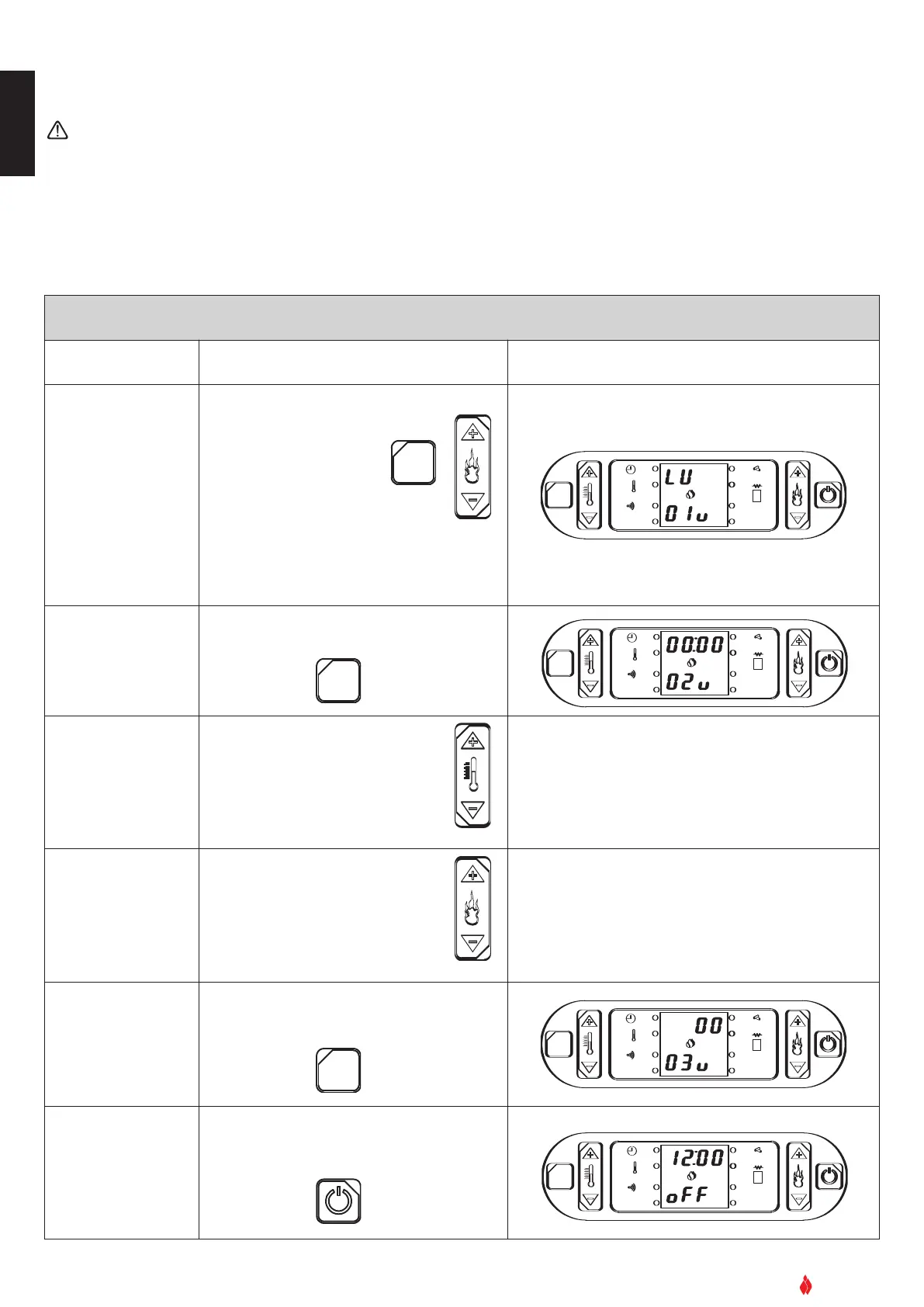
To access the timer set mode, press the keys in the sequence described below.
(NB: at any time exit the timer set mode and change any data erroneously confirmed by pressing the ON/OFF key. Re-enter the mode
b
y repeating the sequence from the beginning and using the SET key to advance to the point at which you exited.)
SETTING THE CLOCK (current day/time)
Function Action Display
Set the day
Press the SET key then key 6.
Press key 1 to advance through the
days of the week.
Press key 2 to return through the
sequence.
OK
S
ET
GRUPPO PIAZZETTA
1
2
3
4
5
6
A
L. F
SET
AL. C
Confirm setting and
move to next section.
Press the SET key to confirm.
OK
S
ET
G
RUPPO PIAZZETTA
1
2
3
4
5
6
A
L. F
SET
AL. C
Set the hour.
Press key 1 to advance through the
hours.
Press key 2 to return through the
sequence.
Upper half: 01:00, 02:00,… … 23:00
Lower half: 02 u
Set the minutes
Press key 6 to advance through the
minutes.
Pr
ess key
5 to r
eturn through the
sequence.
Upper half: 00, 01, 02,… … 59
Lower half: 02 u
Confirm selections
and moving to next
section
Press the SET key to confirm
OK
SET
GRUPPO PIAZZETTA
1
2
3 4
5
6
AL. F
SET
AL. C
Exiting clock setting
mode
Press the ON/OFF key.
OK
SET
GRUPPO PIAZZETTA
1
2
3 4
5
6
AL. F
SET
AL. C
DT2040011-00
Example:


 To Next Page