Need help?
Do you have a question about the Supermicro SC116 Series and is the answer not in the manual?
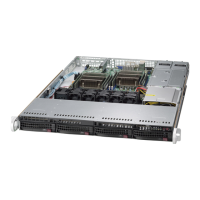
The Supermicro SC116 is a 1U rackmount chassis designed for high-end, high-performance applications, optimized for best price/performance. It offers efficient cooling and significant storage capacity within its compact 1U form factor.
The SC116 chassis serves as a housing for server components, including motherboards, hard drives, power supplies, and expansion cards. Its primary function is to provide a structured and cooled environment for these components to operate reliably in a rackmount setting. The chassis is particularly suited for HPC (High-Performance Computing) and datacenter use due to its optimized cooling and storage capabilities.
The SC116 series includes several models, each with specific configurations for HDDs, PCI slots, and power supplies:
The chassis features ten 2.5" hot-swappable drive bays. SC116AC-R700WB models specifically support SAS3/SATA drives, while others support SAS2/SATA. Only enterprise-level hard drives are recommended for optimal performance and reliability. Drives can be removed without powering down the server, provided they are set up correctly.
The number and type of PCI slots vary by model. "C" models (e.g., SC116TQ-700CB) include one full-height slot, while "U" and "W" models feature two full-height expansion slots and one low-profile expansion slot. Riser cards are required for installing expansion cards and are sold separately.
Each SC116 chassis model includes redundant high-efficiency power supplies, rated at either 700W or 750W. These power supplies are auto-switching capable, operating at 100V to 240V input voltage. Redundant power supplies allow the server to continue running even if one power supply fails, and replacement can be done without tools.
The chassis is equipped with four heavy-duty system fans for cooling, with spaces for an optional fifth and sixth fan for enhanced cooling. These fans are 1U high, powered by 4-pin connectors from the serverboard. The fans are counter-rotating, meaning each unit consists of two fans joined back-to-back, rotating in opposite directions. This design generates exceptional airflow and dampens vibration levels. Air shrouds are included to concentrate airflow and maximize fan efficiency.
Each SC116 chassis comes with a 1U SAS/SATA backplane. Specific models may feature BPN-SAS-116TQ, BPN-SAS3-116A, or BPN-SAS3-116A-N2 backplanes, with the latter supporting NVMe capabilities. The backplane includes power connectors (4-pin), upgrade connectors for diagnostic purposes, MG9071/MG9072 enclosure management chips (for SGPIO controller and protocols), sideband headers (8-pin for SGPIO), and SAS/SATA connectors (numbered 0 through 9). The BPN-SAS3-116A-N2 backplane also includes +12V DC power input for NVMe SSDs and NVMe connectors. Jumpers on the backplane allow for configuration modifications, such as ATMEL chipset reset or NVMe mapping to CPU.
The front control panel includes a power on/off button and a UID (Unit Identifier) button. The UID button, when used with a compatible motherboard, activates a blue U-LED light, making it easy to locate the unit in large racks or server banks.
The chassis features several LEDs to provide system and component status:
The SC116 chassis is designed for installation into a rack unit. It includes two rack rail assemblies: inner fixed chassis rails (pre-installed) and outer fixed rack rails. Optional inner rail extensions can be attached for additional stability. The chassis fits racks between 26" and 33.5" deep. For Telco or post-style racks, L-shaped brackets are used.
The chassis cover can be removed by simultaneously pressing two release buttons and sliding the cover toward the rear. It is crucial not to operate the server without the cover in place for extended periods to ensure proper airflow and prevent overheating.
Hot-swappable hard drives can be installed or removed by pressing a release button on the drive carrier, extending the handle, and pulling the drive out. Dummy drives are pre-installed and must be removed before installing actual hard drives. Drives are secured with M3 screws. It is important not to operate the server with empty hard drive bays (except for short swapping periods).
The backplane is located behind the hard drives and in front of the system fans. To access or change jumper settings, the backplane can be removed by disconnecting cabling, removing five upper screws, and lifting it out. Installation involves sliding it into chassis clips, aligning mounting holes, securing with screws, and reconnecting wiring.
Motherboard installation involves aligning it with permanent and optional standoffs (hexagonal screws and nuts are provided for optional standoffs) and securing it with rounded Phillips head screws. CPU(s), heatsinks, and other components are then secured.
Riser cards are necessary for expansion card installation. The process involves powering down the system, removing the chassis cover, installing the riser card onto a bracket, inserting the card and bracket into the motherboard slot, securing the bracket, and then sliding the expansion card into the riser card and securing it.
Air shrouds are plastic shields that direct airflow. They are positioned in alignment with the CPU, memory, and fan locations and do not require screws for setup. Break-away pieces may need to be removed from the air shroud sides if required by serverboard components.
System fans can be replaced by powering down the system, removing the chassis cover, disconnecting the failed fan's power cord, lifting it out, and placing a new fan into the vacant space. Arrows on the fan indicate air direction and should match other fans. Fan wires are reconnected to the serverboard headers.
Redundant power supplies can be replaced without powering down the server. The process involves pushing a release tab on the back of the power supply, pulling it out using its handle, and then pushing the new power supply module into the bay until it clicks into the locked position.
The manual emphasizes reviewing warning statements for AC/DC systems, including precautions for circuit breakers, power disconnection, equipment installation (only by trained personnel), restricted access areas, battery handling (explosion danger if replaced incorrectly), redundant power supplies (all connections must be removed to de-energize), backplane voltage (hazardous when operating), compliance with electrical codes, product disposal, and hot-swap fan warnings (fans may still be turning). It also provides general server precautions, such as ensuring rack stability, loading heaviest components at the bottom, using UPS, allowing hot-plug components to cool, and keeping panels closed for proper cooling. ESD safety guidelines are provided for handling electronic components.
 General
| Brand | Supermicro |
|---|---|
| Model | SC116 Series |
| Category | Chassis |
| Language | English |

 To Next Page