36
SuperServer E300-9D-4CN8TP/E300-9D-8CN8TP User's Manual
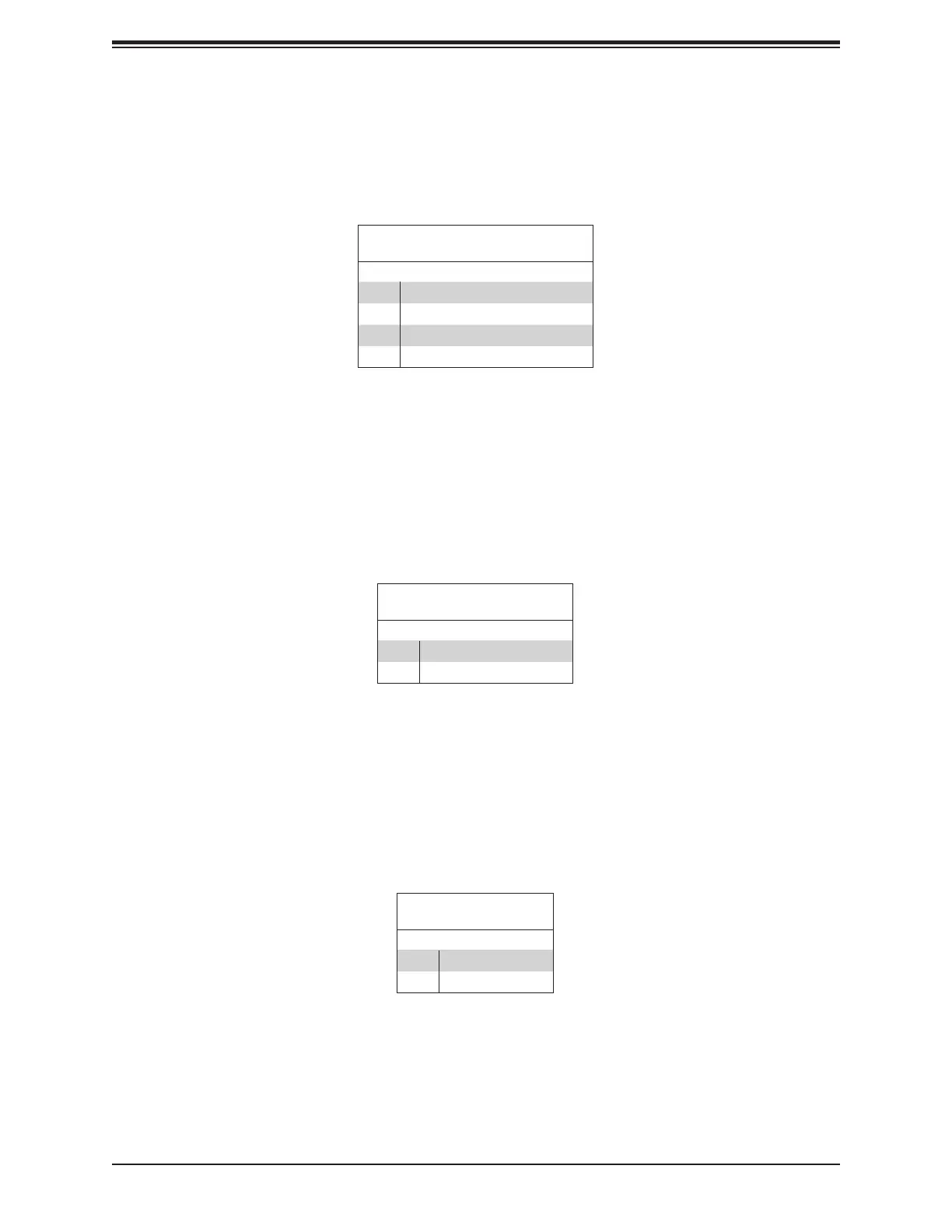
NIC1/NIC2 Activity LED
The NIC (Network Interface Controller) LED connection for LAN port 1 is located on pins 11
and 12 of JF1, and the LED connection for LAN port 2 is on pins 9 and 10. Attach the NIC
HDD LED/UID Switch
The HDD LED/UID Switch connection is located on pins 13 and 14 of JF1. Attach a cable to
pin 14 to show hard drive activity status. Attach a cable to pin 13 to use UID switch. Refer
Power LED
The Power LED connection is located on pins 15 and 16 of JF1. See the table below for pin
LAN1/LAN2 LED
Pin Denitions (JF1)
Pin# Denition
9 Pull up to +3.3 Stby
10 NIC2 Activity LED
11 Pull up to +3.3 Stby
12 NIC1 Activity LED
HDD LED
Pin Denitions (JF1)
Pin# Denition
13 3.3V Stdby/UID_SW
14 HDD Active
Power LED
Pin Denitions (JF1)
Pin# Denition
15 3.3V
16 PWR LED



 To Next Page