Chapter 4: BIOS
103
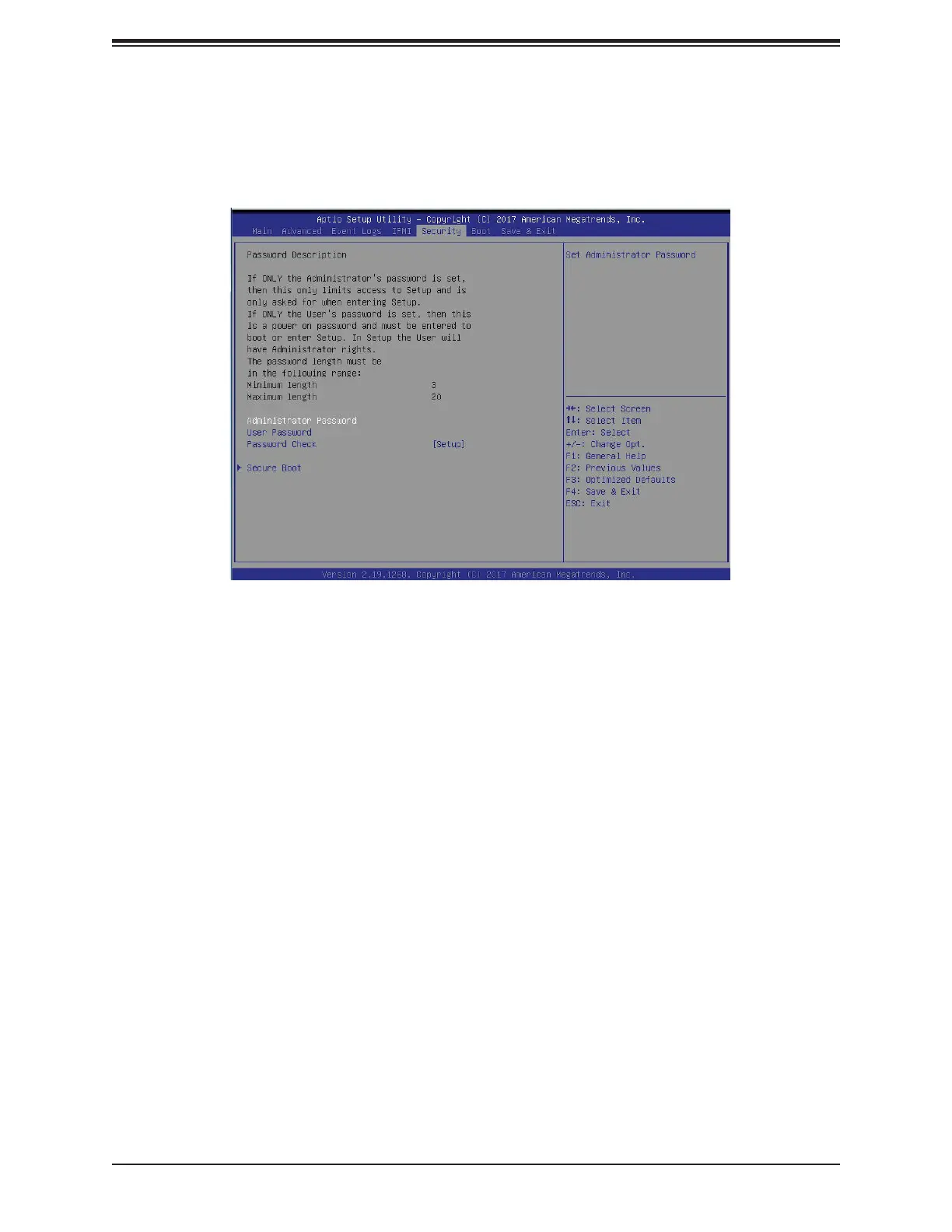
4.6 Security Settings
This menu allows the user to confi gure the following security settings for the system.
Administrator Password
Use this feature to set the administrator password which is required to enter the BIOS setup
utility. The length of the password should be from 3 characters to 20 characters long.
User Password
Use this feature to set the user password which is required to enter the BIOS setup utility.
The length of the password should be from 3 characters to 20 characters long.
Password Check
Select Setup for the system to check for a password at Setup. Select Always for the system
to check for a password at bootup or upon entering the BIOS Setup utility. The options are
Setup and Always.
Secure Boot
When you select this submenu and press the <Enter> key, the following items will display:
• System Mode
• Secure Boot
• Vendor Keys
Attempt Secure Boot
If this feature is set to Enabled, Secure Boot will be activated when a Platform Key (PK) is
entered. A Platform Key is a security key used to manage the security settings of the platform
fi rmware used in your system. The options are Enabled and Disabled.





 To Next Page