Chapter 2: Confi guring BMC IPMI Settings
2-21
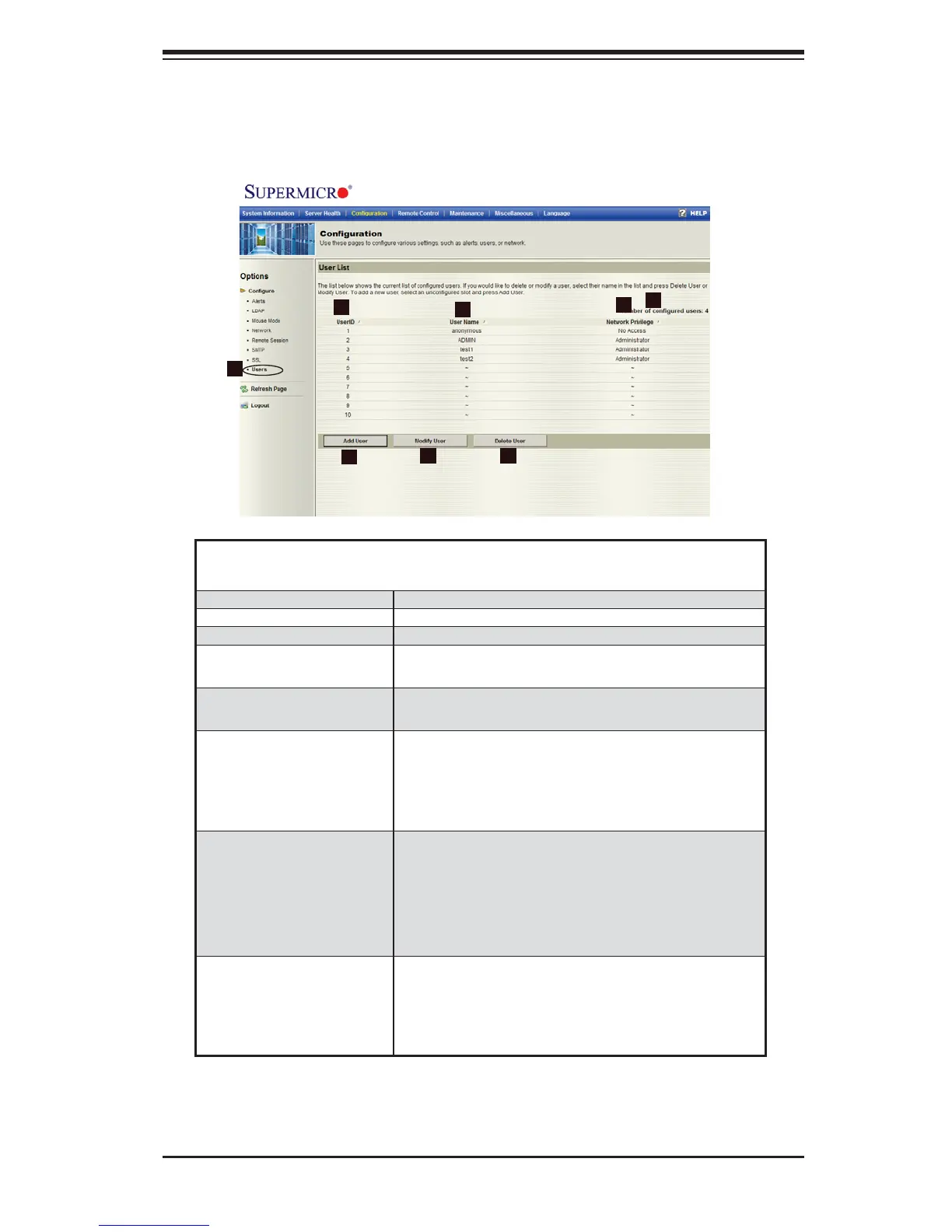
2.4.8 Confi guration - Users Settings
When you click on the Users icon in the Options window (1), the following screen
will display.
Confi guration -
Users Settings
1. Users Check this item to confi gure the user settings.
2. UserID This item displays the ID# of a user.
3. User Name Use this item to enter and display a user name.
4. Network Privilege Use this item to set the network access privilege
for a user.
5. Number of confi gured
users
This item displays the number of the users that
are set up for the network.
6. Add User Click on this icon to add a new user to the net-
work.
When prompted, select an empty slot from the
users list to add an user.
7. Modify User Click on this icon to modify the information or the
status of a user.
When prompted, using the arrow keys, select
a user from the users list to modify the user
information.
8. Delete User Click on this icon to delete a user from the net-
work.
When prompted, using the arrow keys, select a
user from the users list to delete it from the list.
2
1
3
6
5
4
7
8



 To Next Page