396-3815Y1 SureFire PumpRight for Raven RCM 44 Revised 12/04/2019
Setup instructions for Raven RCM and SureFire: 2 Liquid Products
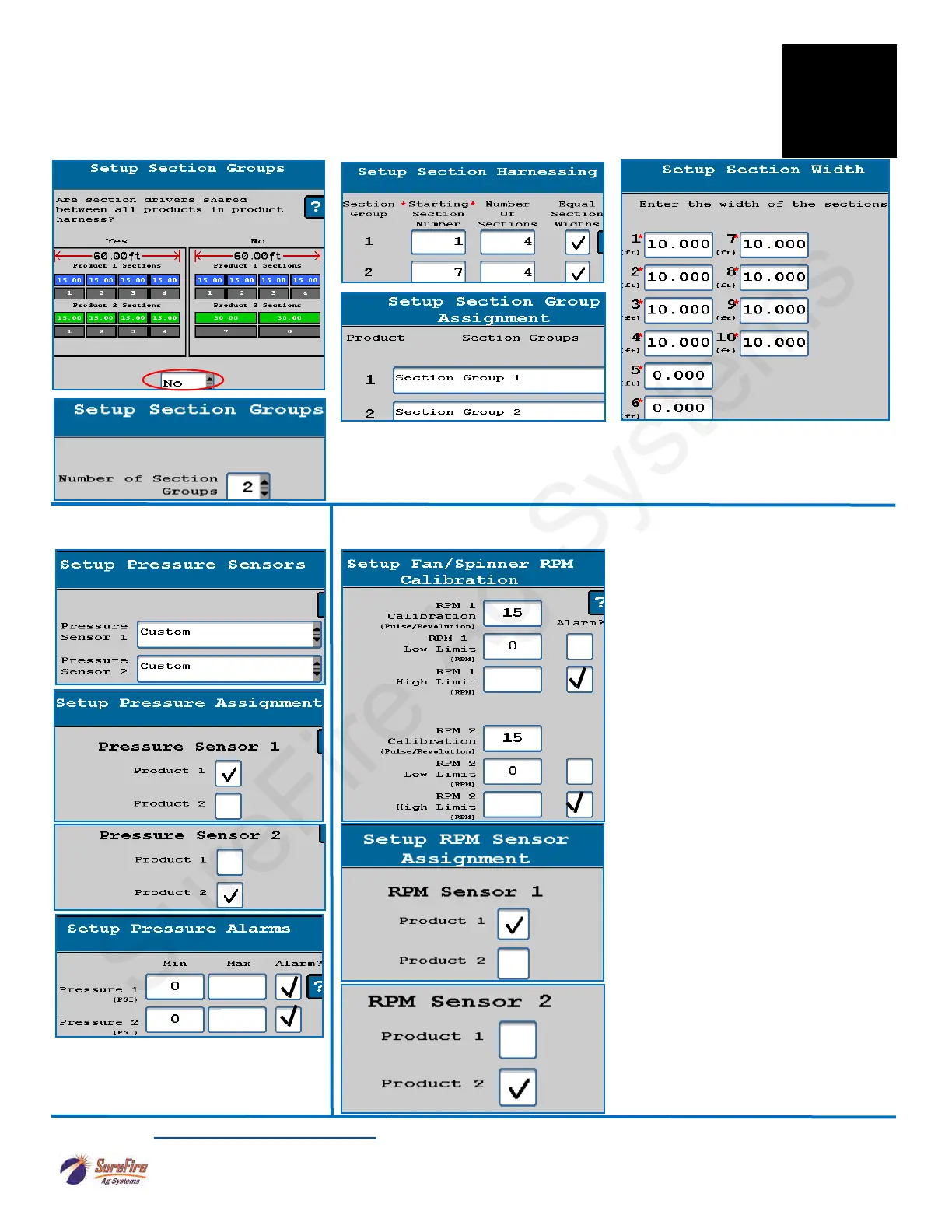
8. SureFire Pressure Sensors will
be CUSTOM.
9. Pump RPM setup-for hydraulic
RPM Calibration for SureFire Pump
RPM sensor is 15 pulses/rev.
Set up as needed for your system.
Product 2 will be RPM Sensor 2 on the
SureFire harness.
If using a Pump RPM sensor, you will
set up a Display Setting on the Run
Screen with the Pump RPM readout
(described later).
Set the RPM High Limit at 500 for a
SureFIre PumpRight hydraulic pump,
and check the Alarm box. If
maximum pump capacity is needed,
this may be increased to 550.
(Generally, if the pump tries to go over
500 RPM, there is probably another
issue such as a plugged strainer or too
much recirculation or other problem.)
Read the Raven RCM Operation Manual for safety information and additional setup/operating information.
Typical setup shown. Many different section setup combinations are possible.
The SureFire harness has Sections 1-6 on one connector and Sections 7-12
on another connector. You could set up each product with 12 sections and
share section drivers. You do NOT have to have the same number of sections
on each product.
For additional protection, set the Max
Pressure at 85 PSI (can be higher if
needed). PRV is set for 100 PSI.
7. Section Group Setup—Typical setup—Product 1 is Sections 1-6. Product 2 is Sections 7-12. Can
have up to 12 sections. Many other setups are possible. For a typical dual product setup, you will say
NO to sharing section drivers. However, when using a Spartan injection pump that is going into a mixing
chamber, say YES to sharing section drivers with the main product.
F
Setup &
Operation
See note above on YES or NO
85
85
500
500


 To Next Page