EasyManua.ls Logo

Suunto D4 - Setting the Alarm

Suunto D4
106 pages
Print Icon
To Next Page IconTo Next Page
To Previous Page IconTo Previous Page
Loading...
NOTE
The display is illuminated by holding down the MODE button for
more than 5 seconds.
Now that you know how to toggle between the shortcuts, you can start to set them.
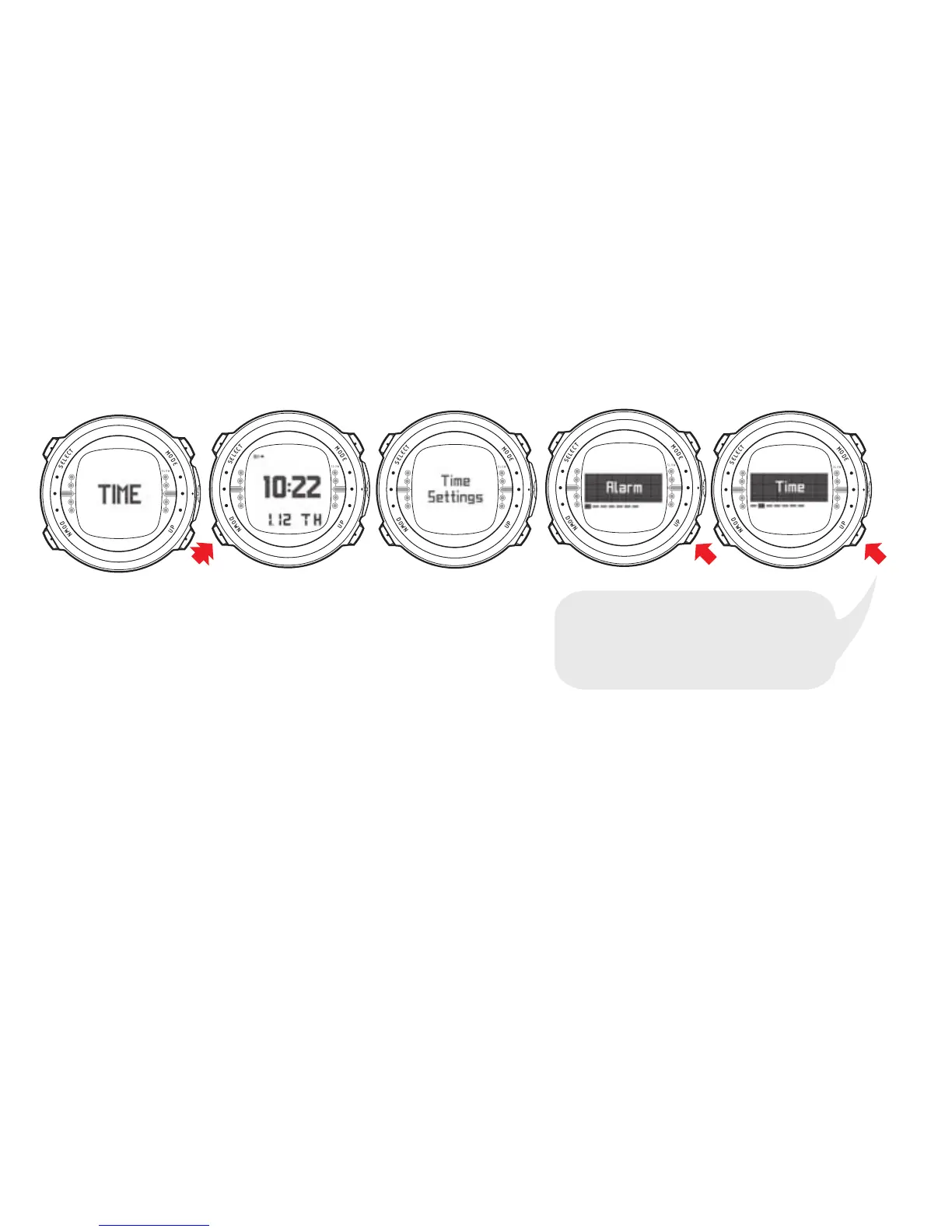
The following figure shows how to enter the TIME SETTINGS menu.
4
/
#
.
6
-
2
$
+
$
"
3
,
.
#
$
4
/
#
.
6
-
2
$
+
$
"
3
,
.
#
$
4
/
#
.
6
-
2
$
+
$
"
3
,
.
#
$
4
/
#
.
6
-
2
$
+
$
"
3
,
.
#
$
4
/
#
.
6
-
2
$
+
$
"
3
,
.
#
$
USE UP AND DOWN BUTTONS
TO TOGGLE BETWEEN ALARM, TIME,
DUAL TIME, DATE, UNITS, BACKLIGHT
AND TONES.
4.1.1. Setting the alarm
The dive computer has a daily alarm function. When the daily alarm activates, the
screen blinks and the alarm sounds for 24 seconds. Press any button to stop the
alarm.
20

Table of Contents

Related product manuals