32
6. Keyless
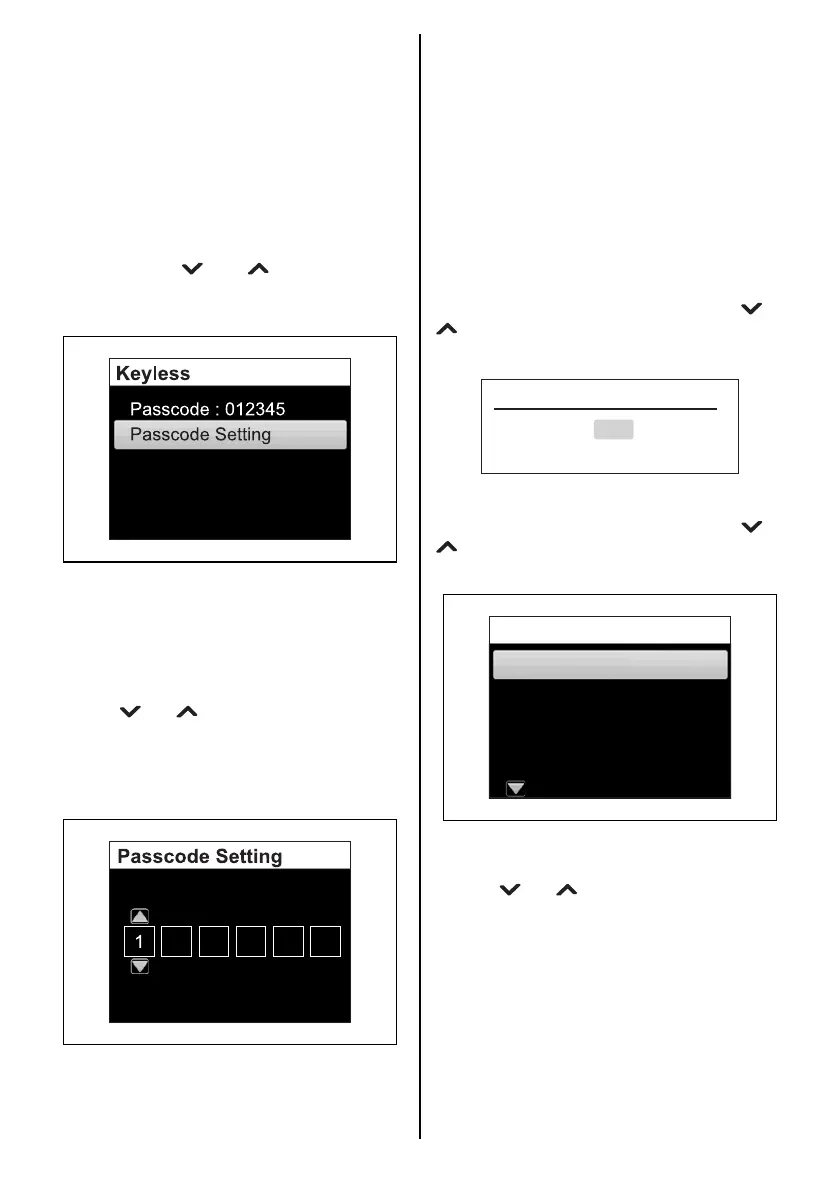
You can display the Keyless Start System pass-
code. You can also change the passcode.
(1)If you have the keyless fob
• Confirm the keyless fob is within the com-
munication range of the Keyless Start
System.
• Confirm that the keyless fob is in commu-
nication ON mode. (Refer to “Switching
the communication mode of the keyless
fob” section.)
• Press the [ ] or [ ] button to select
“Keyless” and then press the [SET] button
to display the Keyless selection menu.
Passcode
The passcode appears.
Passcode Setting
Press the [SET] button.
Enter a 6-digit passcode.
Use the [ ] or [ ] buttons to select a number
for each digit.
Press the [SET] button to move to the next digit.
Press the [MENU] button to return to the previ-
ous digit.
Passcode appears once the [SET] button is
pressed after you have entered all 6 digits.
(2)If you do not have the keyless fob
When the keyless start system starts up,
enter your passcode, and you can change it
within 1 minute after unlocking.
7. Initial Setting
Items in the Initial Setting include important
items for initial setting. Therefore, the confirma-
tion screen “Revise initial setting?” is displayed
when you select “Initial Setting” in the menu
screen and press the [SET] button. To change
the Initial Setting, select “Yes” using the [ ] or
[ ] button and press the [SET] button to dis-
play the Initial Setting menu screen.
“Initial Setting” contains eight (8) menus.
Select the Initial Setting menu using the [ ] or
[ ] button, and then press the [SET] button to
display the setting screen.
Language
Sets the display language.
Use the [ ] or [ ] button to select the display
language, and press the [SET] button.
Revise initial setting?
Yes
No
Unit
Time
Position
Component Setting
Initial Setting
Language



 To Next Page