5-94
OPERATING YOUR VEHICLE
69TB-01E
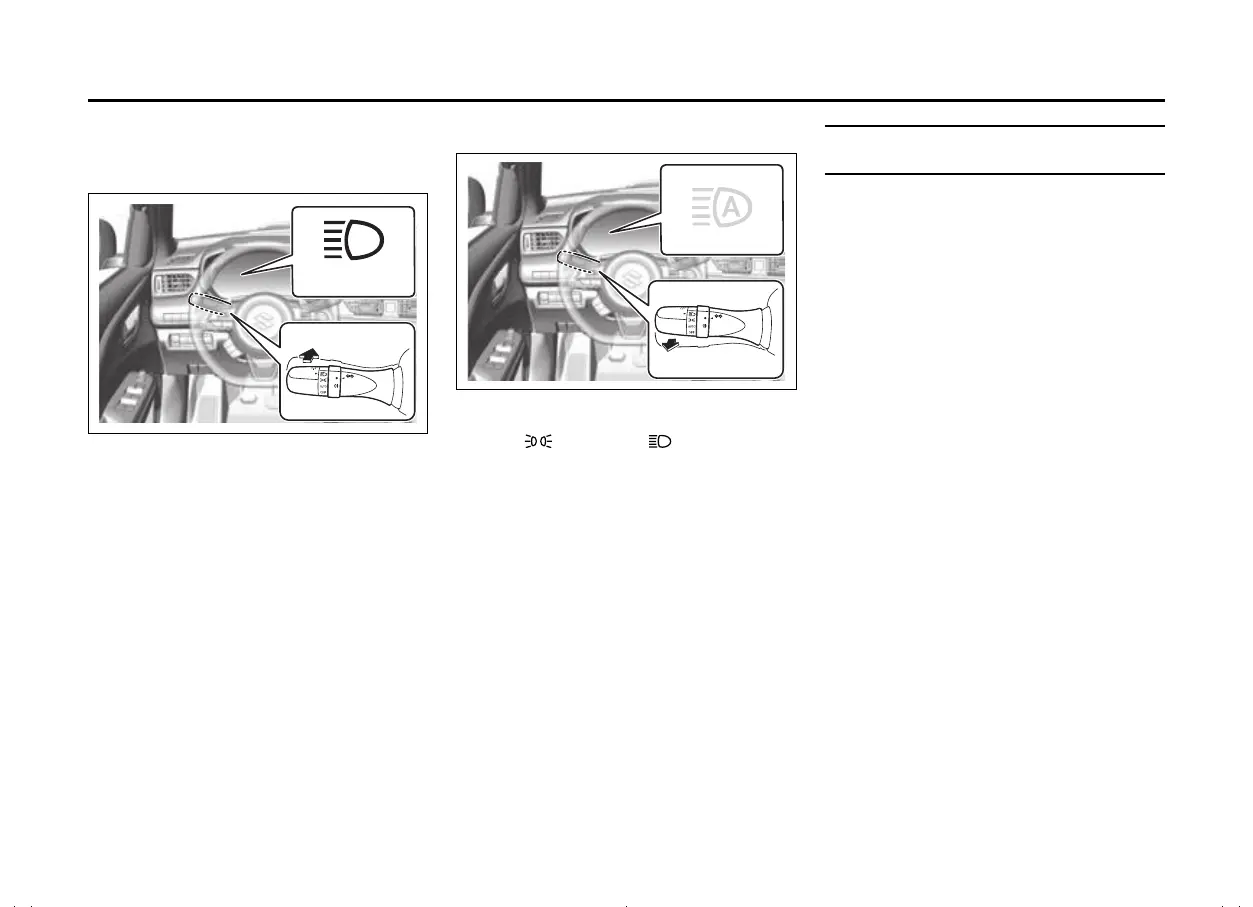
Turning the high beams on/off man-
ually
• Changing to the high beams
69T050700
• Push the lever forward the vehicle as
shown in the illustration (b) to change to
the high beams.
• To return to high beam assist, return the
lever to its original position again.
• Changing to the low beams
69T050710
• Set the knob of the lighting control lever
to the position or position or pull
the lighting control lever toward you as
shown in the illustration (c), the high
beam assist indicator light (green) will
turn off.
• To return to high beam assist, pull the
lever toward you again or set the knob of
the lighting control lever to the “AUTO”
position.
Traffic sign recognition
(if equipped)
(For European countries)
The traffic sign recognition system detects
specific traffic signs using the front camera
(DSBS II) and/or navigation system (when
speed limit information is available) while
driving and warns the driver via information
display and buzzers.
In order to maintain performance of the
speed limit display function, it is necessary
to update map data* on a regular basis.
*: For details about updates, refer to the
separate manual “Infotainment Sys-
tem”.
(Except for European countries)
The traffic sign recognition system detects
specific traffic signs using the front camera
(DSBS II) while driving and warns the
driver via information displays and buzz-
ers.
(c)


 To Next Page
 Loading...