ENG
7
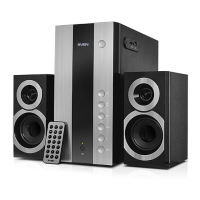
MS-2250
User Manual
• To select the track, you can enter its number on the remote control using the numeric pad
buttons g or select it using buttons c and f on the front panel. The display a will show
thetrack number for a short moment, and then the playback time elapsed.
• You can select a playback mode using the remote control REPEAT k button («ONE» — repeat
the playing track; «RND» — play random tracks; «ALL» — play all tracks available).
* The MSS operation may be incorrect if an SD card of 512 Mb capacity or lower is used. If a USB
flash device of 8 Gb capacity or more is used, command processing time may be extended.
Bluetooth mode
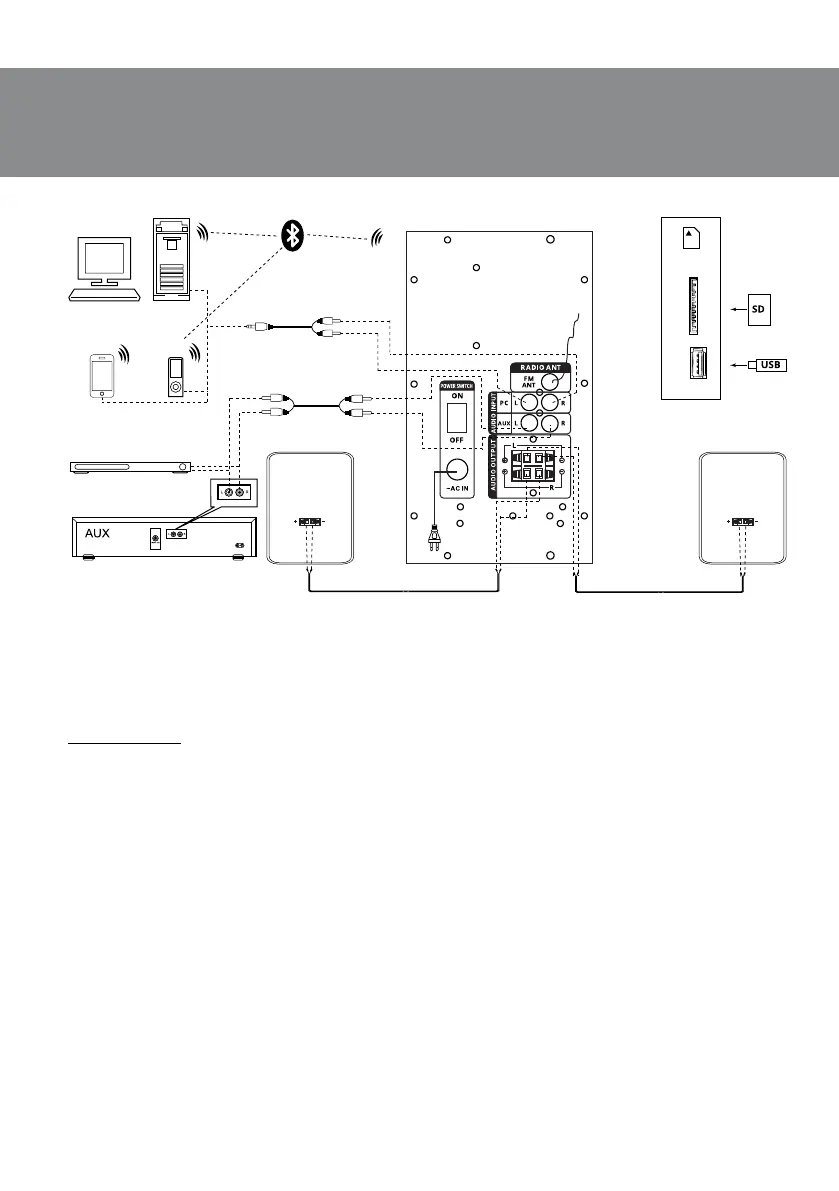
• In order to transmit signal in this mode it is necessary by first to connect the device withasignal
source (see Fig. 5). For this purpose select the Bluetooth mode using button b onthe front
panel of the subwoofer or INPUT button a on the remote control. After 2-3 seconds thespeaker
system will enter the search mode, BLU mode is shown on the display a.
• It is necessary to select the search mode of devices with Bluetooth on a signal source (tele-
phone, notebook, smartphone, etc.). “MS-2250” message will be displayed on the screen whichit
should be connected with*.
• The BLU indicator lights continuously when connection is successful. If there is no any connec-
tion, the lighting of the BLU indicator is intermittent. In this case the system should be switch
over to the search mode once again (to turn o and turn on anew)**.
• It is possible to control the player of a signal source from the remote control or using the but-
ton on the front panel of the subwoofer when connecting to a signal source.
Fig. 5. Connection diagram
FM antenna
Right
speaker
Left
speaker
SD/MMC
CARD
USB
USB/SD-card
connection
CD player
2RCA to 2RCA
signal cable
2RCA to mini-jack
signal cable
PC
DVD
Mobile
device
Player



 To Next Page