AC Power Connection
Connect the subwoofer power cord to the subwoofer amplifier and directly into an AC outlet.
Convenience outlets located on the rear panel of some AV receivers or pre/pros are NOT recom-
mended for your PB17- Ultra R|Evolution as these outlets are not meant for high power devices.
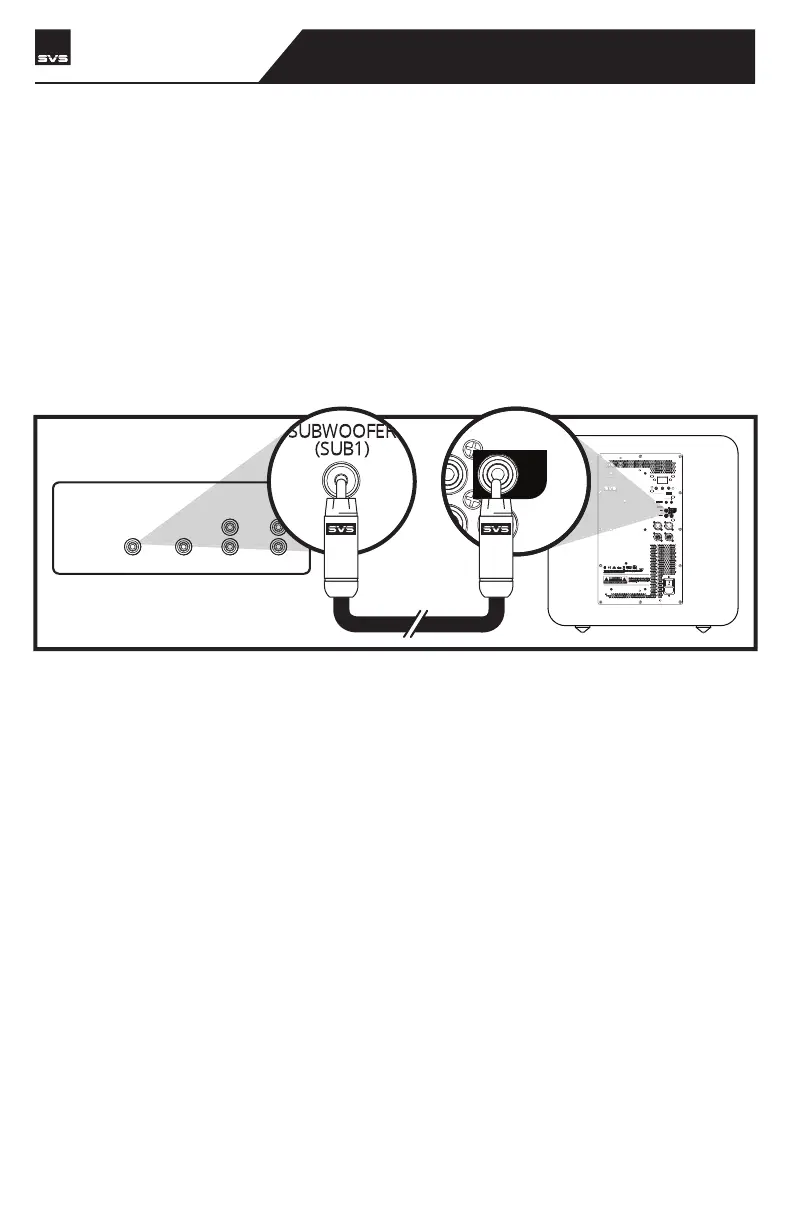
Line Level Connection – Single LFE Channel
The most common way to connect your PB17-ULTRA R|Evolution is with a single RCA or XLR
interconnect cable going from the LFE or SUB1 Output on your AV receiver or preamplifier to the
LFE Input on your PB17- Ultra R|Evolution. This allows your processor to perform the upstream
bass management and send the subwoofer a pre-filtered mono signal.
CONNECTING & CONTROLLING YOUR SUBWOOFER
CENTER
REAR FRONT
SUBWOOFER
(SUB1)
LINE LEVEL OUTPUTS
R
BALANCED
INPUT
OUTPUT
LFE
ON
OFF
100V-240V
50-60Hz 2000W
IR INPUT
SVS SOUNDPATH
SVS | 340 Victoria Rd. Youngstown, OH 44515, USA | svsound.com
SVS | 340 Victoria Rd. Youngstown, OH 44515, USA | svsound.com
USB Output:
RECEIVER/PREAMP
PB17-Ultra R|Evolution
SUBWOOFER



 To Next Page