CONNECTING & CONTROLLING YOUR SUBWOOFER
Enable and adjust the on-board low pass filter of the PB17- Ultra R|Evolution for a smooth blend
with the main speakers.
NOTE: For additional guidance on speaker/subwoofer crossover settings, visit our Subwoofer Matching
Tool at www.svsound.com/merlin, or contact our support team.
www.svsound.com • custservice@svsound.com • (877) 626-5623
RL
LINE LEVEL
INPUT
OUTPUT
LFE
3V-12V | AC/DC
TRIGGER INPUT
IR INPUT
SVS SOUNDPATH
WIRELESS AUDIO ADAPTER
LINE LEVEL OUTPUTS
REAR FRONT
R
L
RECEIVER/PREAMP
PB17-Ultra R|Evolution
SUBWOOFER
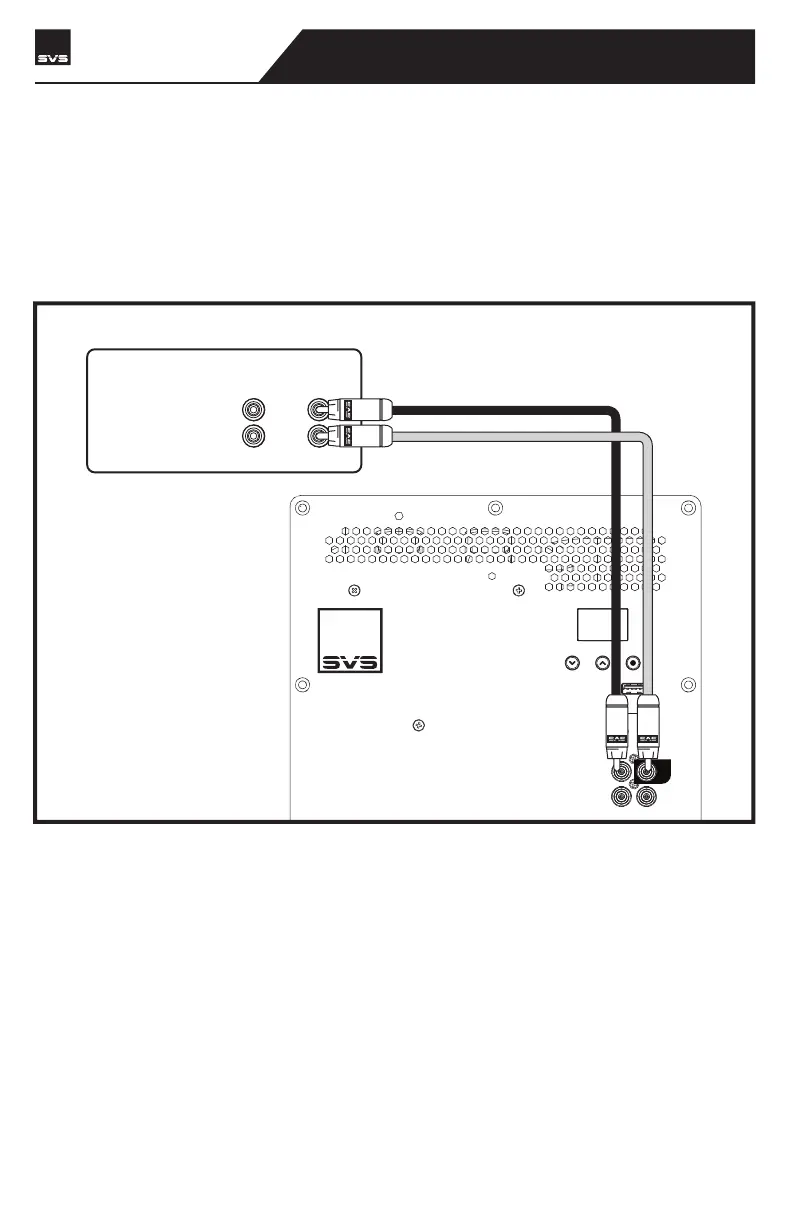
Line Level Connection – Stereo Receiver or Preamplifier Left/Right Channels
Both Left and Right inputs on your PB17- Ultra R|Evolution can be used in a two-channel stereo
application with a stereo preamplifier that has Left and Right line level or Balanced (XLR) outputs.
Connect the left and right outputs of your preamplifier to the left and right line level inputs of the
PB17- Ultra R|Evolution using RCA or XLR interconnects.



 To Next Page