CONNECTING & CONTROLLING YOUR SUBWOOFER
Connecting Multiple Subwoofers or “Going Dual”
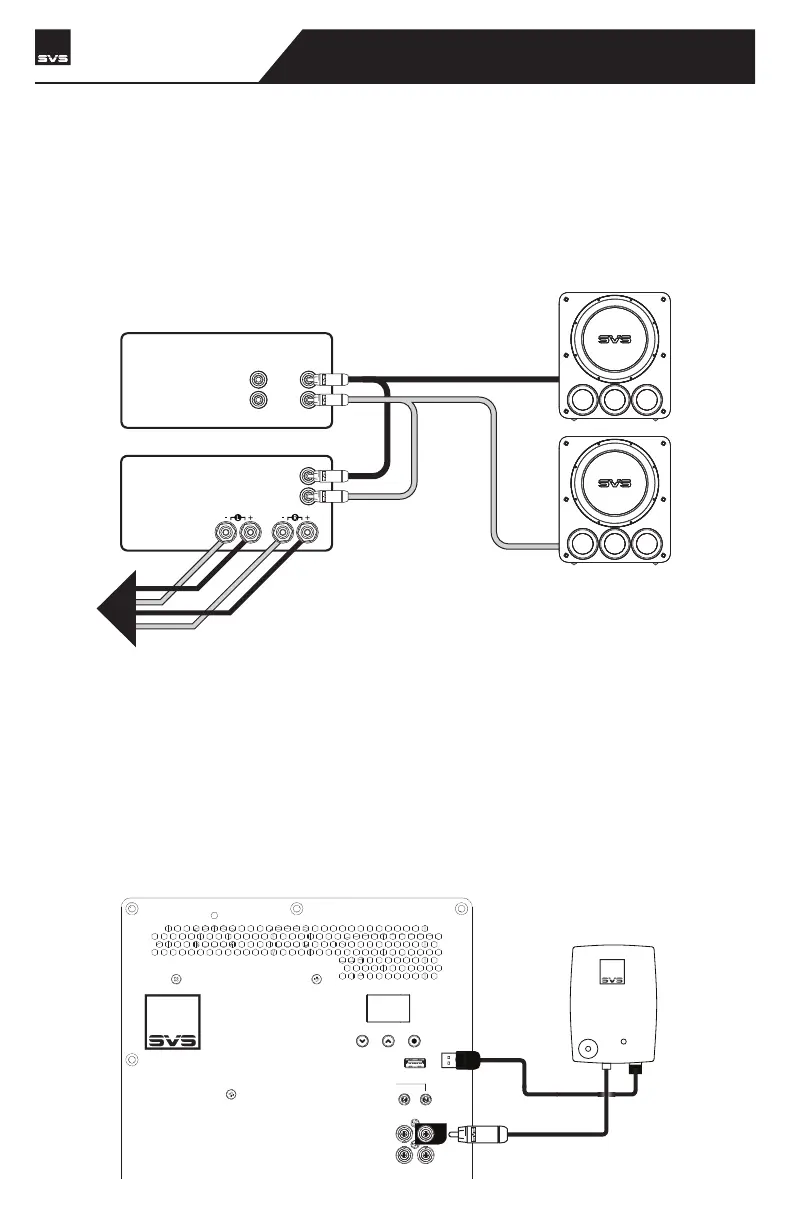
In a 2-channel system you can set up Stereo Subwoofers, where one is used for the Left Channel
and one for the Right Channel. Typically, the subwoofers will be symmetrically placed according
to your speakers. And be sure to maintain all the correct Left and Right output and input connec-
tions to ensure optimum performance.
LINE LEVEL OUTPUTS
REAR FRONT
R
L
RECEIVER/PREAMP
LINE LEVEL INPUTS
SPEAKER LEVEL
OUTPUTS
R
L
TO
SPEAKERS
POWER AMPLIFIER
Going Wireless
If you want to add wireless connectivity via the SVS SoundPath Wireless Adapter (sold separately),
your PB17-Ultra R|Evolution conveniently includes a USB input on the amplifier plate to easily
power the Receiver. Set-up is simple and quick and separate instructions are included with the
adapter.
NOTE: The PB17-Ultra R|Evolution amplifier should be turned off when making all connections.
R
LINE LEVEL
INPUT
OUTPUT
LFE
3V-12V
AC/DC
TRIGGER INPUT
IR INPUT
SVS SOUNDPATH
WIRELESS AUDIO ADAPTER
PB17-Ultra R|Evolution
SUBWOOFER



 To Next Page