Need help?
Do you have a question about the SVS Sound Revolution PB-1000 Pro and is the answer not in the manual?
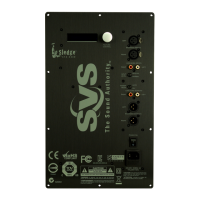
Details the layout and identification of all physical controls and ports on the subwoofer's rear panel.
Describes the function and connection types for various ports like RCA, Trigger, USB, and Speaker Level.
Explains the function of buttons for volume, phase, LPF, and standby, plus the LED status indicator.
Connects via a single RCA cable from receiver LFE/SUB1 out to subwoofer LFE in.
Uses Left/Right RCA outputs from a stereo preamp to the subwoofer's L/R inputs.
Uses speaker wire from amplifier speaker outputs to subwoofer speaker inputs.
Details benefits and methods for integrating multiple subwoofers into a system.
Describes using the SVS SoundPath Wireless Adapter for wireless subwoofer connection.
Recommendations for setting up the subwoofer with AV receivers and processors.
Recommendations for setting up the subwoofer with stereo receivers and pre-amplifiers.
Discusses factors affecting placement and finding the optimal listening spot.
Discusses placing the subwoofer in a corner and its effects on bass response.
Explores front-of-room and side wall placement as common options.
Recommends placement options for dual subwoofers for optimal performance.
Details the SVS mobile app for controlling subwoofer features via Bluetooth.
Explains the function of physical controls on the subwoofer's rear panel.
How to adjust volume and set the low pass filter for speaker blending.
Adjusting phase and polarity to align timing and fix bass issues.
Using EQ and Room Gain Compensation for custom tuning and room correction.
Using pre-saved presets and adjusting port tuning for different sound profiles.
Customizing system settings, naming, standby modes, and factory reset.
Important safety precautions to follow for safe operation and longevity.
Warnings related to power cord, plugs, ventilation, and preventing fire hazards.
Precautions for use in different environments, including heat, moisture, and confined spaces.
Details compliance with FCC rules regarding interference and RF exposure.
Details compliance with Industry Canada's license-exempt RSS standards and RF limits.
Outlines SVS's 5-year warranty against defects in workmanship.
Provides contact details for SVS Sound Experts and links to online resources.
 General
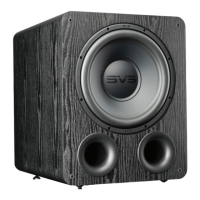
| Driver Size | 12 inches |
|---|---|
| Amplifier Power | 325 watts RMS (820+ watts peak) |
| Enclosure Type | Ported |
| Port Tuning Frequency | 20Hz |
| Frequency Response | 17-260 Hz (±3 dB) |
| Weight | 42.9 lbs |
| Connectivity | RCA stereo input/output |
| Phase Control | 0 to 180 degrees |
| Finish | Black Ash |
| Low Pass Filter | 50 Hz - 160 Hz (adjustable) |

 To Next Page