English version
7
Charging the Sweex Manageable UPS 1000 VA
The UPS starts charging once connected to the mains network. The orange LED will be lit. The UPS will also charge when switched on via the power
switch.
Setting the Sweex Manageable UPS 1000 VA
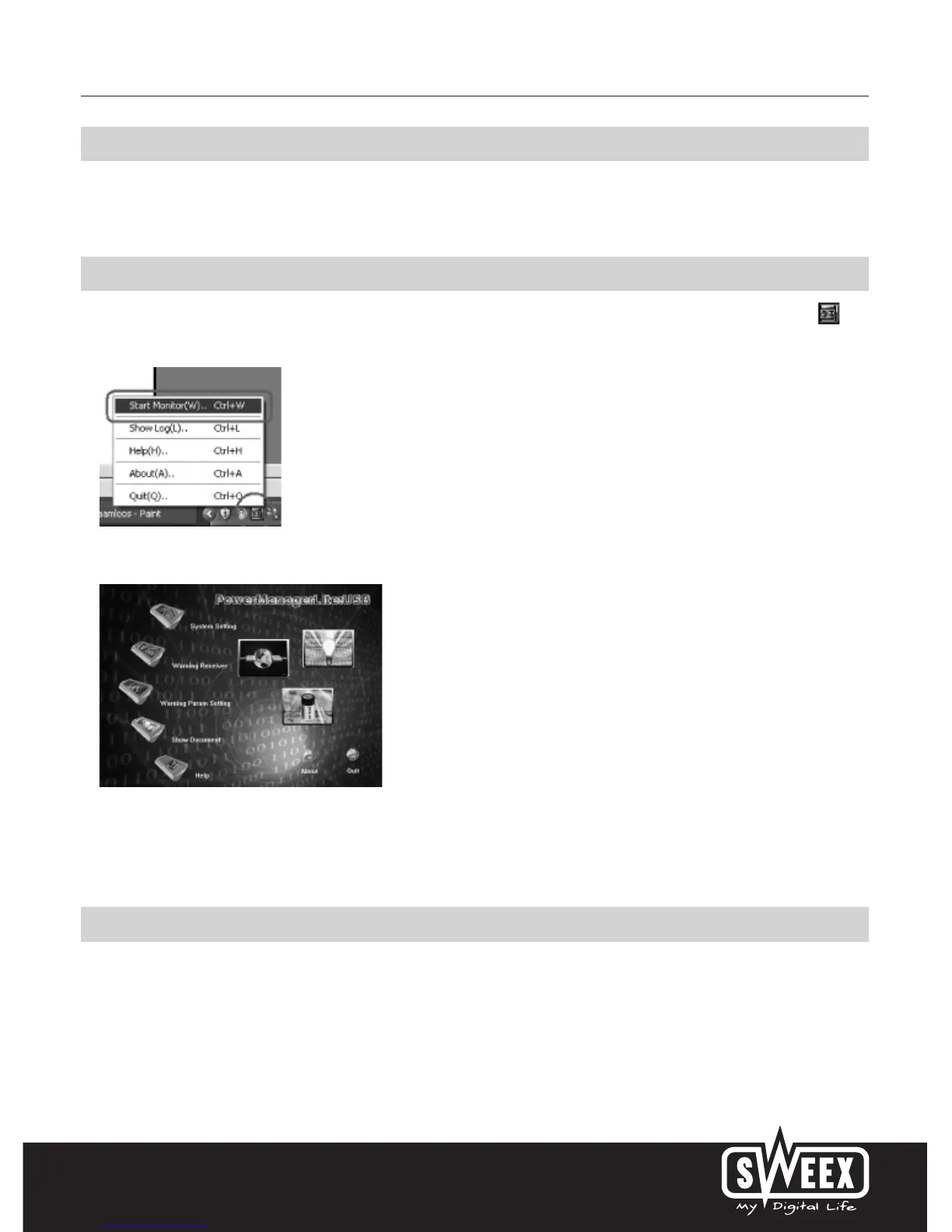
The UPS settings can be adjusted via PowerManagerLite. The icon to start PowerManagerLite is located in the bottom right of your screen.
Double-click this icon with your left mouse button or click it once with your right mouse button and select “Start Monitor (W)...”.
The PowerManagerLite ma in screen appears.
Click on the various icons to change the settings.
Additional tips and further explanation to the remaining functions of PowerManagerLite can be found in the English manual on the CD-ROM.
Warranty
All products under the Sweex brand are warranted for a period of three years. We do not grant support or warranties for any software and/or
(rechargeable) batteries included. Settlement of guarantee only takes place via the dealer where you have purchased the product in question.
The rightful owner has and retains title to all brand names and related rights mentioned in this manual.



 To Previous Page