©2016 SwellPro All Rights Reserved
24
Front Back
Note:
1. If the landing location is the random location, please close the Return-Home function (Switch
SWB to SWB1as see section 4.2.1.1"Normal" position), choose the new location to land manually
once the drone is within range;
2. During Return-Home process, when the drone starts to descend, the right hand AILERON joy
stickwill allow you to choose the best landing location.
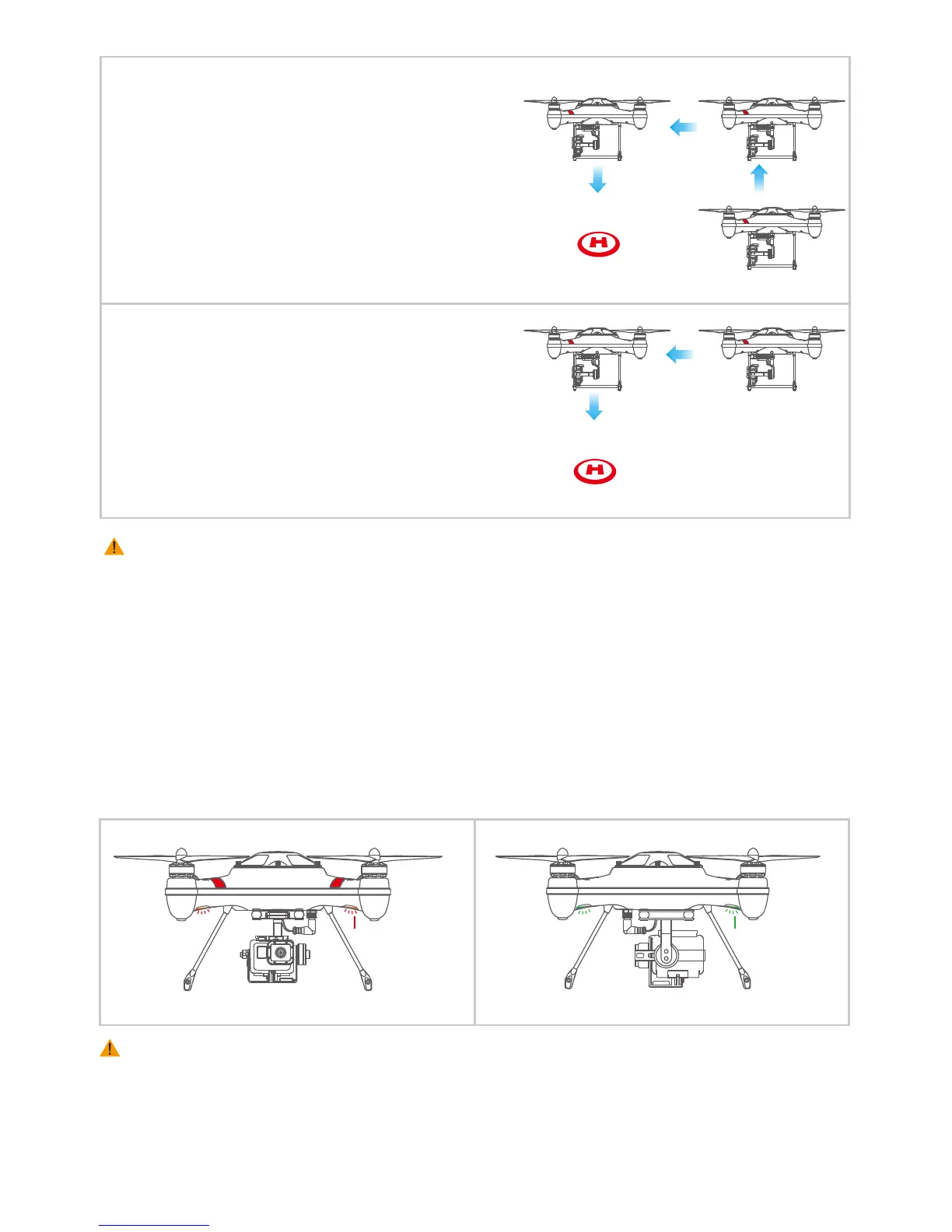
There are 4 navigation LEDs on underside the arms of the drone : the Red LED represent the nose (front)
direction, and the Green LED represent the rear direction.
Notice: When drone battery voltage is lower than 14.4V, all of the 4 navigation lights will start
blinking at the same time.
If the ying vertical height < 20m/ 65 feet and a
horizontal distance away from take-o location >
15m/ 50 feet
( The drone will automatically raise to an altitude
height of 20m / 65 so s to avoid tall objects on return
home, and then will execute the Return-Home
function and return above the take o location and
auto descend )
If the ying vertical height < 20m / 65 feet
and a horizontal distance away from take-o location
< 15m/50 feet
(The drone will keep the its original height and
execute the Return-Home function and return above
the take o location and auto descend )
4.4.5 NAVIGATION LIGHTS














 To Next Page