©2016 SwellPro All Rights Reserved
25
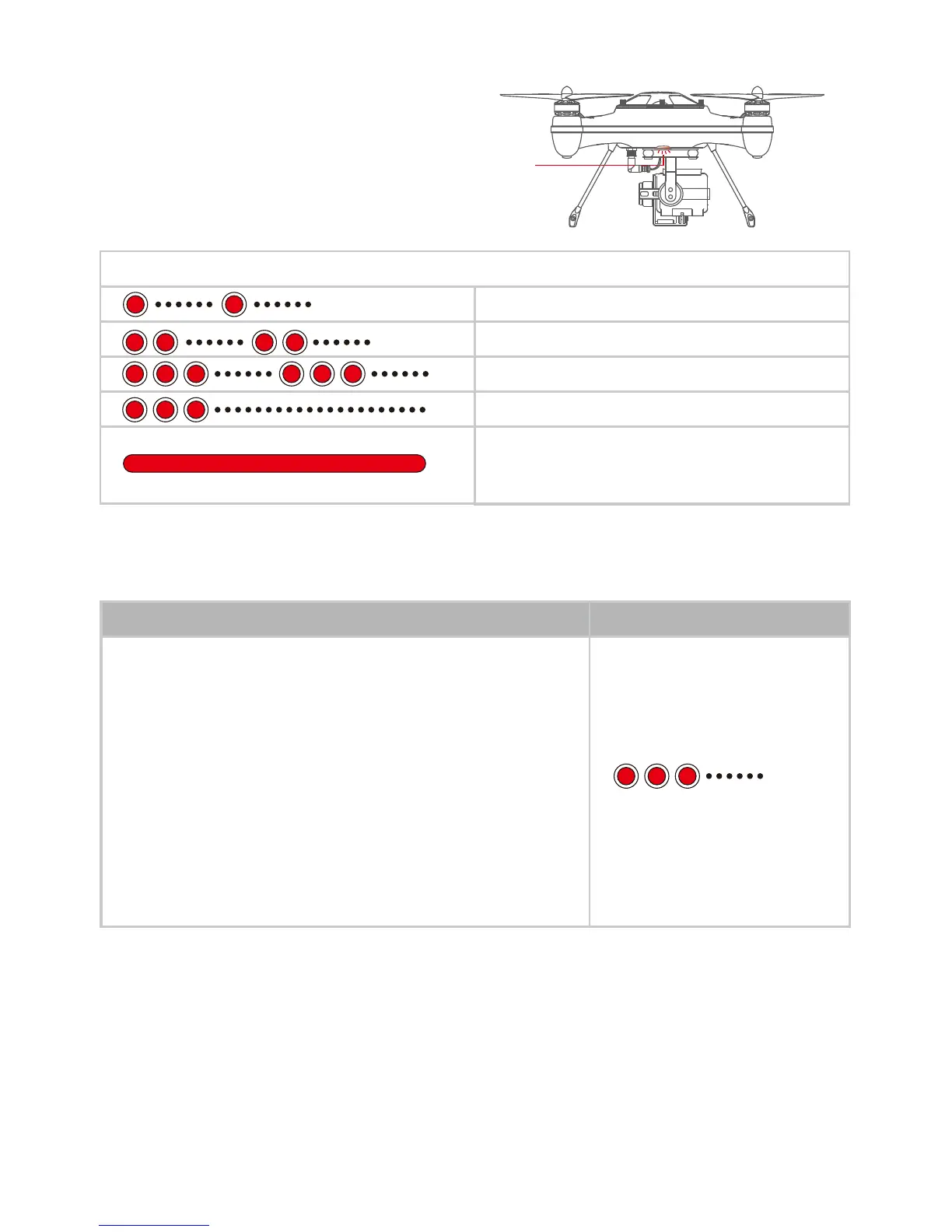
4.4.6 DRONE STATUS INDICATION
Good GPS signal (None or one blinking)
No GPS signal (Two blinking)
1st level low-battery warning
2nd level low-battery warning
Calibration mode or an Unsuccessful
calibration (Solid RED)
Single RED LED: System status & Working
Indication. This LED is located under center
of drone seen through the bottom of case
as pictured.
There are 2 battery-warning levels, both of them can be set in the Assistant Software:
4.5 SMART GROUND STATION (AUTO VERSION)
4.5.1 BLUETOOTH DATALINK MODULE
4.5.1.1 Wire Connection
When the drone battery drops to 1st level warning, the
indication lights will blink 3times intermittently; when it drop to
2nd level warning, the drone will land automatically. If the
location is not suitable for a safe landing, please switch to ATTI
mode to take over ight. as see section 4.2.1.1 (Warning: when
the drone enter into 2nd low battery warning status, land as fast
as possible, otherwise the drone battery might be
over-discharge and get damaged).
4.4.7 LOW BATTERY WARNING & LOW BATTERY AUTO LAND
Low-battery warning LED Indication
LED Indication
Working Indication














 To Next Page