©2019 SwellPro All Rights Reserved
12
Installing and removing the propellers:
When selecting a microSD card for use with your camera, for best results always ensure that the card is rated
for 4K video throughput.
To insert the card, place the microSD card face-up in the recess inside the battery compartment. Carefully
slide the card towards the nose of the Spry+ until it clicks and locks into place.
To remove the card, push the card gently towards the nose of the Spry+ until it clicks and then ejects. Take
care to prevent the card from ejecting too fast out of the slot.
Micro SD Card Installation
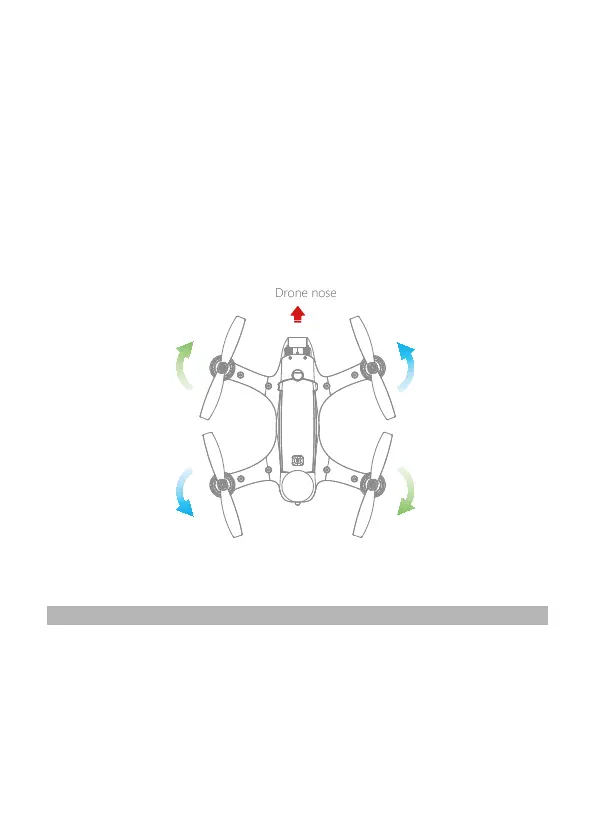
CW propeller 6045R
CCW propeller 6045 CW propeller 6045R
CCW propeller 6045
1. Place each propeller onto the motor hubs according to the diagram below. The propeller
type is stamped on the top of the propeller blade. Propeller types that end with the letter
“R”are fitted to clockwise (CW) motors. If propellers are fitted incorrectly, the drone will
crash.
2. Hold the motor with one hand while tightening the propeller nut. Tighten the nut only until
the propeller does not turn on the motor. Overtightening the propeller nut will damage the
motor.
3. Before each flight, check that the propellers are smooth and undamaged.


 To Next Page