©2019 SwellPro All Rights Reserved
17
Remote Controller Pairing
Always pair the remote controller and then select the FPV channel to match the best channels and
avoid interference.
DescriptionIllustration
FPV Channel Tuning
FPV Chennel Button
DescriptionIllustration
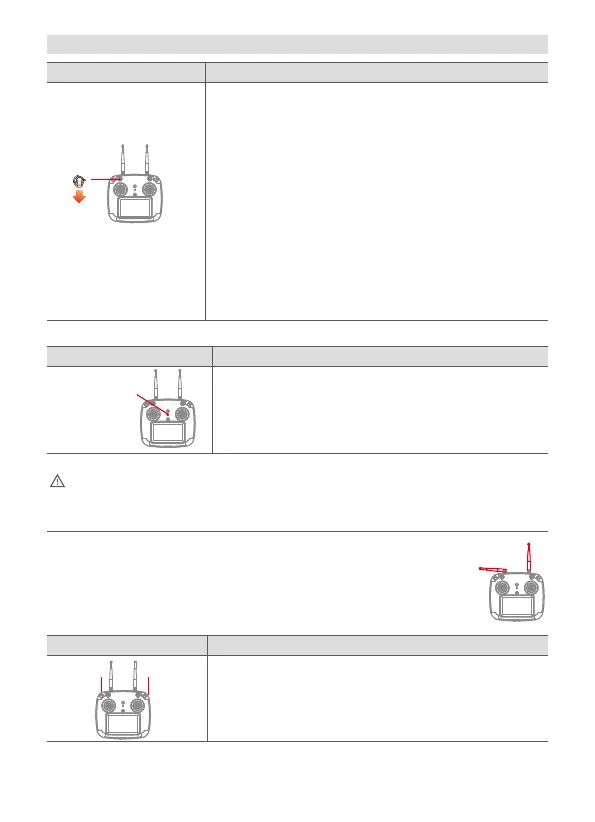
1. To pair the remote controller to the drone, while holding the
Return Home switch down, power on the remote controller.
2. The remote controller will vibrate and beep twice. The
Controller Status Light will flash red and green.
3. Power on the drone. After pairing has completed, the
Controller Status Light will turn green.
4. Long-press the FPV channel button (CH). The FPV screen
will display “RF SEARCHING” and automatically find the
best FPV channel.
There are 8 FPV channels available. Long-press the FPV channel button
(CH) and the system will automatically search for channels. (You can also
use short press to adjust frequency manually)
DescriptionIllustration
Camera Tilt Control
Camera up Camera down
Camera up: Tilt camera up
Camera down: Tilt camera down
In the absence of obstacles and interference the flight height can reach >80m and FPV
transmission range can reach 800m. For best reception, keep the left-hand (2.4GHz)
antenna horizontal and the right-hand antenna (5.8GHZ) vertical.


 To Next Page