GPS
11. 2 V
10
10 10
-10 -10
0
I
I
I
I
I
I
I
I
I
Slide to take off
D: 0.0m H: 0.0m H.S: 0.0m/s V.S: 0.0m/s
Lat:113.860667 Ing:22.704291
GPS
11. 2 V
10
0
Lat:113.860667 Ing:22.704291
©2019 SwellPro All Rights Reserved
28
Delete
Upload
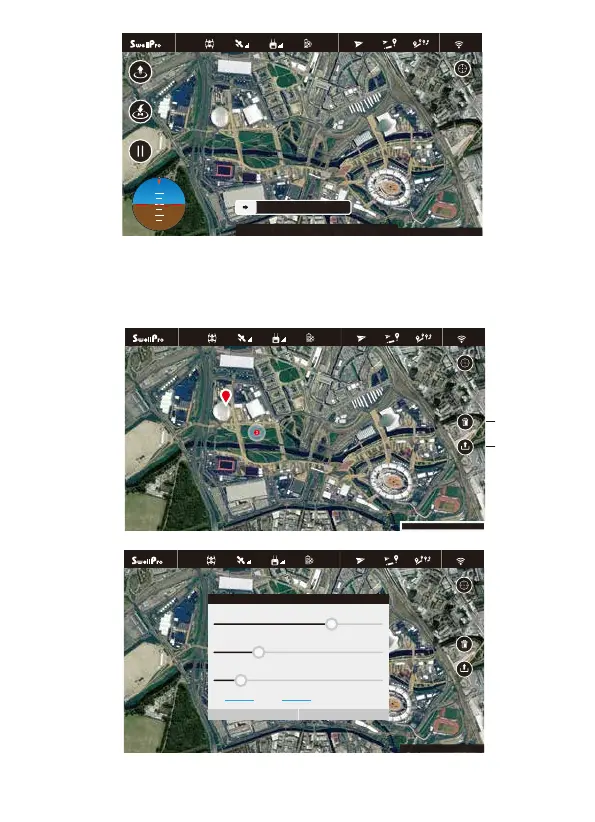
The APP allows you to set hover, return home, flight paths, follow me, tap to fly, etc.
2. Tap-to-Fly: Click the “Point to fly” button, and then click the target points on the map and click the Upload
button. The drone will start flying to the point and hover there. If you need to set the parameters manually,
you can tap on the flight point.
GPS
11. 2 V
10
Point Edit
Altitude:66m
Cancel Ok
Lat:113.860667 Ing:22.704291
FlySpd: 4.0m/s
Hover Time: 3sec
LNG:113.8698811 LAT: 22.6258727


 To Next Page