–
18
–
EN
0C28
4 Select your desired item
Press Arrow (K/L) to point to your
desired item.
Then, press ENTER to select
[BLOCK] or [VIEW].
•
When you select the rating cate-
gory and turn it [BLOCK], the higher rating will
turn [BLOCK] automatically. Also, the lower rat-
ing will turn [VIEW] automatically.
•
When you turn “G” to [VIEW], the all ratings will
turn to [VIEW] automatically.
5 Exit the V-Chip setting mode
Press SETUP on the remote control to return to origi-
nal mode.
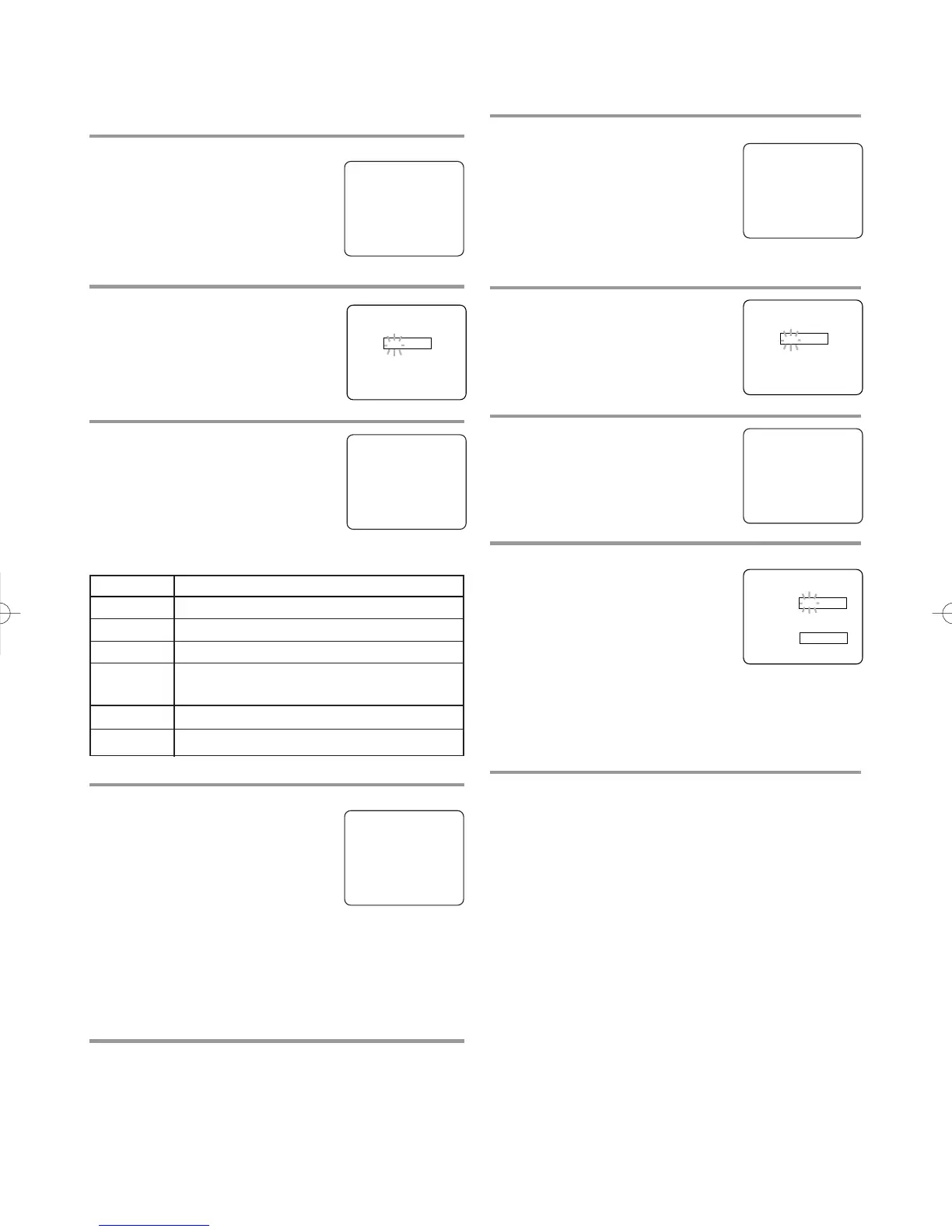
MPAA RATING SET UP
Make sure ...
•
TV/DVD power must be turned on.
1 Select “V-CHIP SET UP”
Press SETUP on the remote control.
Press Arrow (
K/L) to point to “V-
CHIP SET UP”.
Then, press ENTER.
2 Enter 4-digit access code
Press the number buttons. The
default code is 0000.
3 Select “MPAA RATING”
Press Arrow (K/L) to point to
“MPAA RATING”.
Then, press ENTER.
Selection Rating Category Explanations
G General Audience
PG Parental Guidance suggested.
PG-13 Unsuitable for children under 13
R Restricted; under 17 requires accompa-
nying parent or adult guardian
NC-17 No one under 17 admitted
X Mature audience only
- TV SETUP -
CHANNEL SET UP
B V-CHIP SET UP
LANGUAGE [ENGLISH]
CAPTION [OFF]
– V-CHIP SET UP –
TV RATING
B MPAA RATING
CHANGE CODE
G[VIEW]
PG [VIEW]
PG–13 [VIEW]
B R[BLOCK]
NC–17 [BLOCK]
X[BLOCK]
ACCESS CODE
_ _ _ _
CHANGE ACCESS CODE
To change access code, follow the steps.
1 Select “V-CHIP SET UP”
Press SETUP on the remote con-
trol.
Press Arrow (
K/L) to point to “V-
CHIP SET UP”.
Then, press ENTER.
2 Enter 4-digit access code
Press the number buttons. The
default code is 0000.
3 Select “CHANGE CODE”
Press Arrow (K/L) to point to
“CHANGE CODE".
Then, press ENTER.
4 Enter 4-digit access code
Press the number buttons to enter
your desired access code in the
NEW CODE space. Then, enter the
same code in the CONFIRM
CODE space. V-CHIP SET UP
screen appear on the screen.
•
If you enter wrong code, repeat step 4, making
sure you enter the same new code exactly in the
confirm code space.
5 Exit the V-Chip setting mode
Press SETUP on the remote control to return to orig-
inal mode.
NOTE:
•
If you unplug the power cord or power failure
occurs, the changed access code will be lost and
will return to default (0000). Change your access
code again as necessary.
- TV SETUP -
CHANNEL SET UP
B V-CHIP SET UP
LANGUAGE [ENGLISH]
CAPTION [OFF]
ACCESS CODE
_ _ _ _
– V-CHIP SET UP –
TV RATING
MPAA RATING
B CHANGE CODE
NEW CODE
_ _ _ _
CONFIRM CODE
_ _ _ _










 To Next Page