–
12
–
EN
VCR Functions
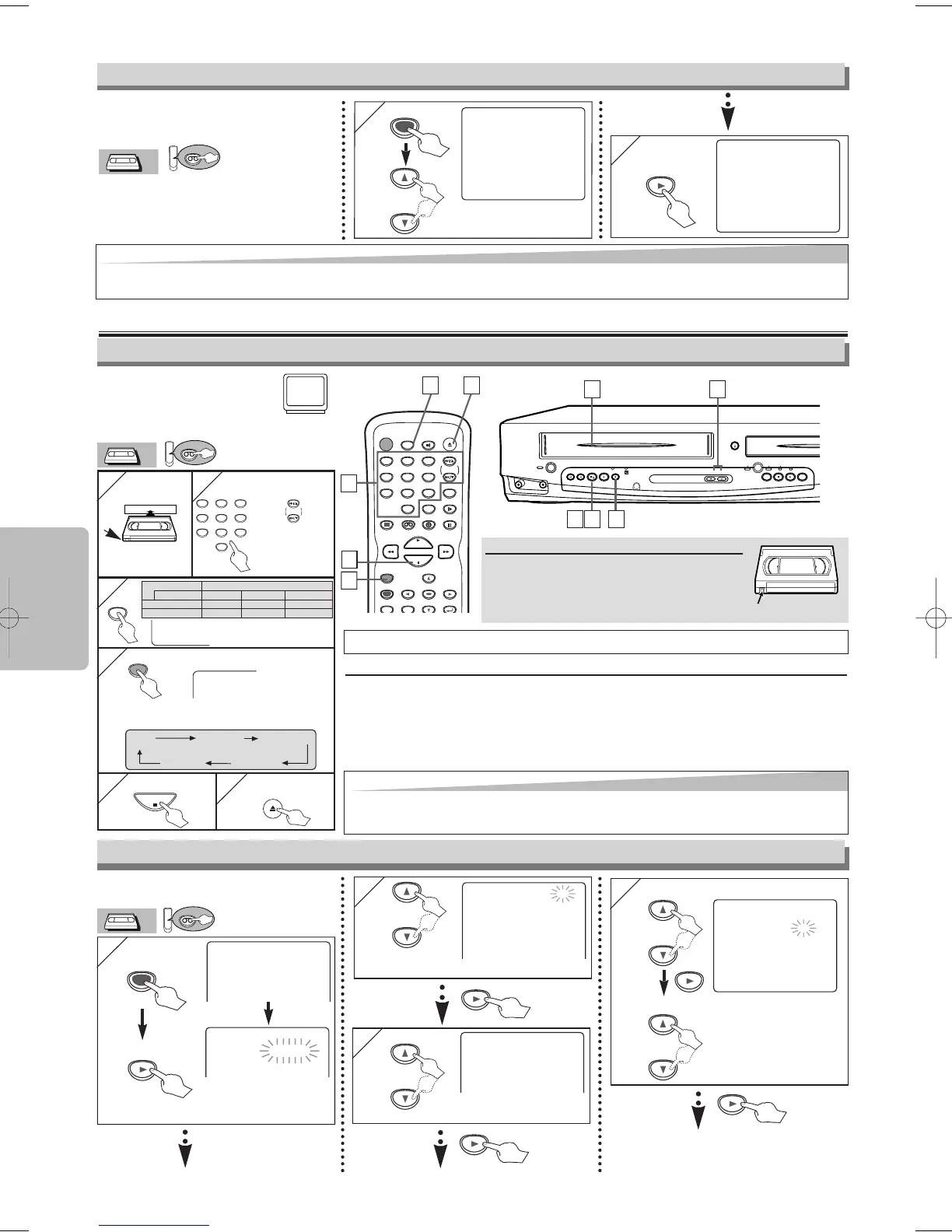
Recording
Accidental erasure prevention
To prevent accidental recording on a
recorded cassette, remove its record tab.
To record on it later, cover the hole with
adhesive tape.
• Select the chan-
nel to record.
1
1
2
2
with tab
SP
• Select the desired
tape speed.
3
3
REC
4
4
Type of tape
T60 T120 T160
SP mode 1hour 2hours 2-2/3hours
SLP mode 3hour 6hour 8hour
Recording/Playback TimeTape Speed
REC OTR(0:30) OTR(1:00).....
(Normal recording)
OTR(8:00) OTR(7:30)
5
5
6
6
Before:
Turn on the TV and set it to
channel 3.
• If channel 3 is already occupied for
broadcasting, see “RF Output Channel” section.
POWER
DISPLAY VCR DVD PAUSE
SLOW
VCR/TV
SKIP/CH.
PLAY
STOP
REC/OTR
MENU
SETUP TOP MENU
ENTER
RETURN
OPEN/CLOSE
/EJECT
SPEED AUDIO
123
456
789
0
+1 0
6
6
5
5
2
2
3
3
4
4
Hit [REC/OTR] repeatedly to select the desired
recording length.
You CAN NOT copy a DVD to a videotape.
To stop recording temporarily (Pause mode)
Hit [PAUSE
kk
].
• During the rec-pause mode, five
C
marks appear on the TV screen. Each
C
mark
represents one minute.
• Hit it again to resume recording.
• Pause mode will be automatically cancelled after 5 minutes to prevent damage to
the tape and the video head.
CHANNEL
STOP
REV FWD
SKIP HG SKIP
OUTPUT
DVD PROGRESSIVE SCAN
OPEN/CLOSE
PLAY
STOP/EJECT PLAY REC/OTR
VCR
POWER
F.FWDREW
VIDEO
AUDIO
/
1
1
5
5
6
6
2
2
4
4
OTR (One Touch Recording)
1
1
- M E N U -
TIMER PROGRAMMING
B AUTO REPEAT [OFF]
CHANNEL SET UP
CLOCK SET
LANGUAGE SELECT
This function will playback a tape
repeatedly from the beginning
when the tape reaches to the end.
Auto Repeat
or
2
2
- M E N U -
TIMER PROGRAMMING
B AUTO REPEAT [ON]
CHANNEL SET UP
CLOCK SET
LANGUAGE SELECT
Hint
Hint
•
To cancel Auto Repeat, follow steps 1)-2) above. Then, hit [
B
], so that [OFF] appears beside AUTO REPEAT. Hit [CLEAR/C.RESET] to exit.
•
If menu remains on the TV screen at step 3), hit [CLEAR/C.RESET] to exit.
or
•Insert a tape with its record tab
into the unit.
2
2
PROGRAM NUMBER 4
DATE – – / – –
START TIME – – : – –– –
END TIME – – : – –– –
CHANNEL – –
REC SPEED – –
1
1
Select an empty program number.
Timer Recording
or
- M E N U -
B TIMER PROGRAMMING
AUTO REPEAT [OFF]
CHANNEL SET UP
CLOCK SET
LANGUAGE SELECT
TIMER PROGRAMMING
PROG 12345678
DATE
START TIME
END TIME
CHANNEL
REC SPEED
Available program num-
ber flashes.
3
3
PROGRAM NUMBER 1
B ONCE
DAILY
WEEKLY
Select “ONCE”, “DAILY”
(Mon-Fri), or “WEEKLY”.
or
4
4 Select the desired month
Select the desired day.
ONE TIME PROGRAM
PROGRAM NUMBER 1
DATE 1 0 / 0 3 MON
START TIME – – : – –– –
END TIME – – : – –– –
CHANNEL – –
REC SPEED – –
• You can program one
year in advance.
or
or
Hint
Hint
• If you want to watch one channel while recording another.
1) Hit [VCR/TV] to put the unit in TV position. The “VCR” light on the unit disappears.
2) Select a channel you want to watch with the TV, the cable box or the satellite box.
H9801UD_EN/SP.qx3 04.12.8 19:34 Page 12



 To Next Page