–
8
–
EN
Setup
3
3
Hint
Hint
• If you accidentally select Spanish or
French and need English: Hit [MENU] and
choose SELEC. IDIOMA or SELECTION
LANGUE. Hit [B] and select ENGLISH.
Finally, hit [CLEAR/C.RESET].
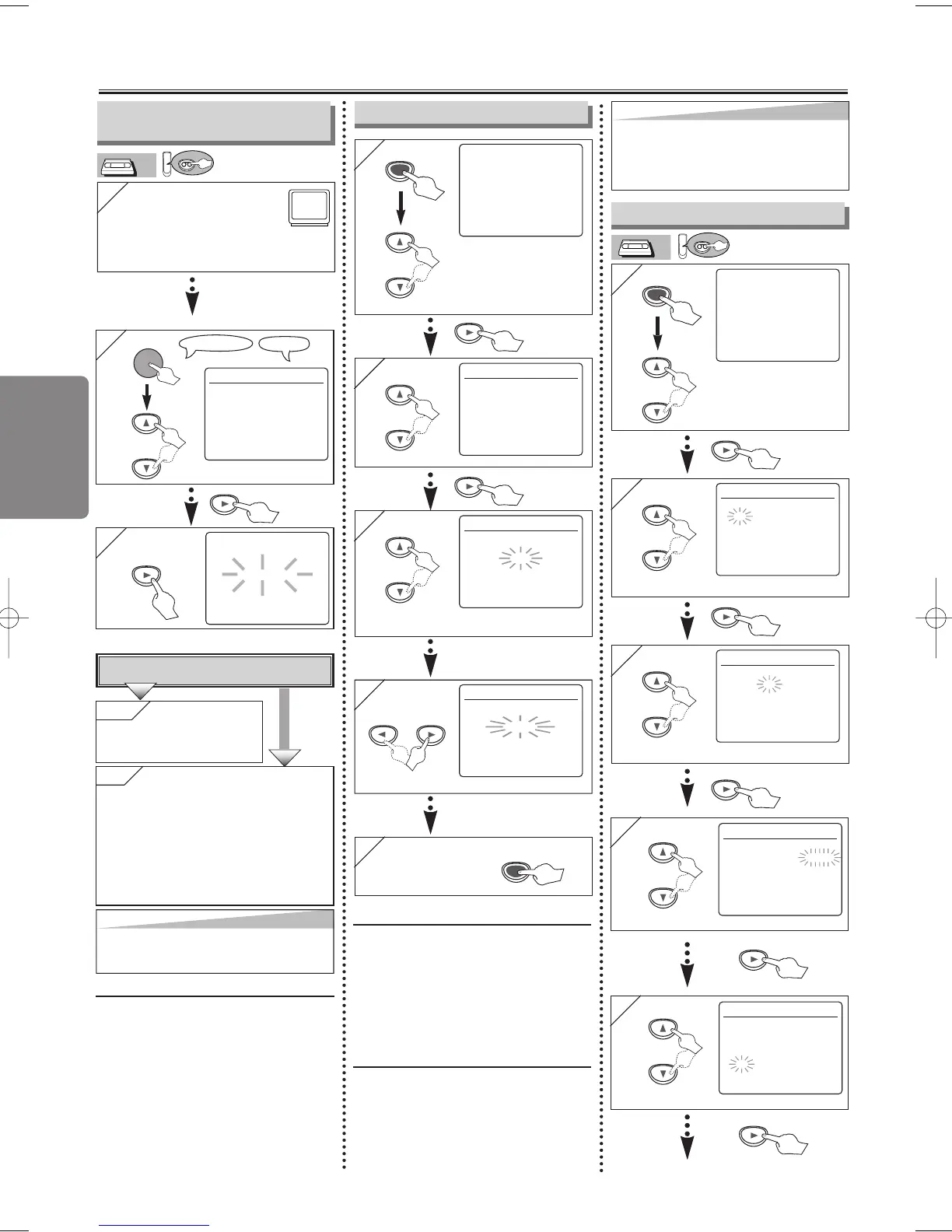
To Preset the Channel Again
1)
Hit [MENU] until the main menu appears.
2) Select “CHANNEL SET UP” by pressing
[
KK
/
LL
], then hit [B].
3) Select
“AUTO SET UP” by pressing
[
KK
/
LL
], then hit [B]. After scanning, the
tuner stops on the lowest memorized
channel.
To Change the On-Screen Language
1)
Hit [MENU] until the main menu appears.
2) Select “LANGUAGE SELECT” by pressing
[
KK
/
LL
], then hit [B].
3) Select “ENGLISH” , “FRANÇAIS” or
“ESPAÑOL” by pressing
[
KK
/
LL
] , then hit
[CLEAR/C.RESET].
Clock Setup
To Select a Channel
You can select a channel using
the Number buttons or
[SKIP/CH.
GG
/
KK HH
/
LL
].
Notes for using the Number buttons:
• When selecting cable channels which
are higher than 99, enter channel
numbers as a three-digit number.(For
example: 117, hit [1], [1], [7])
• You must precede single-digit channel
numbers with a zero (for example: 02,
03, 04 and so on).
5
5
4
4
CLOCK SET
MONTH DAY YEAR
1 0 / 0 3 2 0 0 5
HOUR MINUTE AM/PM
– – : – –– –
CLOCK SET
MONTH DAY YEAR
1 0 / 0 3 MON 2 0 0 5
HOUR MINUTE AM/PM
0 5 : – –– –
Select the current year.
Select the current hour.
1
1
- M E N U -
TIMER PROGRAMMING
AUTO REPEAT [OFF]
CHANNEL SET UP
B CLOCK SET
LANGUAGE SELECT
MENU
2
2
CLOCK SET
MONTH DAY YEAR
1 0 / – –– – – –
HOUR MINUTE AM/PM
– – : – –– –
3
3
CLOCK SET
MONTH DAY YEAR
1 0 / 0 3 – – – –
HOUR MINUTE AM/PM
– – : – –– –
Select the current month.
Select the current day.
• If the clock is not set, the
CLOCK SET screen
appears when you hit
[MENU]. In this case, go
to step 2).
or
or
or
or
or
MANUAL SET UP
CHANNEL 30 (CATV)
ADD
To Add/Delete Channels
1
1
- M E N U -
TIMER PROGRAMMING
AUTO REPEAT [OFF]
B CHANNEL SET UP
CLOCK SET
LANGUAGE SELECT
MENU
2
2
CHANNEL SET UP
AUTO SET UP
B MANUAL SET UP
Select the channel to
be added or deleted.
• If the clock is not set, the
“CLOCK SET” screen
appears when you hit
[MENU]. In this case, hit
[MENU] again.
or
or
or
5
5 To exit the
menu
4
4
Select “ADD” or “DELETE”.
MANUAL SET UP
CHANNEL 30 (CATV)
DELETE
or
Preparation for Use
2
2
LANGUAGE SELECT
B ENGLISH [ON]
FRANÇAIS
ESPAÑOL
Hint
Hint
• Repeat these steps only if either there
was a power failure or this unit has been
unplugged for more than 30 seconds.
1
1
Turn on the TV and set it
to channel 3.
• If channel 3 is already occupied for broadcasting,
see“RF Output Channel” section.
POWER
3
3
CH 01
AUTO SET UP
No
No
Please wait for a few minutes.
After scanning...
•
The tuner stops on the lowest memorized channel.
•
You can select only the channels memorized
in this unit by using
[SKIP/CH.
GG
/
KK HH
/
LL
]
(or [CHANNEL
KK
/
LL
]
).
• If "AUTO SET UP" appears on the TV
screen again, check the cable connections.
Then, hit [B] once again.
Y
Y
es
es Hit [MENU] to
exit.
•
Refer to “Hint for Cable Box or
Satellite Box” section on page 6.
Do you connect the cable from the cable box or
the satellite box to the unit’s ANT-IN jack?
YES
Turn On the Unit for the
First Time
or
H9801UD_EN/SP.qx3 04.12.8 19:33 Page 8



 To Next Page