EasyManua.ls Logo

Sylvania SDVD 7014 - Page 5

Sylvania SDVD 7014
16 pages
Print Icon
To Next Page IconTo Next Page
To Previous Page IconTo Previous Page
Loading...
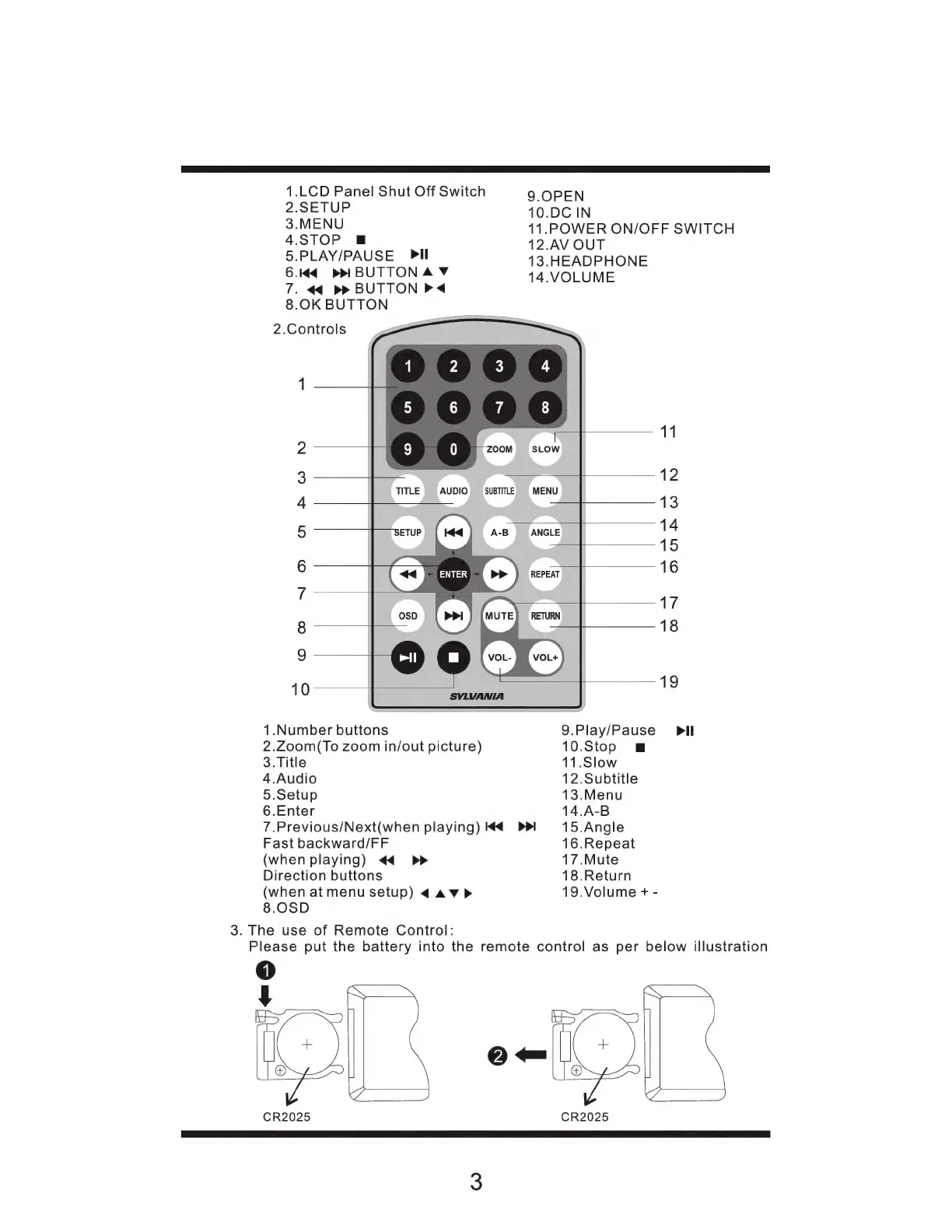
1.LCD
Panel
Shut
Off
Switch
9.
OPEN
2.SETUP
10.DC
IN
3.MENU
11.POWER
ON/OFF
SWITCH
4.STOP
Em
12.AV
OUT
5.PLAY/PAUSE
Pll
13.HEADPHONE
6.44
pp
BUTTONA
Y
14.VOLUME
7.
44 >>
BUTTON
P<
8.0K
BUTTON
2.Controls
1
11
2
3
12
TITLE
AUDIO
SUBTITLE
MENU
4
13
5
14
15
6
16
:
17
8
18
9
10 13
1.Number
buttons
9.Play/Pause
Pll
2.Zoom(To
zoom
in/out
picture)
10.Stop
E
3.Title
11.Slow
4.Audio
12.Subtitle
5.Setup
13.Menu
6.Enter
14.A-B
7.Previous/Next(when
playing)
M4
15.Angle
Fast
backward/FF
16.Repeat
(when
playing)
<4 p>
17.Mute
Direction
buttons
18.Return
(when
at
menu
setup)
4
4
v
>
8.0SD
3.
The
use
of
Remote
Control:
19.Volume
+
-
Please
put
the
battery
into
the
remote
control
as
per
below
illustration
Hem
a
O
CR2025
N\A
O
CR2025

Related product manuals