EasyManua.ls Logo

Sylvania SDVD 7014 - Powering and Installation; Controls, Indicators, and Connectors

Sylvania SDVD 7014
16 pages
Print Icon
To Next Page IconTo Next Page
To Previous Page IconTo Previous Page
Loading...
touch
the
surface
of
disc.
Handle
the
disc
by
its
edge.
Clean
the
disc
by
wiping
the
disc
from
the
center
out
with
a
cleaning
cloth.
Remove
the
disc
from
the
unit
and
store
it
in
its
case
after
playing.
Some
playback
operations
of
discs
may
be
intentionally
fixed
by
software
producers.
Since
this
unit
plays
discs
according
to
the
disc
contents
the
software
producers
designed,
some
playback
features
may
not
be
available.
Also
refer
to
the
instructions
supplied
with
the
discs.
D.
Contents
1.
1x
7"
DVD
Player
Combo
with
built-in
Rechargeable
lithium
Polymer
battery
.
1x
Remote
Control
with
battery
1x
Audio/Video
Cable
1x
AC/DC
Adapter
1
X
Cigarette
Lighter
Adapter
1x
Instruction
Manual
.
1X
Earphone
NOA
E.
Powering
and
installation
1.
Powering
the
system
indoors
Plug
one
end
ofthe
AC
to
DC
adapter
into
the
DC
inputjack
on the
RIGHT
side
of
the
main
unit,
then
plug
the
other
end
into
the
AC
power
receptacle.
2.
Powering
the
system
in
a
car
Plug
one
end
of
the
cigarette
lighter
adapter
into
the
DC
input
jack
on the
unit,
then
plug
the
other
end
into
the
cigarette
lighter
socket
F
ZOO”,
O
E
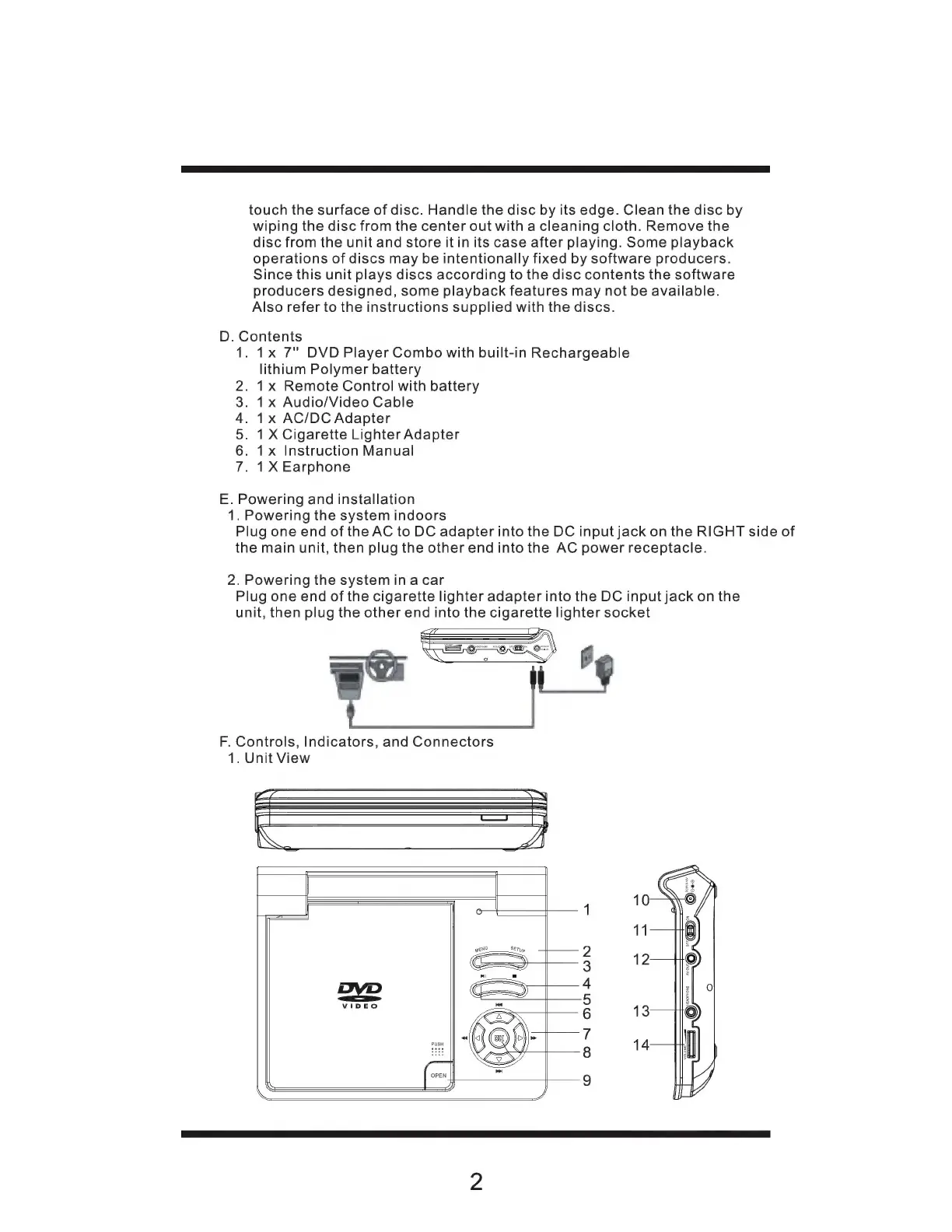
F.
Controls,
Indicators,
and
Connectors
1.
Unit
View
O
ON
ONA
UN

Related product manuals