EasyManua.ls Logo

Sylvania SDVD 7014 - Loading and Playing a Disc

Sylvania SDVD 7014
16 pages
Print Icon
To Next Page IconTo Next Page
To Previous Page IconTo Previous Page
Loading...
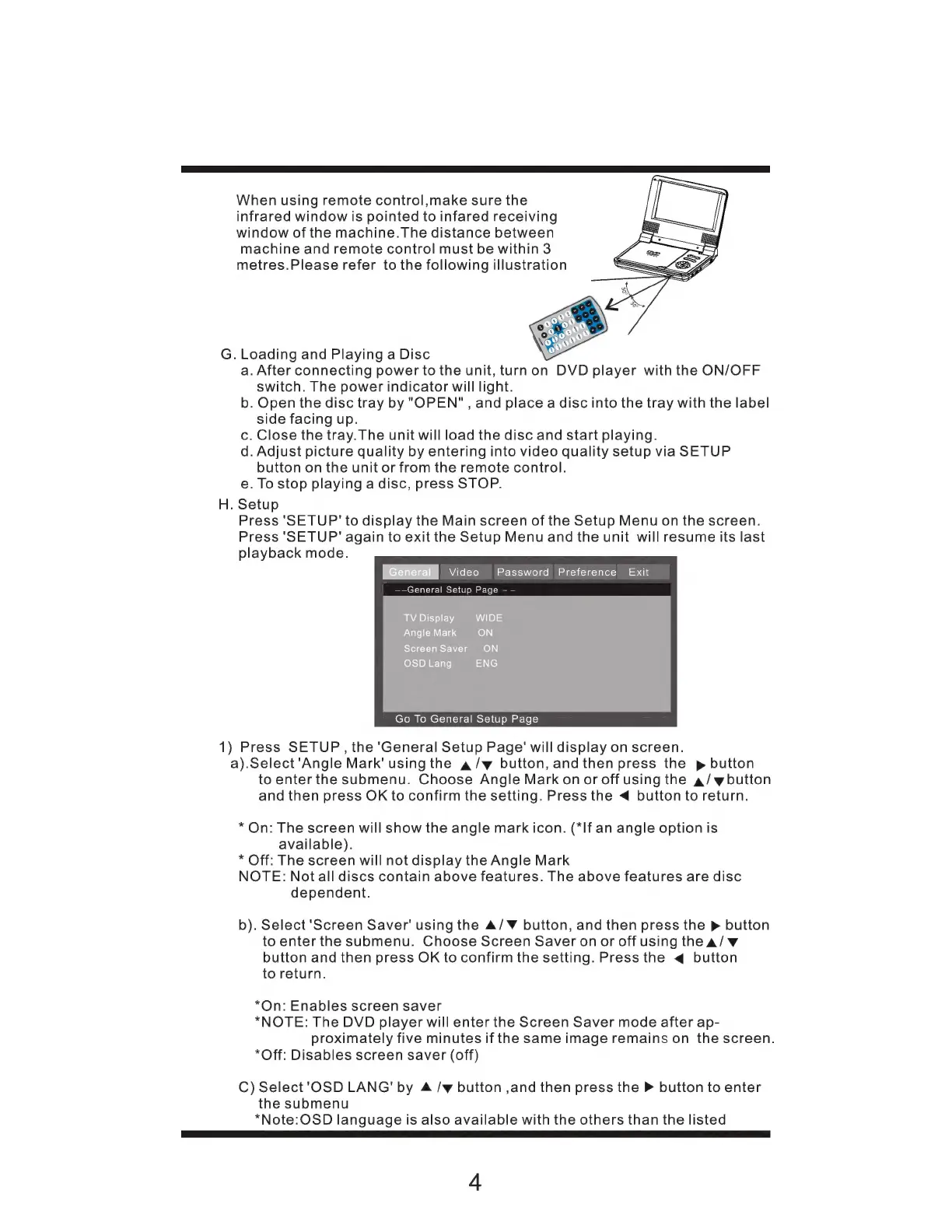
When
using
remote
control,make
sure
the
infrared
window
is
pointed
to
infared
receiving
window
of
the
machine.
The
distance
between
machine
and
remote
control
must
be
within
3
metres.Please
refer
to
the
following
illustration
G.
Loading
and
Playing
a
Disc
a.
After
connecting
power
to
the
unit,
turn
on
DVD
player
with
the
ON/OFF
switch.
The
power
indicator
will
light.
b.
Open
the
disc
tray
by
"OPEN",
and
place
a
disc
into
the
tray
with
the
label
side
facing
up.
c.
Close
the
tray.
The
unit
will
load
the
disc
and
start
playing.
d.
Adjust
picture
quality
by
entering
into
video
quality
setup
via
SETUP
button
on
the
unit
or
from
the
remote
control.
e.
To
stop
playing
a
disc,
press
STOP.
H.
Setup
Press
'SETUP'
to
display
the
Main
screen
of
the
Setup
Menu
on
the
screen.
Press
'SETUP'
again
to
exit
the
Setup
Menu
and
the
unit
will
resume
its
last
playback
mode.
[General
|
Video
Password
Preference
Exit
—-—General
Setup
Page
-
—
Go
To
General
Setup
Page
1)
Press
SETUP,
the
'General
Setup
Page'
will
display
on
screen.
a).Select'Angle
Mark'
using
the
A
/w
button,
and
then
press
the
p
button
to
enter
the
submenu.
Choose
Angle
Mark
on
or
off
using
the
a/w
button
and
then
press
OK
to
confirm
the
setting.
Press
the
«
button
to
return.
*
On:
The
screen
will
show
the
angle
mark
icon.
(*If
an
angle
option
is
available).
*
Off:
The
screen
will
not
display
the
Angle
Mark
NOTE:
Not
all
discs
contain
above
features.
The
above
features
are
disc
dependent.
b).
Select
'Screen
Saver'
using
the
A/V
button,
and
then
press
the
»
button
to
enter
the
submenu.
Choose
Screen
Saver
on
or
off
using
the
A /
w
button
and
then
press
OK
to
confirm
the
setting.
Press
the
«
button
to
return.
*On:
Enables
screen
saver
*NOTE:
The
DVD
player
will
enter
the
Screen
Saver
mode
after
ap-
proximately
five
minutes
if
the
same
image
remains
on
the
screen.
*Off:
Disables
screen
saver
(off)
C)
Select'OSD
LANG'
by
A
/w
button
,and
then
press
the
»
button
to
enter
the
submenu
*Note:OSD
language
is
also
available
with
the
others
than
the
listed
MMN]
4