EasyManua.ls Logo

Sylvania SDVD 7014 - Page 7

Sylvania SDVD 7014
16 pages
Print Icon
To Next Page IconTo Next Page
To Previous Page IconTo Previous Page
Loading...
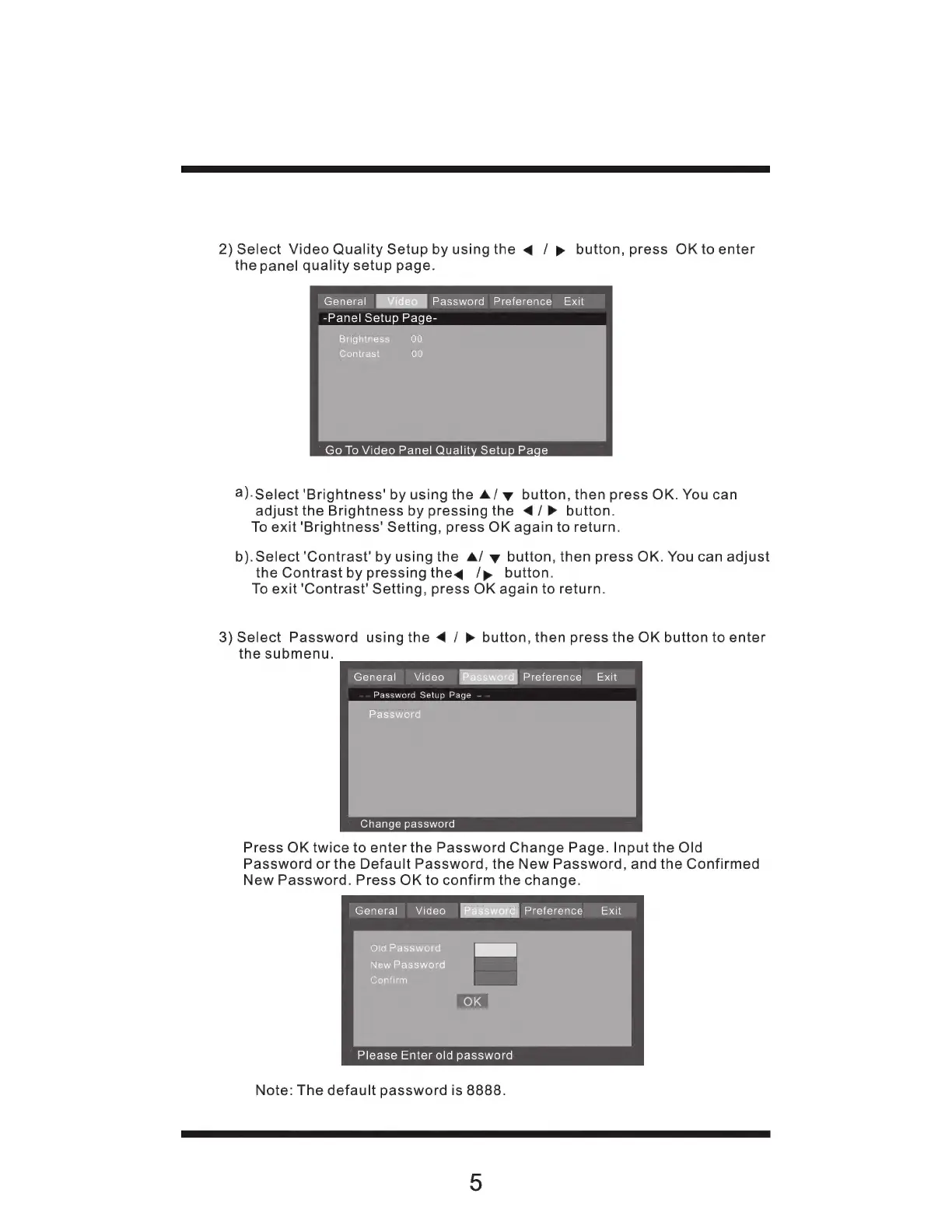
2)
Select
Video
Quality
Setup
by
using
the
«4
/
p
button,
press
OK
to
enter
the
panel
quality
setup
page.
General
V
Password
Preference
Exit
-Panel
Setup
Page-
Brightness
00
Contrast
(010)
Go
To
Video
Panel
Quality
Setup
Page
a).
Select
'Brightness'
by
using
the
A/
y
button,
then
press
OK.
You
can
adjust
the
Brightness
by
pressing
the
</P>
button.
To
exit
'Brightness'
Setting,
press
OK
again
to
return.
b).Select'Contrast'
by
using
the
A/
y
button,
then
press
OK.
You
can
adjust
the
Contrast
by
pressing
theq
/p
button.
To
exit
'Contrast'
Setting,
press
OK
again
to
return.
3)
Select
Password
using
the
«
/
»
button,
then
press
the
OK
button
to
enter
the
submenu.
General
Video
[Password]
Preference
Exit
Password
Setup
Page
-
Password
Change
password
Press
OK
twice
to
enter
the
Password
Change
Page.
Input
the
Old
Password
or
the
Default
Password,
the
New
Password,
and
the
Confirmed
New
Password.
Press
OK
to
confirm
the
change.
General
Video
[Bas
di
Preference
Exit
Old
Password
Es
New
Password
Confirm
Please
Enter
old
password
Note:
The
default
password
is
8888.