EasyManua.ls Logo

Sylvania SDVD 7014 - Page 8

Sylvania SDVD 7014
16 pages
Print Icon
To Next Page IconTo Next Page
To Previous Page IconTo Previous Page
Loading...
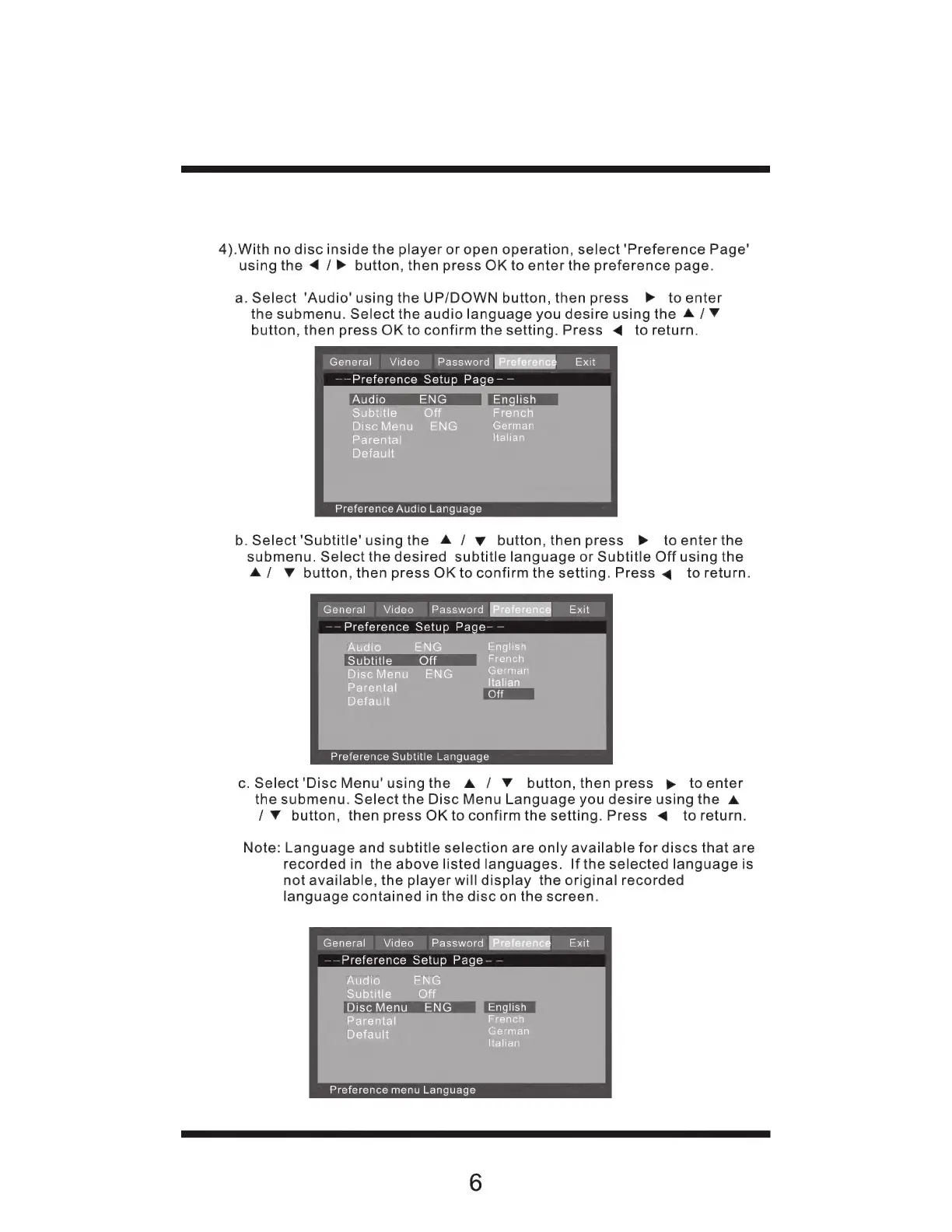
4).With
no
disc
inside
the
player
or
open
operation,
select
'Preference
Page"
using
the
4
/
>
button,
then
press
OK
to
enter
the
preference
page.
a.
Select
'Audio'
using
the
UP/DOWN
button,
then
press
P
toenter
the
submenu.
Select
the
audio
language
you
desire
using
the
A
/
Y
button,
then
press
OK
to
confirm
the
setting.
Press
«4
to
return.
General
Video
Password
[Preference
Exit
——Preference
Setup
Page-
—
Audio
ENG
English
Subtitle
(ojij
French
Disc
Menu
ENG
German
Parental
Italian
Default
Preference
Audio
Language
b.
Select
'Subtitle'
usingthe
A
/
y
button,
then
press
»
toenterthe
submenu.
Select
the
desired
subtitle
language
or
Subtitle
Off
using
the
A
/
Y
button,
then
press
OK
to
confirm
the
setting.
Press
4
to
return.
General
Video
Password
Beee
Exit
——
Preference
Setup
Page-
—
Audio
ENG
English
Subtitle
Off
French
Disc
Menu
ENG
German
Parental
m
Default
Preference
Subtitle
Language
c.
Select
'Disc
Menu'usingthe
A
/
Y
button,
then
press
p
to
enter
the
submenu.
Select
the
Disc
Menu
Language
you
desire
using
the
A
/
Y
button,
then
press
OK
to
confirm
the
setting.
Press
<
to
return.
Note:
Language
and
subtitle
selection
are
only
available
for
discs
that
are
recorded
in
the
above
listed
languages.
Ifthe
selected
language
is
not
available,
the
player
will
display
the
original
recorded
language
contained
in
the
disc
on
the
screen.
General
Video
Password
Exit
——Preference
Setup
Page-
—
Audio
ENG
Subtitle
(ojij
Disc
Menu
ENG
English
Parental
French
Default
German
Italian
Preference
menu
Language