EasyManua.ls Logo

Sylvania SDVD 7014 - Page 9

Sylvania SDVD 7014
16 pages
Print Icon
To Next Page IconTo Next Page
To Previous Page IconTo Previous Page
Loading...
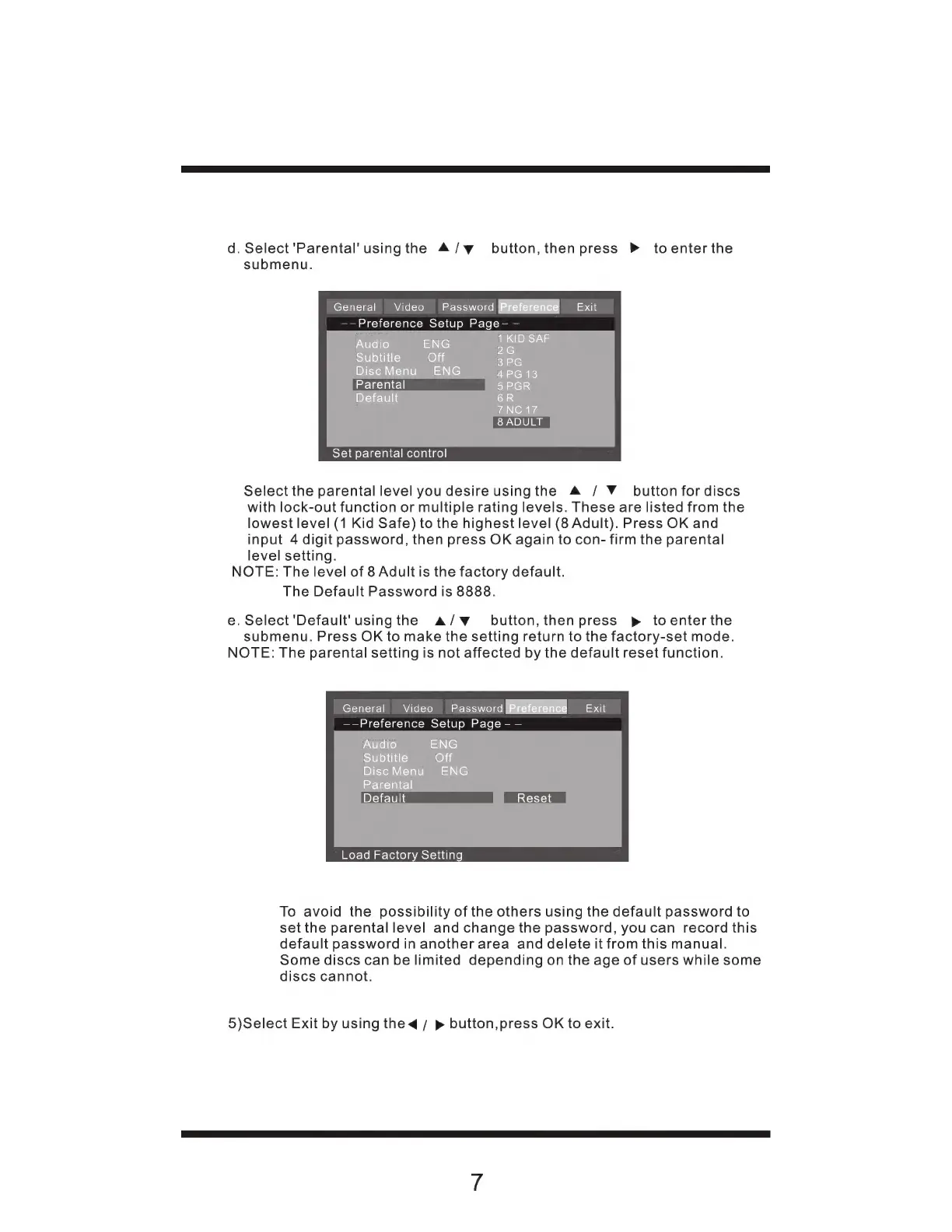
d.
Select'Parental'usingthe
4/w_
button,
then
press
>
toenterthe
submenu.
General
Video
Password
Biese
Exit
——Preference
Setup
Page-
—
Audio
ENG
URBE
Subtitle
Off
ane
Disc
Menu
ENG
4PG
13
Parental
5PGR
Default
6R
7NC
17
8
ADULT
Set
parental
control
Select
the
parental
level
you
desire
usingthe
A
/
Y
button
for
discs
with
lock-out function
or
multiple
rating
levels.
These
are
listed
from
the
lowest
level
(1
Kid
Safe)
to
the
highest
level
(8
Adult).
Press
OK
and
input
4
digit
password,
then
press
OK
again
to
con-
firm
the
parental
level
setting.
NOTE:
The
level
of
8
Adult
is
the
factory
default.
The
Default
Password
is
8888.
e.
Select'Default'
usingthe
A/vw
button,
then
press
p
toenterthe
submenu.
Press
OK
to
make
the
setting
return
to
the
factory-set
mode.
NOTE:
The
parental
setting
is
not
affected
by
the
default
reset
function.
General
Video
Password
Pee
Exit
Preference
Setup
Page
-
Audio
ENG
Subtitle
Off
Disc
Menu
ENG
Parental
Default
Load
Factory
Setting
To
avoid
the
possibility
of
the
others
using
the
default
password
to
set
the
parental
level
and
change
the
password,
youcan
record
this
default
password
in
another
area
and
delete
it
from
this
manual.
Some
discs
can
be
limited
depending
on
the
age
of
users
while
some
discs
cannot.
5)Select
Exit
by
using
the
4
/
>
button,press
OK
to
exit.