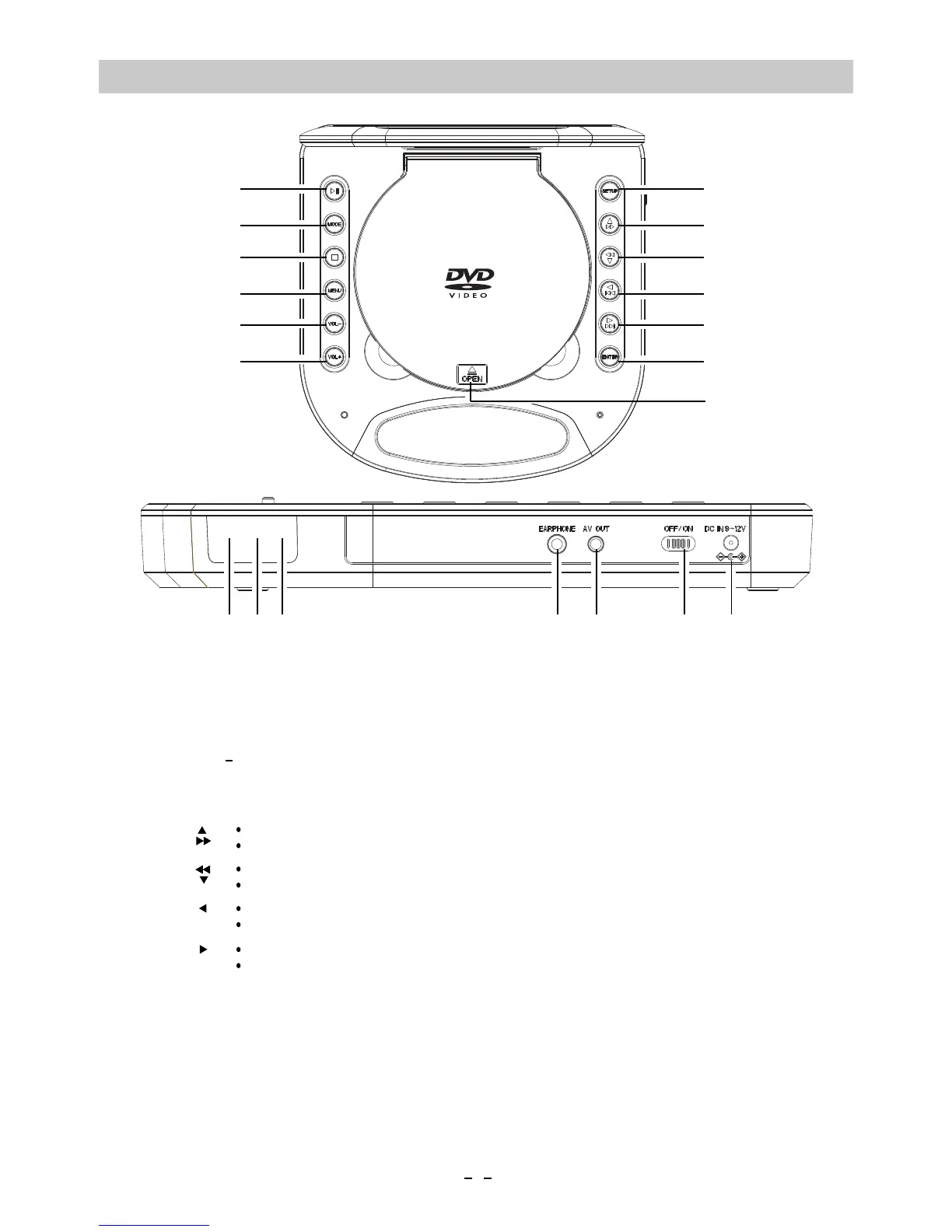
LOCATION OF CONTROLS
SETUP
MENU
VOL+
OPEN
VOL
ENTER
4.
7.
11.
12.
6.
3.
1.
5.
13.
Ŷ
ŹOO
1
2
3
4
5
6
7
8
9
10
11
12
13
2.
MODE
ǿŻŻ
ǿŻŻ
8.
9.
10.
17.
18.
19.
20.
14.
16.
14
15
17
18
19
20
7
In setting menu, press to moving the cursor upward.
In disc playback mode, press to fast searching froward.
In setting menu, press to moving the cursor downward.
In disc playback mode, press to fast searching backward.
In setting menu, press to moving the cursor to left.
In disc playback mode, press to skip tracks backward.
In setting menu, press to moving the cursor to right.
In disc playback mode, press to skip tracks forward.
Press to start playback or pause.
In playback mode, press to stop.
Press to switch the aspect retio to 4:3 or 16:9.
Press to enter to disc selection menu.(Function depends on the disc recording).
Press to decrease volume level.
Press to enter to setting menu.
Press to confirm the selection (settings).
Press to open the disc door.
Press to increase volume level.
Charge Indicator
EARPHONE Jack
AV OUT ( Audio/Video Output ) Jack
Power ON/OFF Switch
DC IN Jack
16
15.
Remote Sensor
Power Indicator





 To Next Page