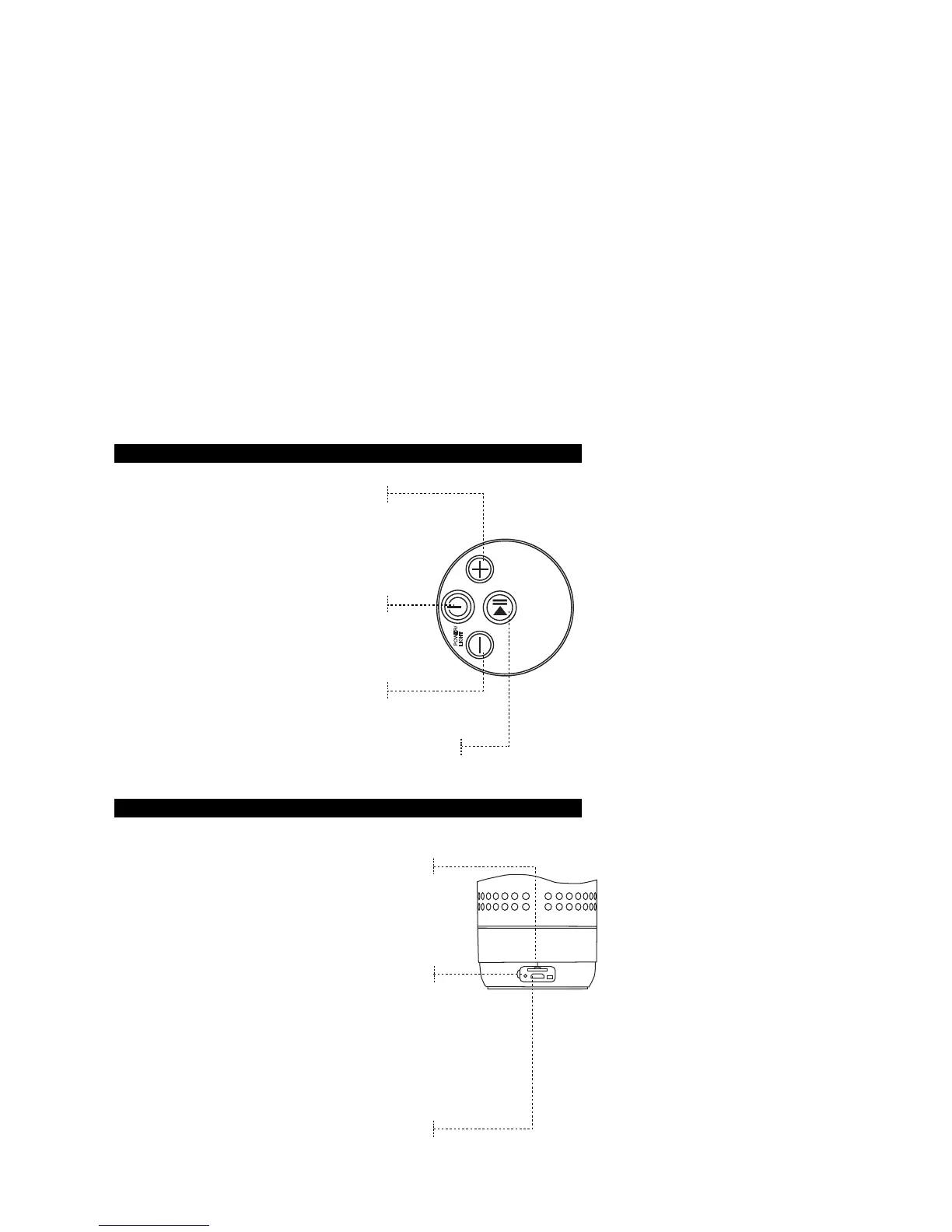
Button Functions 4-1
Volume Up / Next Song
Press once for next song, Press and hold to
increase volume and have “Beep” sound you
will heard on the max.
Power / Light
Press and hold for 3 seconds to power on the
speaker, Press and hold for 3 seconds again to
turn off the speaker. Press once to switch on
the lights, press again to switch off the lights.
Volume Down / Previous Song
Press once for previous song, Press and hold
to decrease volume.
Play / Pause
W
Press and hold this button to change the input source when the
TF card is inserted.
hen music playback, press the button to pause
and play.
Button Functions 4-2
TF Card mode
When the TF card is inserted in this product, this unit
will change to TF card mode automatically, then it can
control the volume up and down and change to the next
and previous track. The operation are same as above.
Working LED indicator
Power on: blue LED light flashes quickly;
Bluetooth paired: blue LED is solid;
Music playback: blue LED light flashes slowly in
playing. When press to pause,
the LED will be solid.
Charge Status: Red LED is on during charging. The
red LED will turn off when the battery charged
completely.
RESET Function:
Insert a needle to this hole and put it to reset this
product when it’s out of control.
USB Charge Socket
Use a computer USB port / power adapter to
recharge speaker.
P
OW
E
R/
LI
G
H
T



 To Next Page