•
Shaded buttons are used for following operation.
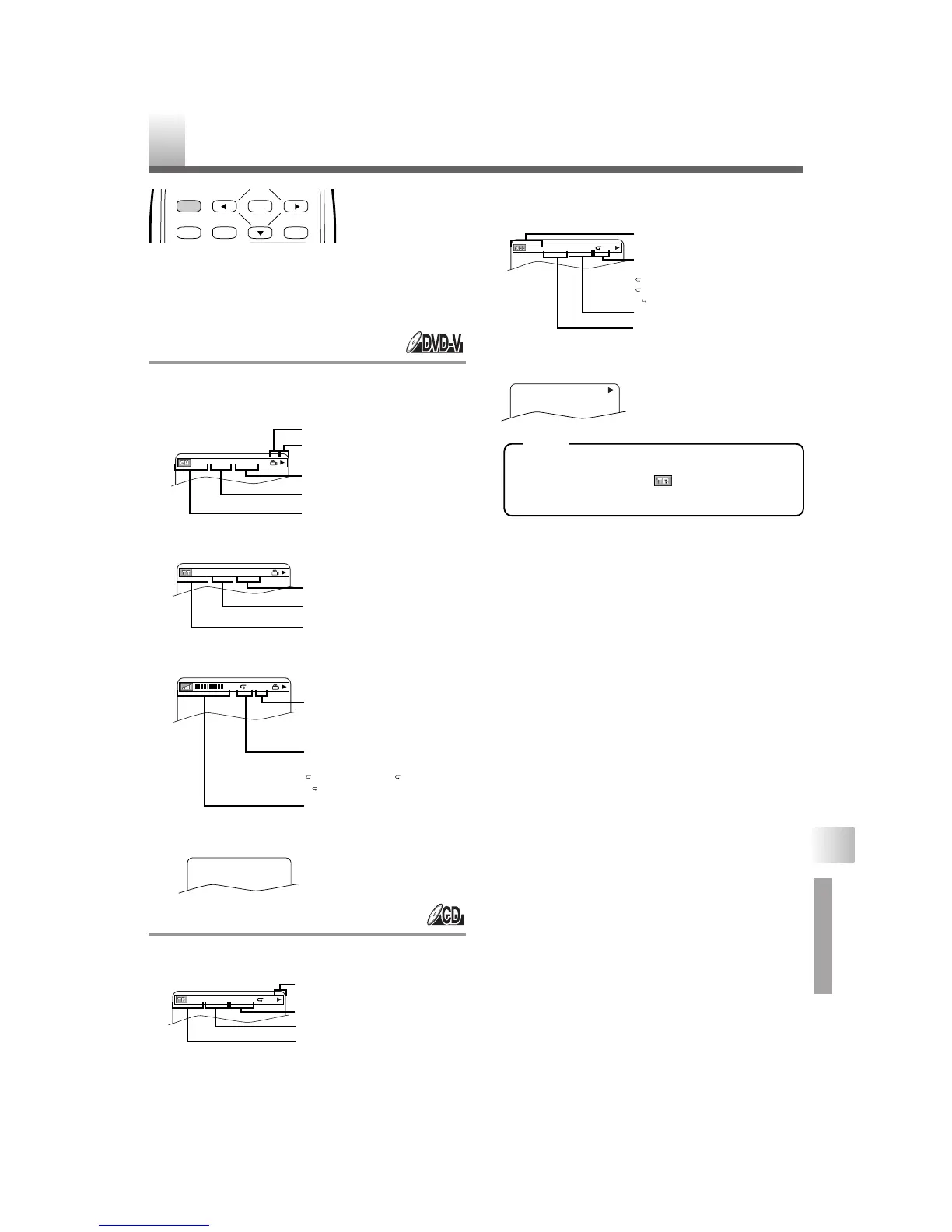
You can check the information about the current disc
by pressing
[DISPLAY].
For DVD-Vs
1 Press [DISPLAY] during playback to show
current Chapter.
2
Press [DISPLAY] again to show current Title.
3 Press [DISPLAY] again.
4 Press [DISPLAY] again to exit.
For Audio CDs
1 Press [DISPLAY] during playback to show the
current Track.
2 Press [DISPLAY] again to show current Total
Tra ck .
3 Press [DISPLAY] again to exit.
•
When you are playing a disc in PROGRAM
or RANDOM mode, “PROGRAM” (or
“RANDOM”) will be displayed at step 2.
–
27
–
EN
NOTE
THE ON-SCREEN INFORMATION
ENTER
RETURNTITLESETUP
DISPLAY
CH(Chapter):
Current chapter number / Total chapters
Elapsed time of the current chapter
Remaining time of the current chapter
Current playback status
Angle icon, appears only when avail-
able on the DVD
TT(Title):
Current title number / Total titles
Elapsed time of the current title
Remaining time of the current title
Current repeat setting appears only
when the repeat setting is active
C: Chapter repeat / T: Title repeat /
AB:A-B repeat
BIT RATE: The amount of audio and
video data currently being read
Layer numbers, appears only when
playing a two-layered Disc
L0: Layer 0 is playing
L1: Layer 1 is playing
TR(Track):
Current track number / Total tracks
Elapsed time of the current track
Remaining time of the current track
Current playback status
Current repeat setting appears only
when the repeat setting is active
T: Track repeat
A: All Tracks repeat
AB:A-B repeat
ALL:
Current track number / Total tracks
Elapsed time of the entire disc
Remaining time of the entire disc
CHANGING THE SETTINGS / THE ON-SCREEN INFORMATION









 To Next Page