3
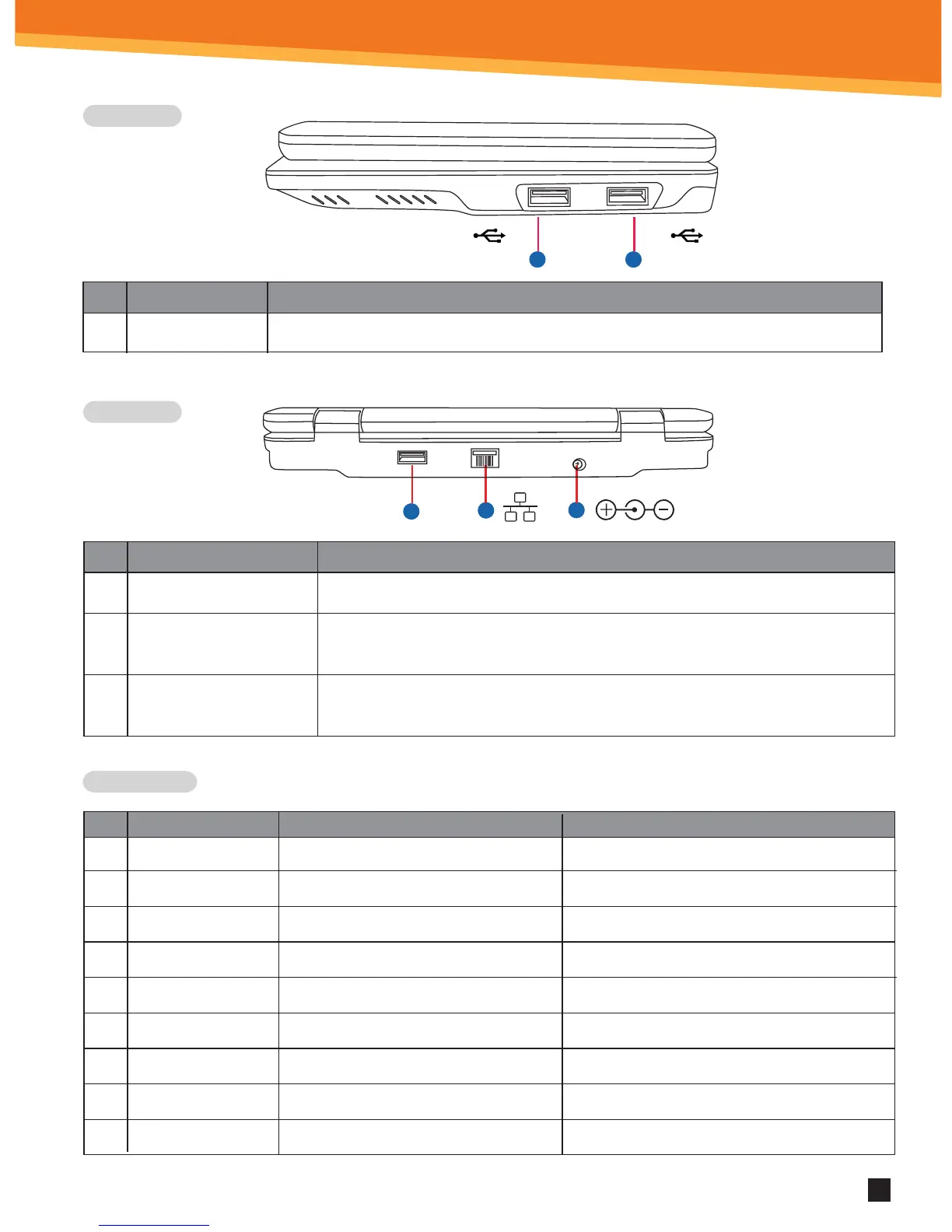
Side View
Back View
Short-Cut Keys
1
3
2
1
1
No.
1.
Item
USB port (2.0)
Description
2 USB ports can be used to connect USB memory, mice and other equipment.
Item
1.
2.
3.
Power jack
Network interface
Special factory
USB port
This port connects the AC power adaptor.
The Ethernet (RJ-45) network interface supports standard Ethernet wires
(CAT5, CAT5e, etc.) to connect to local networks.
This USB is strictly for the factory use; do not use it !
USB 2.0 USB 2.0
SYNETA7
X
No.
1.
2.
3.
4.
5.
6.
7.
8.
9.
Short-cut
ESC
F1
F2
F3
F4
F5
Function
Back
Ethernet Settings
Wifi Settings
Browser
Email
Volume down
Remark
Moves back to the previous screen
Ethernet Settings menu
Wi-Fi Settings menu
Web browser application
Email application
Decreases volume
F6 Volume up Increases volume
F7 Home Displays Home screen panel
F8 Menu Menu options



 To Next Page