16
Luggage Box
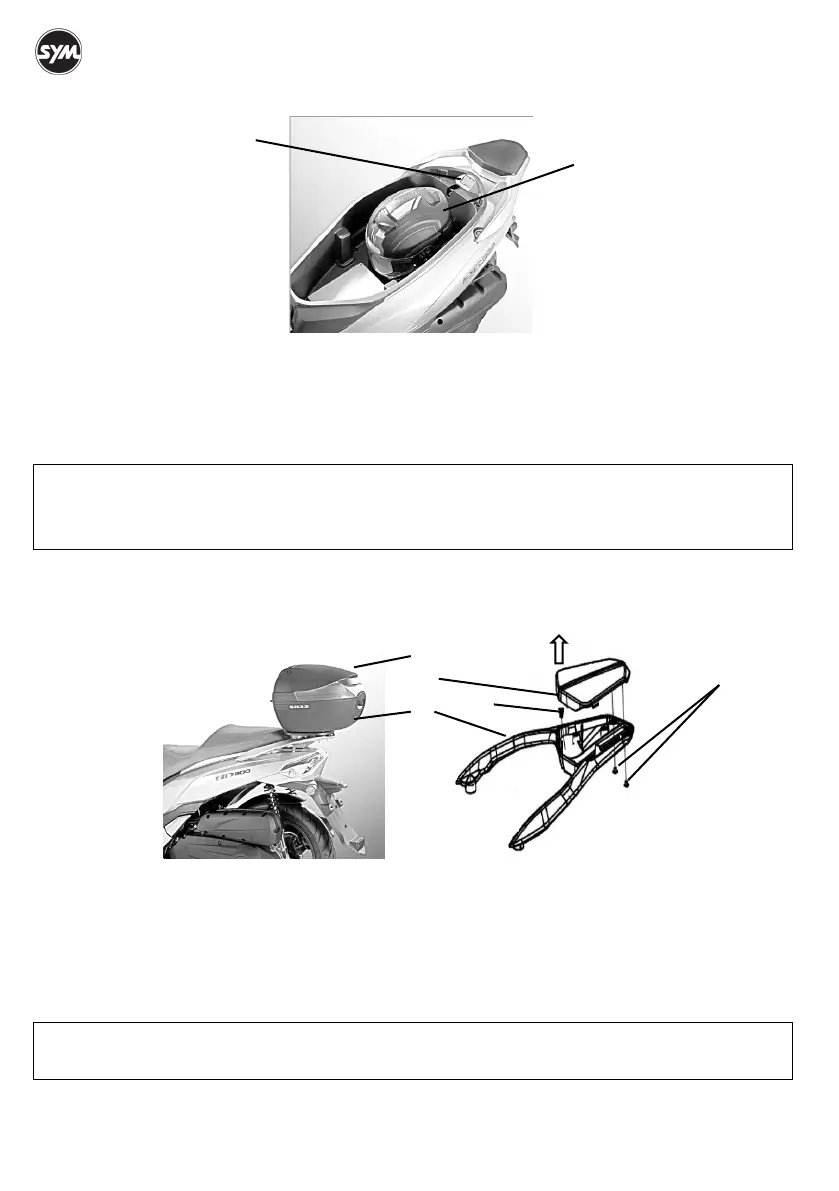
The luggage box is under the seat. Open the seat (page 11) to use the luggage box. Helmets ○,
A can be
stored in the luggage box. Some helmets may not fit in the space due to the size or design. The diagnostic
tool connector ○,
B is located in the rear top of the luggage box.
Maximum load: 10 kg.
Rear Carrier
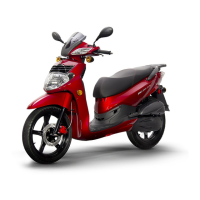
The rear carrier ○,
A is designed to install a top box ○,B. Remove the rear carrier cover ○,C to install a top
box. The top box ○,
B is not a HD 300 accessory.
Remove the screws ×2 ○,
D.
Pull up ○,
a and remove the cover.
Remove the clip ○,
E.
Install a chosen top case and make sure the top case is mounted securely.
NOTE :
• Do not exceed the maximum weight limit.
• The luggage box may affected by engine heat. Do not put in valuables, food or objects are flammable
or susceptible to heat damage.
NOTE :
• Contact your SYM authorized dealer for more information if you need to install a top case.
○,A
○,B
○,A
○,B
○,C
○,D
○,E
○
a


 To Next Page