CAUTION:
Never operate the ignition switch key when the motorcycle is running. To turn the ignition switch
to “OFF” and “LOCK” position will shut off the electrical system and that may result in a
dangerous accident. Therefore, the ignition switch can only be turned off after the motorcycle has
been completely stopped.
Always remove the key and be sure to take the key away with you after locking the steering
handle before leaving your motorcycle.
If ignition switch remains in the “ON” position for a prolonged period after the engine has been
stopped, the battery’s capacity will be reduced and this may affect the engine’s start ability.
Make sure to take the key away with you before you lock your seat.
§USE OF BUTTONS §
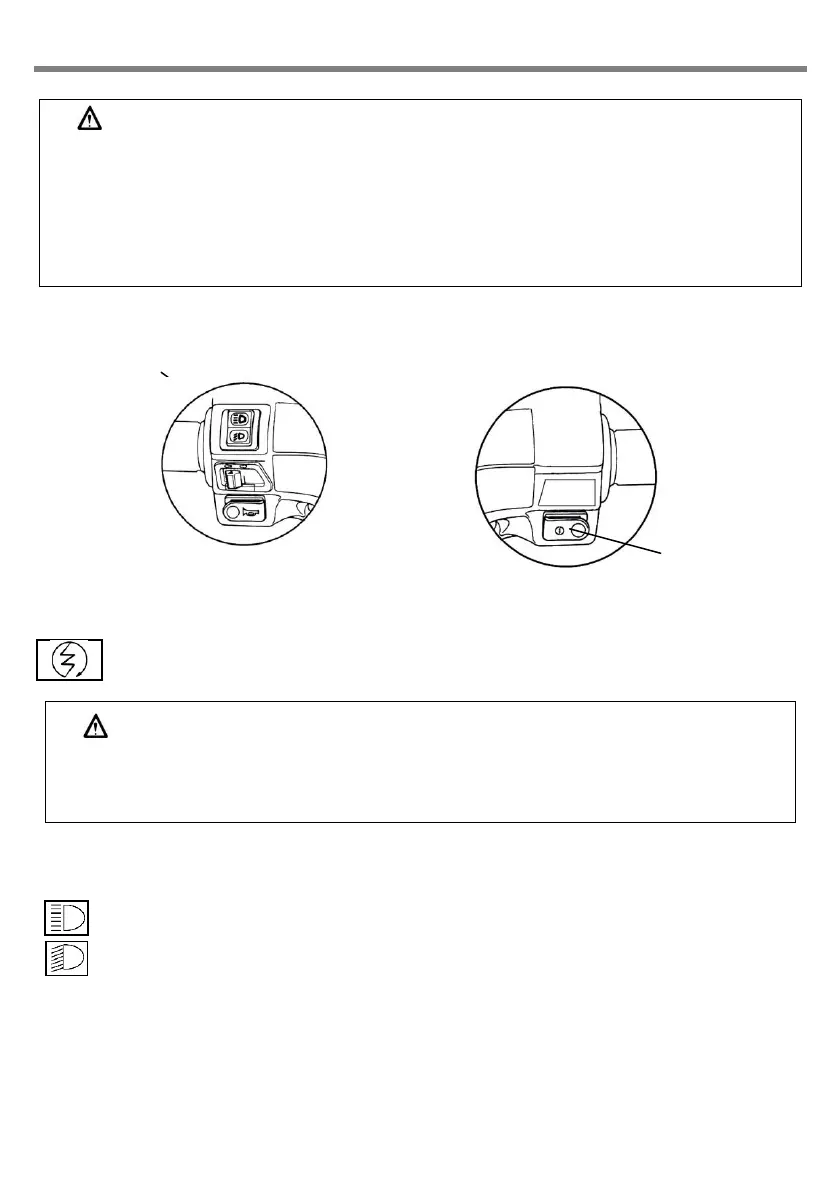
Electrical starter button
This is a starting motor button (switch) for engine starting.
With the main switch “on”, press this button while holding the front or rear brake lever will start
the engine.
CAUTION:
Release this button immediately after engine has been starter, and never press the button again
to avoid damaging the engine.
This mechanism is a safety design. The engine can only be started after the front or rear brake
lever (pedal) has been applied.
High/low beam switch
This is the high and low beam of headlight switching switch. Press this switch to switch between high
and beams.
This is for high beam.
This is for low beam.(please turn to low beam riding in city.)
Electrical starter
button



 To Next Page
 Loading...