-4-
1
1
1
2
3
3
4
3
2
2
2
2
3
4
1
1
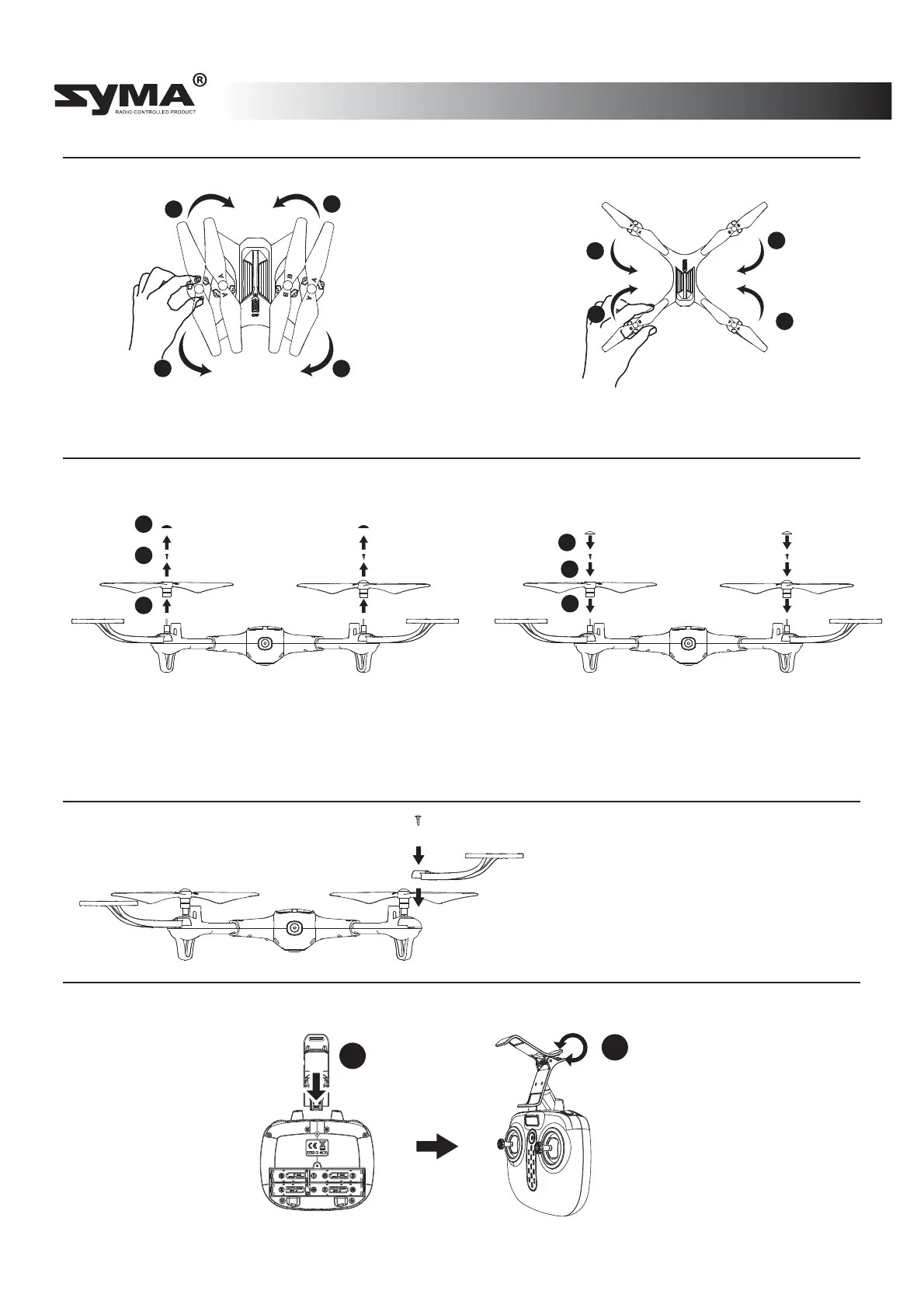
Assembling the product
Folding the quadcopter
Installing the propeller protectors
1. Unfold the arms in the
direction of the arrow
2. Fold the arms in the direction
of the arrow until the quadcopter
is fully folded.
Detaching the propellers
Re-installing the propellers
Attaching the phone holder
Remove the propeller covers and
screws in the direction of the arrow,
Insert the phone
holder
into the opening
on the remote
control.
Press the spring to
adjust the size of
the phone holder.
Insert the protective frame into
the fuselage in the direction of
the arrow, and fasten the
screws.
Insert the propellers onto the body of the
quadcopter in the direction of the arrow,
Note: The propellers are labelled “A/B”. Ensure that each propeller is inserted in
the corresponding position on the arms, and then tighten the screw.and then
tighten the screws and attach the propeller covers.
English



 To Next Page