EasyManua.ls Logo

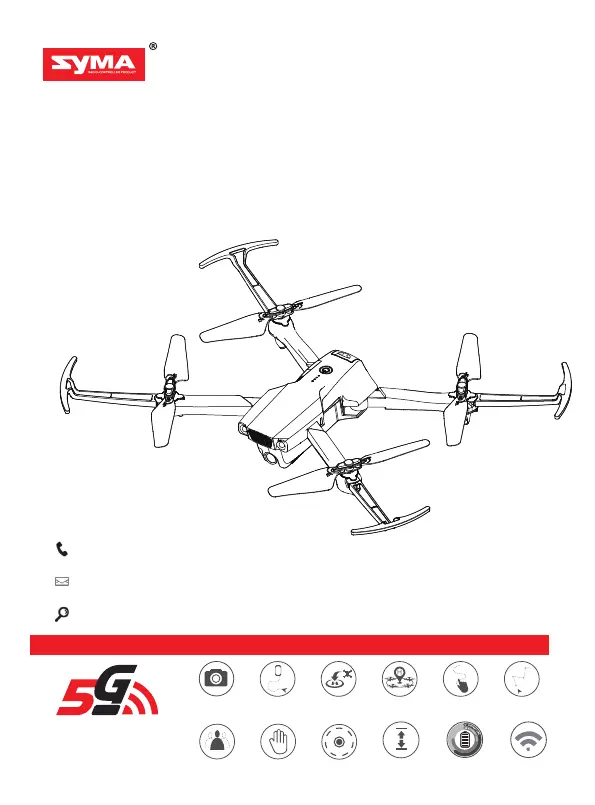
SYMA X500 - User Manual

SYMA X500
16 pages
Print Icon
To Next Page IconTo Next Page
Loading...
1080P HD camera with 250 m
Image
transmission range
(requires a 5G smartphone)
Accreditation standard: GB/T26701-2011
Palm control
Flight plan
Waypoint flightGPS tracking One key to retrun Circle flight
Human tracking
4K 5G WIFI
Camera
Optical flow
positioning
Long battery life Dual-frequency
technology
14+
Take-off/landing
FOLDABLE DRONE
INSTRUCTIONS FOR USE
X500
+1(718)312-0558(USA)
+49 335-4551-9201(Germany)
usa@symatoys.com(US)
eu@symatoys.com(EU)
http://www.symatoys.com

Questions and Answers

  • L
    Lauren RivasJul 28, 2025
    How to fix SYMA X500 aircraft that does not travel forward in headless mode?
    • K
      Kyle BarreraJul 28, 2025
      If your SYMA Drones aircraft isn't moving forward in headless mode, it's likely because the aircraft was involved in a collision. You should reconfigure the forward direction to correct this.
  • B
    brad14Aug 3, 2025
    What to do if my SYMA X500 aircraft does not respond?
    • S
      Stephanie YorkAug 3, 2025
      If your SYMA Drones aircraft isn't responding, it could be due to a couple of reasons: undervoltage protection might be enabled, or the remote control battery might be low, indicated by a flashing power indicator. To resolve this, charge the aircraft battery and change the batteries in the remote control.
  • S
    Shawn HunterAug 9, 2025
    Why does my SYMA Drones aircraft not hover properly?
    • K
      kelly32Aug 9, 2025
      There are a couple of reasons your SYMA Drones aircraft might not be hovering properly. It could be that the aircraft isn't calibrated level to the ground or the air pressure is unstable due to poor weather conditions. To fix this, calibrate the aircraft and avoid flying in poor weather.
  • N
    Nicholas HoldenAug 15, 2025
    What to do if my SYMA X500 Drones aircraft’s response is intermittent?
    • M
      Mary GreenAug 15, 2025
      If your SYMA Drones aircraft's response is intermittent, it could be due to nearly empty remote control batteries or interference from a remote control on the same frequency. Try changing the batteries first. If that doesn't work, move to a different area where there is no interference.
  • T
    Thomas Hernandez MDAug 21, 2025
    Why does my SYMA X500 aircraft drift to one side whilst hovering?
    • B
      Brianna BradyAug 21, 2025
      If your SYMA Drones aircraft drifts to one side while hovering, it's likely because the aircraft isn't calibrated level to the ground. To solve this, calibrate the aircraft.

Summary

Important Safety Information

Safety Guide

Provides essential safety guidelines for operating the drone and handling batteries.

Charging the Aircraft Battery

Battery Removal and Charging

Procedure for safely removing, charging, and inserting the aircraft battery.

Flight Preparation

Pre-Flight Calibration and Power On

Compass Calibration

Steps to calibrate the drone's compass for accurate navigation and flight stability.

Aircraft Operation

Remote Control Flight Operations

Explains basic flight controls like ascent, descent, forward, backward, and rotation.

Flight Modes

GPS Mode Operations

Explains GPS mode capabilities, range limits, and conditions for use.

Advanced Flight Functions

One-Touch Take-off and Landing

Guides on initiating automatic take-off and landing using a single button.

Return to Home and Signal Loss

Return to Home Function

Explains how the drone automatically returns to its take-off point in GPS mode.

Automatic Return on Signal Loss

Details automatic return procedures when the remote control signal is lost.

Low Battery and App Features

Automatic Return on Low Battery

Describes the drone's automatic return behavior when the battery level is critically low.

Indicators and Troubleshooting

Troubleshooting Common Issues

Common problems, their causes, and solutions for operating the drone.

SYMA X500 Specifications

General IconGeneral
GPSYes
Charging TimeAbout 180 minutes
BrandSYMA
ModelX500
TypeQuadcopter
FeaturesHeadless Mode, One Key Takeoff/Landing
Camera4K

Related product manuals