Need help?
Do you have a question about the SYMA X600W and is the answer not in the manual?
Details on aircraft and remote control specifications like range, flight time, and battery.
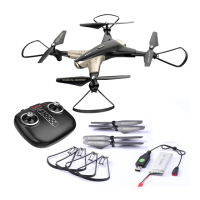
Diagram and labels for the drone's physical parts such as motors and propellers.
Diagram and labels for the remote control's buttons and joysticks.
Instructions and diagrams for folding and unfolding the drone's arms.
Steps to remove propeller covers, screws, and propellers.
Guide on how to attach propellers correctly to the drone.
Instructions for fitting the protective frames onto the drone's fuselage.
Steps for inserting and securing the phone holder onto the remote control.
Procedure for safely removing the drone's battery.
Instructions on how to charge the drone's battery using the USB cable and adapter.
Steps for correctly inserting the charged battery back into the drone.
Guide on how to link the remote control to the drone for operation.
Methods to power on the drone using the remote control joysticks or button.
Methods to safely power off the drone.
Diagrams showing joystick controls for drone movement like ascend, descend, and turns.
Instructions for performing spins and flips using the remote control buttons.
How to adjust the drone's controls to correct drifting during flight.
Indicator light signaling low battery level; advises landing the aircraft.
Mechanism activated if blades collide or get stuck, stopping the drone.
Procedure to calibrate the drone's levelness for stable flight.
Switching between speed modes and indication beeps.
Function to automatically take off, hover, or land the drone.
Drone hovers at current height when throttle is released.
Mode where drone orientation doesn't matter for control.
Procedure to re-orient the drone if its directional heading is deviated.
Instructions for downloading and using the SYMA FLY app for live feed.
 General
| Brand | SYMA |
|---|---|
| Model | X600W |
| Type | Quadcopter |
| Camera | Yes |
| FPV | Yes |
| Remote Control | Yes |
| Remote Control Frequency | 2.4GHz |
| Color | White |
| Skill Level | Beginner |
| Camera Resolution | 720P |
| Battery | 3.7V |
| Charging Time | 90 minutes |
| Age Recommendation | 14+ years |


 To Next Page