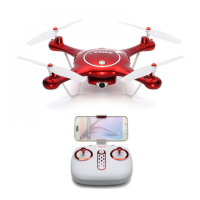
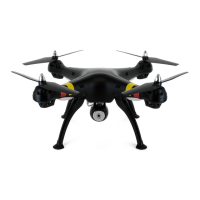
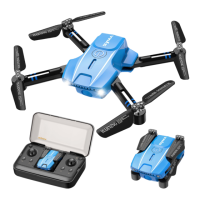
This document describes the SYMA X500Pro Foldable Drone, a remote-controlled aircraft suitable for users aged 14 and above. It features a 4K 5G WIFI camera with a 500m image transmission range, provided the mobile phone supports 5G WiFi.
Function Description
The X500Pro is a foldable drone designed for aerial photography and video recording, offering various intelligent flight modes. It includes GPS tracking, one-key return, circle flight, flight plan, waypoint flight, human tracking, palm control, optical flow positioning, and one-key take-off/landing. The drone is equipped with a brushless motor for stable flight and dual-frequency technology for enhanced control.
Important Technical Specifications
Aircraft:
- Weight: Approx. 215g
- Size: 305x280x65 mm
- Range: 500 m
- Altitude: 100 m
- Image Transmission Range: 500 m
- Flight Time: Hovers indoors for 24-25 minutes
- Operating Conditions: 0°C to 40°C
- Video Transmission Frequency: 5 GHz
- Motor: 1503 Brushless motor
- Battery: 7.6 V 1700 mAh
- Charging Time: About 3 hours
Remote Control:
- Operating Frequency: 2.4 GHz
- Range: 500 m
- Operating Conditions: 0°C to 40°C
- Charging Time: About 1 hour
- Maximum Radio-Frequency Power Transmitted: < 10 dBm
- Frequency Range: 2408MHz - 2478MHz
Camera:
- Resolution: 4K (for 5G WIFI camera)
- Image Transmission: 5G WIFI (requires 5G WiFi compatible mobile phone)
- Memory Card Support: Up to 64 GB
Usage Features
Assembly and Setup:
- Propeller Installation: Propellers must be attached according to diagrams, ensuring correct orientation (clockwise and anticlockwise) to the designated arms. Incorrect installation will prevent correct flight. Propellers are delicate and consumable parts; only manufacturer-supplied replacements should be used.
- Memory Card Insertion: An optional memory card can be inserted for storing photos and videos.
- Battery Charging: The aircraft battery is charged using the included USB charging cable. An adapter with a smaller rated current will result in longer charging times. The indicator flashes green slowly during charging and stays constant green when fully charged. A rapid flashing green indicates a defective battery.
- Remote Control Battery: The remote control requires batteries to be inserted with correct polarity. The indicator flashes rapidly when waiting for a signal and stays constant when pairing is complete.
- SYMA AIR App: The SYMA AIR app can be downloaded by scanning a QR code or from an app store. It is compatible with iOS 8.0/Android 5.0 or later and provides video tutorials for smart app features.
Flight Preparation:
- Calibrating the Compass: This involves holding the aircraft horizontally and rotating it 360 degrees, then holding it vertically and rotating it 360 degrees. Calibration should not be performed near strong electromagnetic fields or large metal objects. The angle of inclination must not exceed 30 degrees during horizontal calibration.
- Searching for Satellites: The rear indicator changes from orange to green when a satellite lock is achieved and the take-off location is recorded. This process takes approximately one minute. If the GPS signal is weak (rapidly flashing green rear indicator), the aircraft should be landed manually and satellite search restarted. GPS mode cannot be used indoors.
- Turning On/Off: The aircraft can be turned on by moving the left joystick upwards or by pushing both joysticks downwards in a V shape for 1 second. To turn off, push the left joystick downwards for 2-3 seconds, push both joysticks downwards in a V shape for 2 seconds, or press the one-key take-off/landing button. The aircraft automatically switches off if its angle of inclination exceeds 90 degrees.
Flight Modes:
- Optical Flow Positioning: Front indicator is constant white, rear indicator is constant yellow. This mode is impaired in dark surroundings, reflective surfaces, or altitudes above 6m. It only supports altitudes less than 6m. A rapidly flashing rear indicator indicates a weak optical signal.
- GPS Mode: Front indicator is constant white, rear indicator is constant green. In this mode, the aircraft can fly up to 500m distance and 100m altitude with normal battery, or 20m distance and 20m altitude with low battery. A rapidly flashing rear indicator indicates a weak GPS signal, and GPS mode cannot be used indoors.
- Headless Mode: The aircraft indicator flashes once every 4 seconds. The forwards direction is set when the aircraft is first switched on. To enable/disable, hold down the right joystick for approximately 3 seconds (remote control beeps 8 times for enabled). In this mode, the aircraft moves in the direction corresponding to the joystick input, regardless of its orientation.
- Level Calibration: Place the aircraft on a level surface and move both joysticks to the lower right corner for approximately 3 seconds. The indicator flashes rapidly then stays constant. Calibration cannot be performed if the angle of inclination is greater than 10 degrees.
- High/Low Speed Mode: Briefly press the right joystick to switch between modes. Low speed is default. The remote control beeps twice for high speed and once for low speed.
- One-Key Take-Off/Landing: Pressing the button makes the aircraft automatically take off and hover at 1.5m, or land automatically if already in active mode.
Photography and Video Recording:
- Remote Control: Press the photo button (indicator flashes once) or record button (indicator flashes twice to start, twice again to stop).
- Hand Gestures: Position hand approximately 1.5m from the front lens and hold the gesture for 3 seconds for photo or video.
- Storage: Photos and videos are saved to the phone if no memory card is inserted, or to both the memory card and phone if a card is present.
- Limitations: Gestures cannot be used when the bottom camera is on. The camera may accidentally activate if surrounding objects resemble gestures.
Return to Home (RTH) Function:
- GPS Mode: Hold the home button to make the aircraft return to its take-off position. During RTH, the joysticks can be used to control ascend/descend and left/right movement to avoid obstacles. Hold the home button again to terminate RTH.
- Altitude Adjustment: If flying below 20m, the aircraft ascends to 20m before returning. If flying above 20m, it returns at the current altitude.
- Loss of Signal: If the remote control signal is lost for more than 20 seconds, the aircraft automatically returns to the take-off position. If the signal is restored during RTH, the home button can be held to terminate the flight.
- Low Battery: When the battery is low, the aircraft automatically returns to the take-off position. Joysticks can be used to avoid obstacles. RTH cannot be terminated if the aircraft is further than 20m from the landing position.
- Limitations: The aircraft cannot automatically avoid obstacles during RTH. RTH is not available if the GPS signal is weak. If no GPS signal and loss of contact for more than 20 seconds, the aircraft will land automatically instead of returning home.
Smart App Features:
- The SYMA AIR app offers various features including GPS tracking, one-key return, circle flight, flight plan, waypoint flight, human tracking, palm control, optical flow positioning, take-off/landing, and MV features. Users should watch video tutorials in the app or on the SYMA website and pre-configure flight altitude and distance.
Maintenance Features
- Cleaning: Use a clean and soft cloth to clean the product.
- Heat and Moisture: Keep the product away from heat sources and avoid water exposure, as moisture can damage electronic parts.
- Transformers: Transformers used with the aircraft should be regularly examined for damage (cord, plug, enclosure, etc.) and repaired or replaced before further use.
- Battery Care:
- Do not short circuit or compress the battery.
- Do not disassemble or store in hot environments.
- For long-term storage (10+ days), discharge the battery to 40%-50% to prolong its lifespan.
- Rechargeable batteries must be removed from the aircraft before charging and charged under adult supervision, away from flammable materials.
- Exhausted batteries must be removed from the aircraft.
- Only use the supplied charging cable.
- Battery temperature must not exceed 60°C (140°F).
- Never charge on flammable surfaces, near flammable products, or inside a vehicle.
- Do not leave the battery unattended during charging.
- Ensure charger output voltage matches battery voltage.
- Do not expose the battery to moisture or direct sunlight.
- Keep out of reach of children.
- Replace batteries if aging.
- Remove the adapter after full charge to prevent discharge and prolong service life.
- Propeller Replacement: Propellers are consumable parts and should be replaced with manufacturer-supplied parts if necessary.
- Troubleshooting: The manual provides a troubleshooting guide for common issues like unresponsiveness, intermittent response, drifting, incorrect travel in headless mode, and improper hovering, along with suggested solutions such as charging batteries, changing remote control batteries, moving to a different area, calibrating the aircraft, reconfiguring forwards direction, and avoiding poor weather.
Warranty
The product comes with a limited 2-year warranty and free limited replacement parts for 2 years. The warranty covers defects in material and workmanship. To be eligible, the product must be used as intended, not disassembled or modified, labels and serial numbers must be intact, and the buyer must have a warranty code obtained by online registration. Exceptions include normal wear and tear, accidental damage, unauthorized modifications, incorrect use, battery/charger mismatch, operator failure to follow instructions, electromagnetic interference, operating in interference-prone areas, exceeding load capacity, using aged/damaged/unauthenticated third-party components, or defective batteries. Free replacement parts (excluding batteries, motors, circuit boards, and transmitters) are available for registered vehicles, with shipping charges potentially applying.

 Need help?

 To Next Page
 General