5V2A A adapter
USB
!
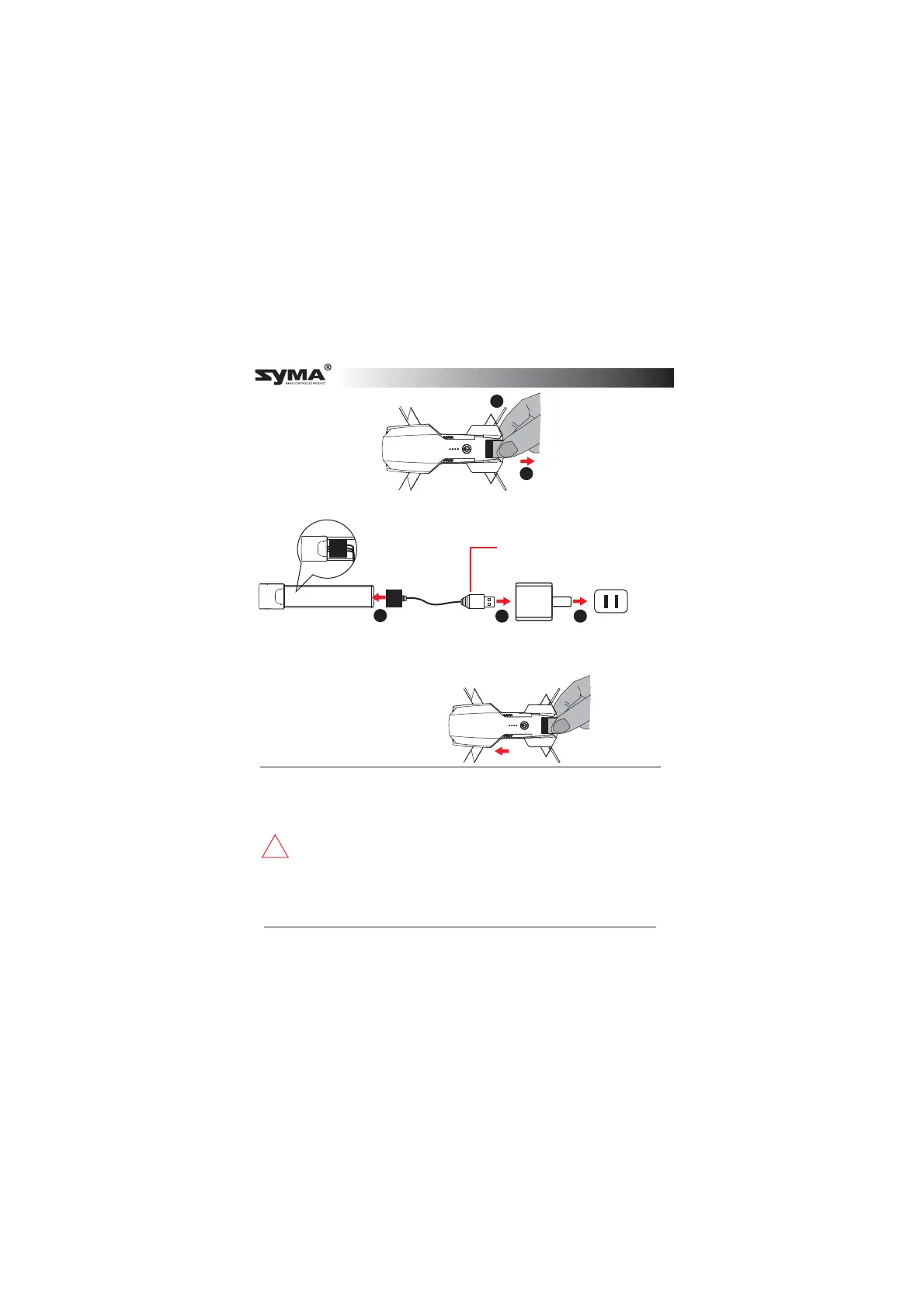
* Charge the aircraft with the USB charging cable that came with the product.
* The battery will take longer to charge when you use an adapter with a smaller
rated current.
1 2 3
1
2
Remove the battery
Charge the battery
Charging the aircraft battery
USB charging cableBattery
Indicator in slow flashing green:
Charging in progress
Indicator in constant green:
Battery is fully charged
Indicator in rapid flashing green:
Battery is defective
Insert the battery
* Ensure that the battery holder
clicks into place.
* Do not short circuit or compress the battery, as this may cause an
explosion.
* Do not disassembling the battery or store it in a hot environment.
* If you do not plan to use the aircraft for at least 10 days, discharge the
battery to 40%-50%. This helps to prolong the lifespan of the battery.
* Rechargeable batteries should be removed from the aircraft before
charging charged.
* Rechargeable batteries should only be charged under the supervision
of adults.and keep away from flammable materials.
* Exhausted batteries should be removed from the aircraft.
* Caution: Risk of explosion if battery is replaced with incorrect ones,
please install the batteries according to the instructions.
English



 To Next Page