WiseScript Package Editor Reference 95
Using Script Editor
Product Details page, you enter InstallationName in the Installation Title field. The
following line is generated in the script: Set Variable APPTITLE to InstallationName.)
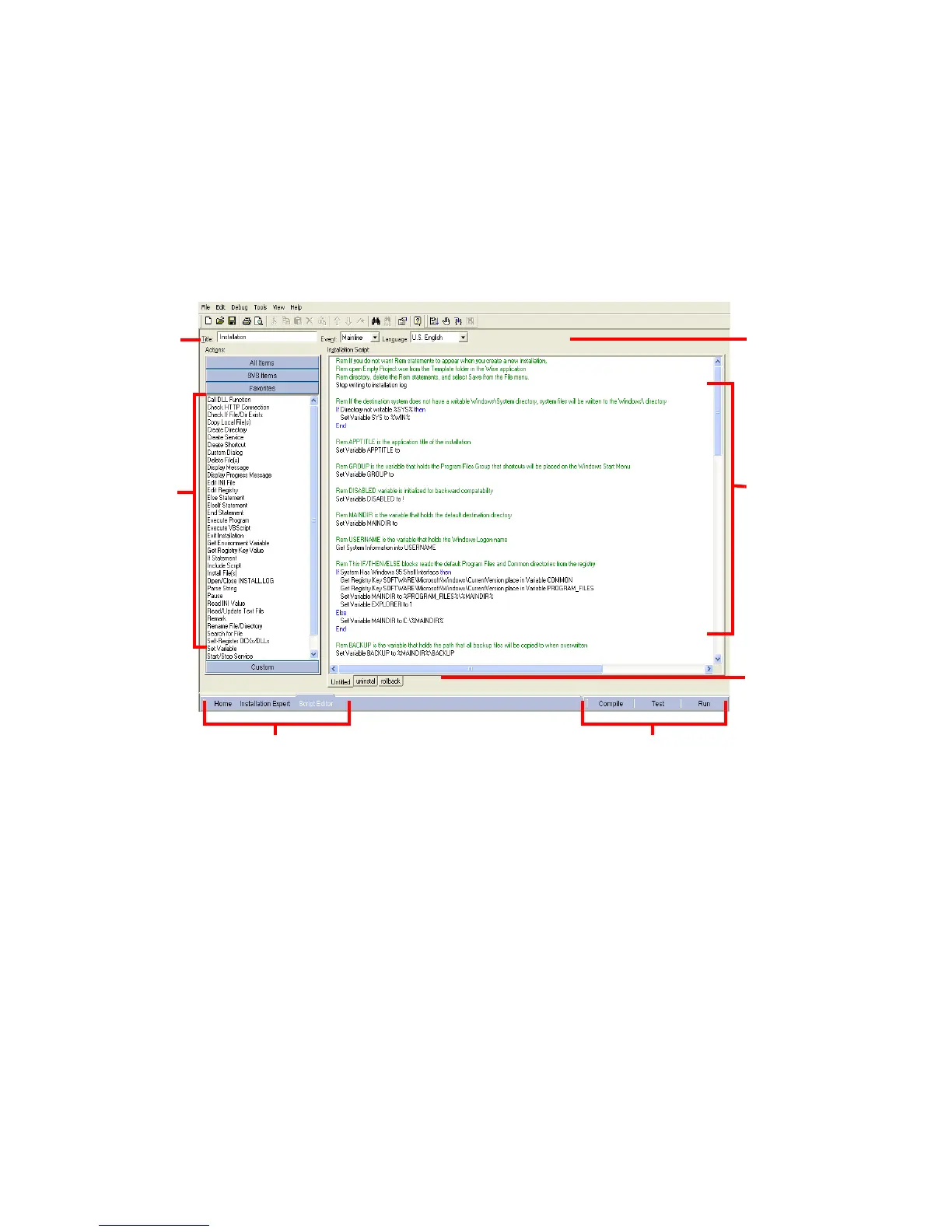
The Script Editor Window
The Script Editor window contains all the tools necessary to develop and edit
WiseScripts. To access Script Editor, click Script Editor at the lower left of the main
window.
Title
This field contains the script’s name. By default, it is the name entered in the
Installation Title field on the Product Details page followed by “Installation.” If you
change the title of the script here, it does not change on the Product Details page. When
you run the installation, this name appears at the top of the splash dialog box (the
Initializing Wise Installation wizard dialog box), and in the title bar of the installation
screen.
Event
From this drop-down list, you select the script to edit. The Mainline script is the script
that typically contains installation instructions.
See Customizing the List of Actions on page 97.
Event and
Language drop-
down lists
Tabs for the main
script and each
include script or
VBScript
Script list
Title
Actions list
Compile, Test, and RunView Navigation




 To Next Page